Dropdown
The message of type select displays a dropdown. You can give your dropdown a pre selected value by adding the "selected_item": {"text": "Porsche", "value":"porsche"} object to your select message.
Example
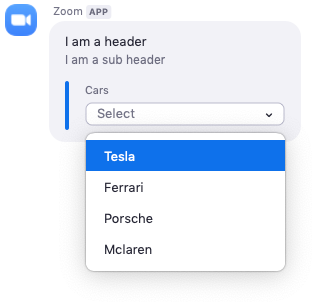
JSON example
{
    "head": {
        "text": "I am a header",
        "sub_head": {
            "text": "I am a sub header"
        }
    },
    "body": [
        {
            "type": "select",
            "text": "Cars",
            "select_items": [
                {
                    "text": "Tesla",
                    "value": "tesla"
                },
                {
                    "text": "Ferrari",
                    "value": "ferrari"
                },
                {
                    "text": "Porsche",
                    "value": "porsche"
                },
                {
                    "text": "Mclaren",
                    "value": "mclaren"
                }
            ]
        }
    ]
}
Dynamic dropdowns
The static_source key can populate the select_items array
dynamically. The value of static_source can be set to either
members, or channels.
| Value | Description |
|---|---|
| members | Displays a dropdown list of members in the channel the message was sent to. |
| channels | Displays a dropdown list of channels the user (who clicks the dropdown message) is in. |
NOTE: When using
static_sourcedo not includeselect_items. When usingselect_itemsdo not includestatic_source.
User actions
When a user selects an option in the dropdown, a POST request with data about the option selected is sent to the Bot Endpoint URL you specfied in your apps dashboard. Here is an example request body.
{
    "event": "interactive_message_select",
    "payload": {
        "accountId": "gVcjZnWWRLWvv_GtyGuaxg",
        "channelName": "Tommy Gaessler",
        "messageId": "20190618205440879_sRHVqf4_aw1",
        "original": {
            "head": {
                "sub_head": {
                    "text": "I am a sub header"
                },
                "text": "I am a header"
            },
            "body": [
                {
                    "select_items": [
                        {
                            "text": "Tesla",
                            "value": "tesla"
                        },
                        {
                            "text": "Ferrari",
                            "value": "ferrari"
                        },
                        {
                            "text": "Porsche",
                            "value": "porsche"
                        },
                        {
                            "text": "Mclaren",
                            "value": "mclaren"
                        }
                    ],
                    "text": "Cars",
                    "type": "select"
                }
            ]
        },
        "robotJid": "v1m0yn1imztuogsxjje8fdew@xmpp.zoom.us",
        "selectedItems": [
            {
                "value": "tesla"
            }
        ],
        "timestamp": 1560891284464,
        "toJid": "kdykjnimt4kpd8kkdqt9fq@xmpp.zoom.us/robot_v1m0yn1imztuogsxjje8fdew@xmpp.zoom.us",
        "userId": "KdYKjnimT4KPd8KKdQt9FQ",
        "userJid": "kdykjnimt4kpd8kkdqt9fq@xmpp.zoom.us",
        "userName": "Tommy Gaessler"
    }
}