Buttons
Buttons capture user actions. A user in the chat can choose a button, and it sends a request to your API with the value as the command.
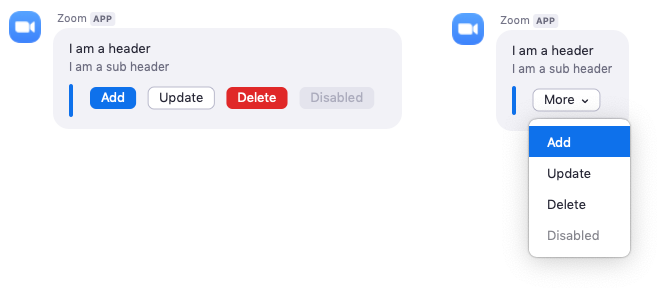
There are four color options to choose from when sending a button.
Primaryfor a blue buttonDefaultfor a white buttonDangerfor a red buttonDisabledfor a gray and unclickable button
The limit key is a way to specify how many buttons show up. If the
items array of buttons is greater than the limit, the buttons are grouped in a menu list.
Example
The image on the right is an example of an overflow button list, or if you want all the buttons to be grouped in a menu.
JSON example
{
    "head": {
        "text": "I am a header",
        "sub_head": {
            "text": "I am a sub header"
        }
    },
    "body": [
        {
            "type": "actions",
            "items": [
                {
                    "text": "Add",
                    "value": "add",
                    "style": "Primary"
                },
                {
                    "text": "Update",
                    "value": "update",
                    "style": "Default"
                },
                {
                    "text": "Delete",
                    "value": "delete",
                    "style": "Danger"
                },
                {
                    "text": "Disabled",
                    "value": "disable",
                    "style": "Disabled"
                }
            ]
        }
    ]
}
User actions
When a user chooses a button, a POST request with data about the button is sent to the Bot Endpoint URL you specfied in your apps dashboard. Here is an example request body.
{
    "event": "interactive_message_actions",
    "payload": {
        "accountId": "gVcjZnWWRLWvv_GtyGuaxg",
        "actionItem": {
            "text": "Add",
            "value": "add"
        },
        "channelName": "Tommy Gaessler",
        "messageId": "20190618205516496_ynICmz8_aw1",
        "original": {
            "head": {
                "sub_head": {
                    "text": "I am a sub header"
                },
                "text": "I am a header"
            },
            "body": [
                {
                    "type": "actions",
                    "items": [
                        {
                            "style": "Primary",
                            "text": "Add",
                            "value": "add"
                        },
                        {
                            "style": "Default",
                            "text": "Update",
                            "value": "update"
                        },
                        {
                            "style": "Danger",
                            "text": "Delete",
                            "value": "delete"
                        },
                        {
                            "style": "Disabled",
                            "text": "Disabled",
                            "value": "disable"
                        }
                    ]
                }
            ]
        },
        "robotJid": "v1m0yn1imztuogsxjje8fdew@xmpp.zoom.us",
        "timestamp": 1560891332219,
        "toJid": "kdykjnimt4kpd8kkdqt9fq@xmpp.zoom.us/robot_v1m0yn1imztuogsxjje8fdew@xmpp.zoom.us",
        "userId": "KdYKjnimT4KPd8KKdQt9FQ",
        "userJid": "kdykjnimt4kpd8kkdqt9fq@xmpp.zoom.us",
        "userName": "Tommy Gaessler"
    }
}