Use the Upload File API to upload meeting recording files before adding them to ZRA.
Note: This method allows uploading only one file at a time.
Prerequisites
- Generate oAuth token using S2S app credentials.
- Any associated metadata of the recording you want to include in the recording is in the proper .json format:
-
host_id -
Conversation start date and time
-
Conversation end time (optional)
-
Conversation title or topic
-
Conversation type
-
Participant list (optional)
If added, internal or external participant names display in the conversations list.
-
Timeline (optional)
If added, speakers' names display in the conversation details page under the Participants tab. ZRA generates the new transcript based on video and timeline.
-
Steps
API: Upload ZRA file using Zoom Revenue Accelerator API.
-
Upload the recording file using the file API.
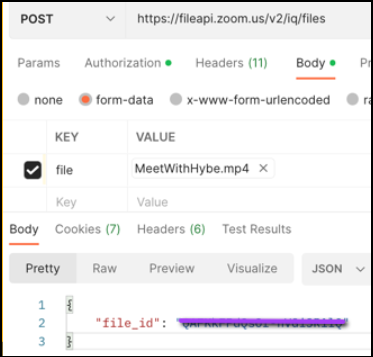
-
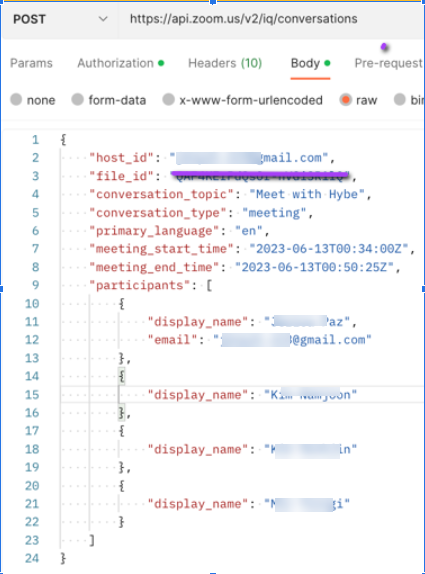
Add Conversation using Zoom Revenue Accelerator API with the following details:
file_idfrom the previous step.host_idcan be email or Zoom user ID.- If
host_idis blank, the API adds the oAuth token owner as the default host. You can reassociate the conversations to the correct host by using the Update conversation host id to new host id by conversation id endpoint. - Meeting details such as conversation topic, start time.
See Sample request format with file_id
Success Criteria
- Host association is achieved.
- Participants are visible in the list of conversations page.
- Speaker diarization in IQ with Speaker 1, Speaker 2, and so on.
- Transcript is generated by ZRA and is searchable within ZRA.