Migrating Chorus recordings to Zoom Revenue Accelerator
For Chorus recordings, we recommend you use the Chorus API to retrieve all metadata information for a particular conversation. Save the response of this API as a file ending with transcript.json and upload it using the Upload File API to Zoom Revenue Accelerator. Zoom Revenue Accelerator automatically parses and extracts relevant fields from the file to complete the metadata information matching for that conversation.
-
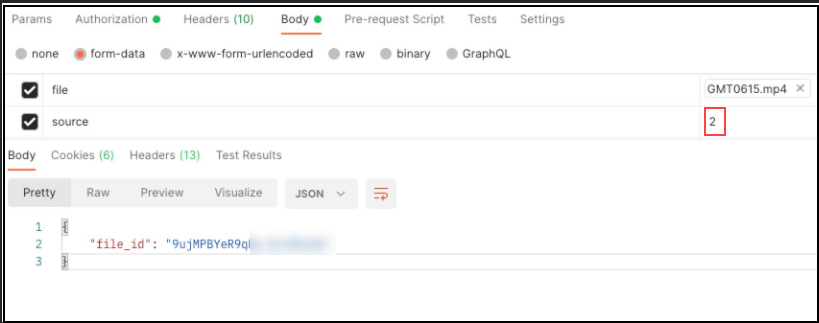
Use the Zoom Revenue Accelerator Upload File method to upload the video file and obtain the file ID for the main file.
-
Use the Zoom Revenue Accelerator Upload File method to upload the
*transcript.jsonfile as an attachment to the main file. You must specify the source field as 2 (representing Chorus).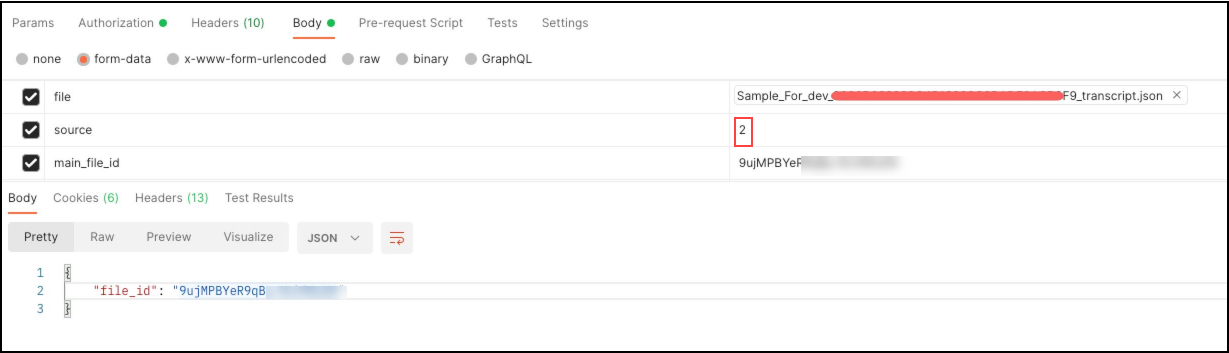
-
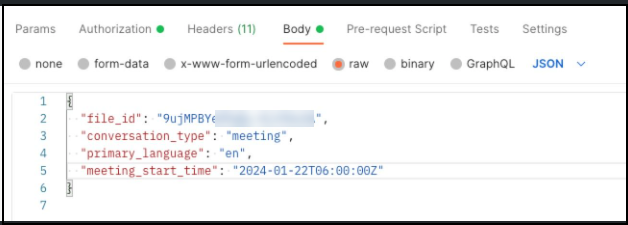
Finally, use the Zoom Revenue Accelerator Add conversation by file ID or download URL method to create the conversation. You only need to include these fields if other metadata information is available in the
*transcript.jsonfile.file_idprimary_languagemeeting_start_timeconversation_type
Metadata field mapping for Chorus
| Zoom Revenue Accelerator metadata | Chorus Source field | Comment |
|---|---|---|
| Conversation Topic | data.attributes.name | |
| Participants | data.attributes.participants | |
| Duration | data.attributes.recording.duration | |
| Host info | data.attributes.owner | The host in the file needs a Zoom Revenue Accelerator license, otherwise do nothing |
| Deal info | data.attributes.deal | |
| Transcript | data.attributes.recording.utterances |
Example Chorus API response
{
    "data": {
        "attributes": {
            "_created_at": "2023-06-01T03:40:45.204078Z",
            "_modified_at": "2023-06-01T03:41:23.753567Z",
            "company_name": "fffff",
            "deal": {
                "close_date": "2022-05-23T00:00:00Z",
                "current_stage": "Closed Lost",
                "follow_up": {
                    "doc_type": "recording",
                    "id": "824F350FEE6544C5B2A2035E002D7500",
                    "start_time": "2022-04-08T14:30:30Z"
                },
                "id": "0064X000022wASnQAM",
                "initial_amount": -1.0,
                "initial_stage": "Prospect",
                "name": "ffff",
                "on_stage_since": "2022-05-23T18:17:33Z",
                "size": 0
            },
            "language": "en",
            "meeting": {
                "id": "624368a5596ff9c1e7b67c56"
            },
            "name": "Chorus Test with transcript",
            "owner": {
                "email": "xxx@xx.com",
                "name": "S qq",
                "person_id": 13219902,
                "user_id": 211286
            },
            "participants": [
                {
                    "company_name": "ggg",
                    "email": "aaa@aaa.aa",
                    "name": "aaa",
                    "person_id": 6119484,
                    "picture": "",
                    "type": "rep",
                    "user_id": 125054,
                    "zi_person_id": 7181652254
                },
                {
                    "company_name": "ggg",
                    "email": "bbb@bbb.bb",
                    "name": "bbb",
                    "person_id": 13219902,
                    "picture": "",
                    "type": "rep",
                    "user_id": 211286,
                    "zi_person_id": -1878355350
                },
                {
                    "company_name": "ggg",
                    "email": "ccc@ccc.cc",
                    "name": "cccc",
                    "person_id": 31239721,
                    "title": "Senior Manager, Marketing Technology",
                    "type": "prospect",
                    "zi_person_id": 8084141422
                }
            ],
            "private": false,
            "recording": {
                "audio_only": false,
                "autojoin": true,
                "duration": 1405.6,
                "end_reason": "",
                "schedule_end_time": "2022-03-30T20:24:45.600000Z",
                "schedule_start_time": "2022-03-30T20:01:20Z",
                "start_time": "2022-03-30T20:01:20Z",
                "utterances": [
                    {
                        "date_time": "2022-03-30T20:01:20Z",
                        "engaging": false,
                        "expired": false,
                        "id": "0000B662999C4B13888C0DADE0ACB3F9_0",
                        "index": 0,
                        "participant": 6119484,
                        "snippet": "Hi. Hello. How are you? Busy?",
                        "snippet_length": 3.9849999999999994,
                        "snippet_time": -32.019999999999996,
                        "speaker_id": 6119484,
                        "speaker_name": "aaaa",
                        "speaker_type": "rep"
                    },
                    {
                        "date_time": "2022-03-30T20:01:20Z",
                        "engaging": false,
                        "expired": false,
                        "id": "0000B662999C4B13888C0DADE0ACB3F9_1",
                        "index": 1,
                        "participant": 13219902,
                        "snippet": "Oh, good. But I've been in back to back. So I haven't pulled anything open for this meeting and I was just looking at your",
                        "snippet_length": 4.224999999999994,
                        "snippet_time": 36.46,
                        "speaker_id": 13219902,
                        "speaker_name": "bbbb",
                        "speaker_type": "rep"
                    }
                ]
            },
            "status": "done",
            "user_company_name": "rrrr"
        },
        "id": "ggggg",
        "type": "recording"
    }
}