Add conversations: upload recording, transcripts, metadata files
Use the Upload File API to upload existing transcript, participant, and speaker attribute files.
Prerequisites
-
Generate oAuth token using S2S app credentials
-
Media file (eg: mp4 file)
-
Transcript as json file (sample transcript file)
-
Metadata as json file (sample transcript file)
-
Any associated metadata of the recording you want to include in the recording is in the proper .json format:
-
Host (optional - API reads from
metadata.json) -
Host information (optional)
-
Conversation start date and time
-
Conversation title or topic (optional - API reads from
metadata.json) -
Conversation type
-
Participant list (optional or not required - API reads from
metadata.json) -
Timeline (not recommended)
If added, ZRA will generate the new transcript based on video and timeline.
-
-
ZRA APIs accept JSON-formatted metadata and transcript files from Gong and Chorus. For more details, see the section on supported metadata and transcript file formats.
Chorus examples will be provided in a future version of this developer support page.
Steps
API: Upload ZRA File using Zoom Revenue Accelerator API
-
Upload the recording file using the file API.
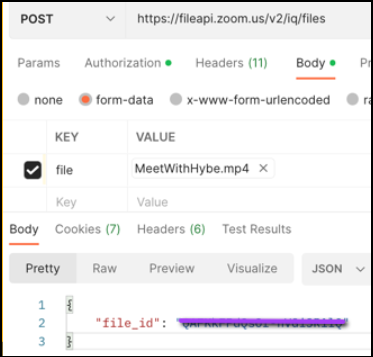
-
Upload
transcript.json.- File name must include
transcript.json(eg:abc123_transcript.json) main_file_id: response from the previous step- source: 1 for Gong, 2 for Chorus
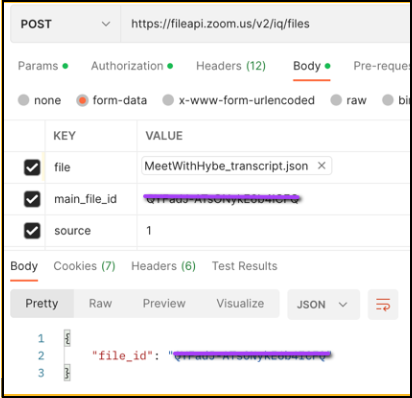
- File name must include
-
Upload
metadata.json.- File name must include
metadata.json(eg: abc123_metadata.json) main_file_id: use the response from file API as themain_file_id- source: 1 for Gong, 2 for Chorus
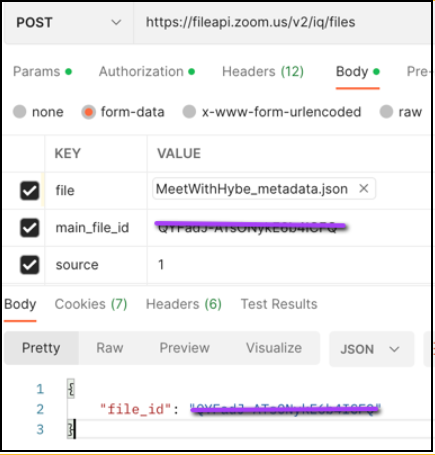
[Requires the addition of two lines to the original Gong json.]
- File name must include
-
Add conversation using Zoom Revenue Accelerator API. Read speaker information from the transcript and metadata files.
Note: If you want to use the source transcript, we recommend you don't add the timeline info in the API payload. If a timeline is added, ZRA will regenerate the transcript and not use the original transcript.
Any associated metadata of the recording you want to include in the recording must be in the proper .json format:
-
host_id(optional - API reads frommetadata.json)If used, the conversation will be reassociated to this host.
-
Conversation start date and time
-
Conversation title or topic (optional - API reads from
metadata.json) -
Conversation type
-
primary_language(See the FAQ) -
Participant list (optional or not required - API reads from
metadata.json) -
Timeline (not recommended)
If added, ZRA will generate the new transcript based on video and timeline.
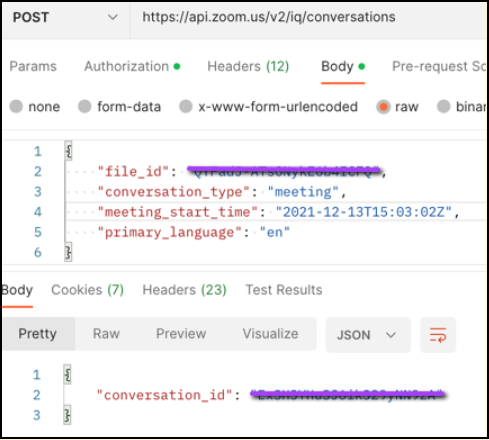
Success Criteria
- Host association is achieved
- Participants are visible in the list of conversations page
- Speaker diarization in ZRA with speaker names
- ZRA does not generate a new transcript
- Source transcript is used and is searchable within ZRA