Use the Add Conversation API, and provide a download_url to an active file service, to directly upload a file and add a conversation into ZRA. This method allows you to update one conversation at a time.
Note: We recommend using the host_id parameter to properly associate each conversation to the correct user when using this method.
Prerequisites
- An active connection to the prior vendor's API and appropriate scopes and permissions.
- The Download URL for the recording.
- Any associated metadata of the recording you want to include in the recording are in the proper .json format:
-
host_id -
Conversation start date and time
-
Conversation end time (optional)
-
Conversation title/topic
-
Conversation type
-
Participant list (optional)
If added, internal or external participant names display in the conversations list.
-
Timeline (optional)
If added, speakers' names display in the conversation details page under the Participants tab. ZRA generates the new transcript based on video and timeline.
-
- Generated oAuth token using S2S app credentials for the Zoom Marketplace app.
Steps
API: Add Conversation using Zoom Revenue Accelerator API
- Create the request object with the following details and call parameters:
-
download_url of the recording file
-
host_idof the user you would like to associate the recording to:- Email or Zoom user id
- If
host_idis provided but not available within the account, this API returns an error - If
host_idis blank, the API adds the oAuth token owner as the default host. You can reassociate the conversations to the correct host by using the Update conversationhost_idto newhost_idby conversation id endpoint.
-
Conversation metadata such as conversation topic (also known as title), meeting start time
-
See Sample request with download_url
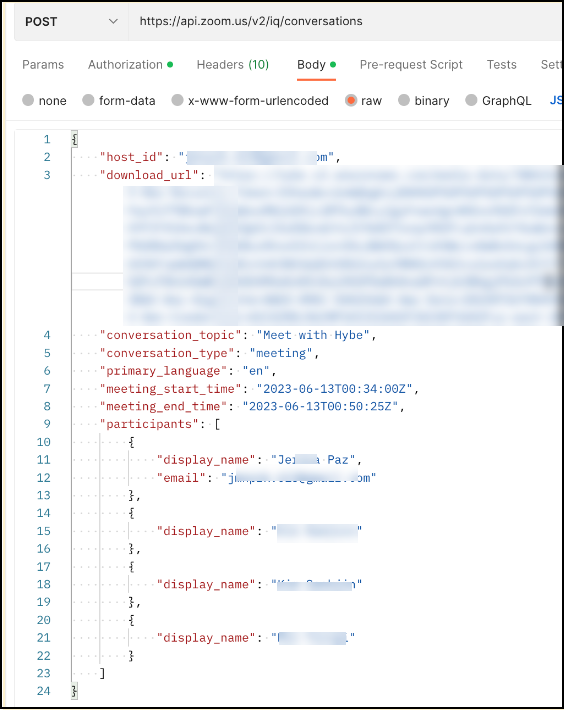
-
Success Criteria
- Host association is achieved.
- Participants are visible in the list of conversations page.
- Speaker diarization in ZRA with Speaker 1, Speaker 2, and so on.
- Transcript is generated by ZRA and is searchable within ZRA.