Custom API knowledge base
This guide shows you how to use Zoom Marketplace APIs to build a custom application to sync knowledge base content. Admins can create and manage a knowledge base with a custom API connector that enables you to write scripts, pull content from external systems, and then push it to the Zoom knowledge base.
This method is an alternative for those who cannot use Zoom Virtual Agent's native knowledge base solutions. Although this method offers great flexibility, it requires technical expertise to initiate API requests and access customer knowledge base content.
1. Create custom API knowledge base
To create a new knowledge base in AI Management, choose 3rd party integration, then Custom API to enable integration with external systems through a tailored API connector.
-
Go to AI Management, then Knowledge Base.
-
Choose Add Knowledge Base.
-
Select Custom API Connection from the connection dropdown.
-
Name your knowledge base and choose Add.
-
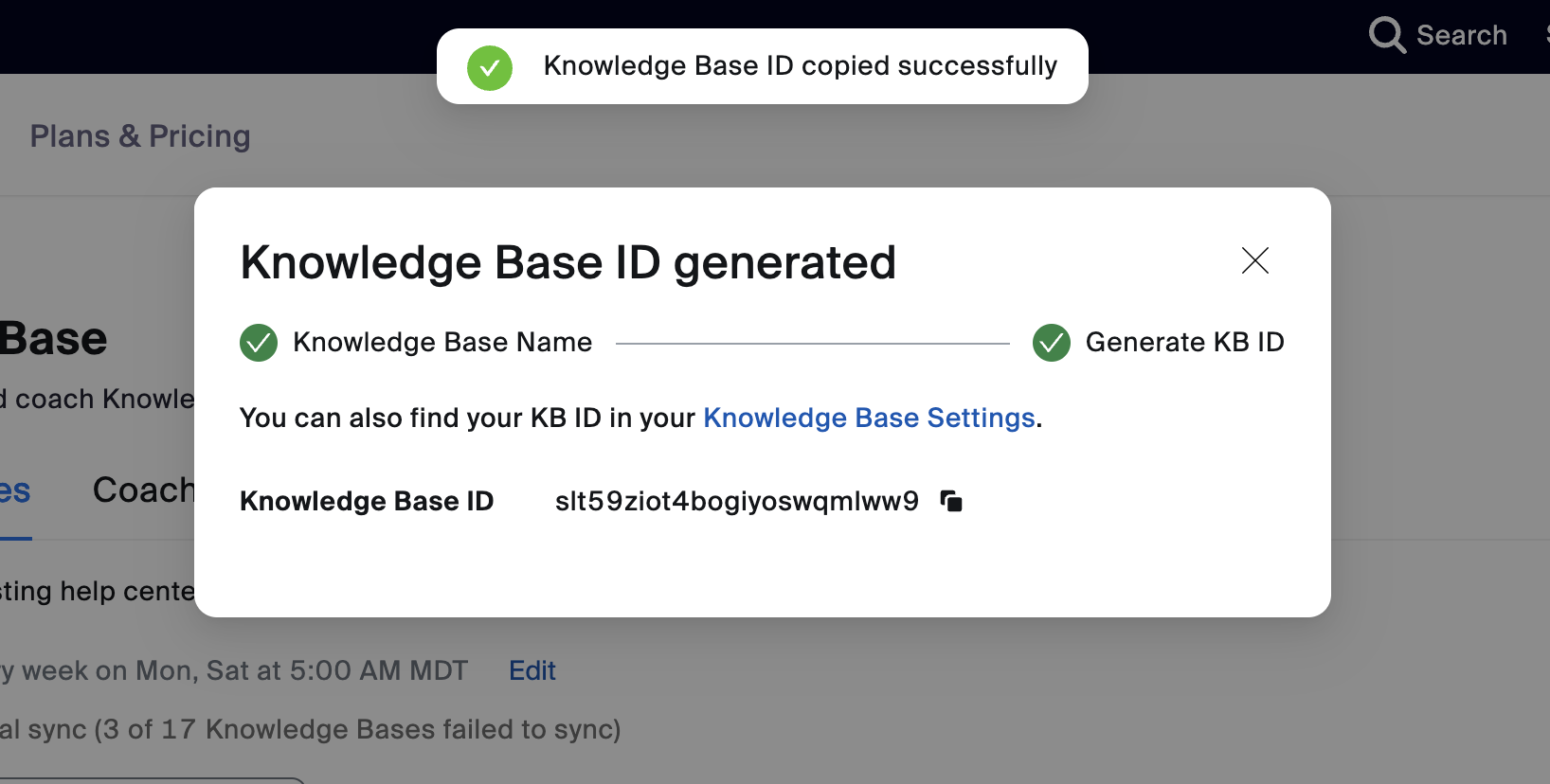
Copy the knowledge base ID. Save the ID to use in API calls.
2. Create Zoom Marketplace app
Developing a custom app on the Zoom App Marketplace provides a seamless way to integrate and extend Zoom's capabilities with your knowledge base system.
-
Go to Zoom Marketplace.
-
In the top right, choose Develop, then Build Server-to-Server App.
-
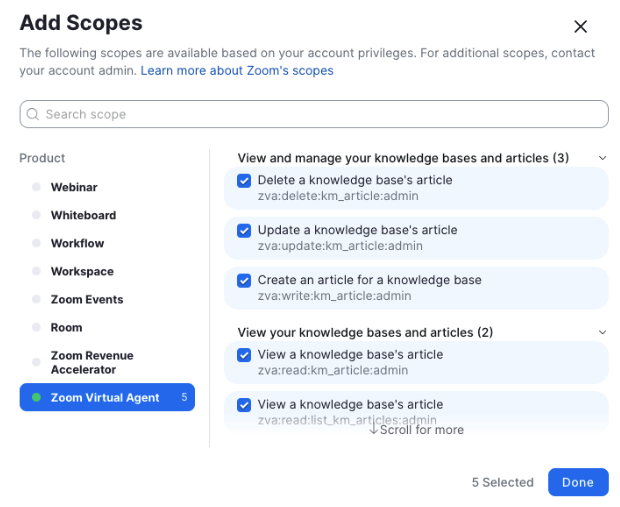
To manage knowledge bases and articles, add the Zoom Virtual Agent scopes to your name.
3. Make API calls to manage the knowledge base
You can now make API calls to manage a custom API knowledge base. You could write a script to pull content from any external system and push that content into your Zoom Knowledge Base.
In this section, we provide an example script that pulls content from the Atlassian Confluence system, and pushes it into a created knowledge base. This example script has no dependencies and only requires node 18+.
Note: You must install Node to run this script.
-
Update email on line 1.
-
Replace line 3
CONFLUENCE_API_TOKENto generate the Atlassian API Token.To create an API token for your Atlassian account, see Manage API tokens for your Atlassian account | Atlassian Support.
-
Update lines 5 and 6 for your Confluence Page ID and Space Name.
-
Replace lines 8-12 for your knowledge base specific settings.
| Replace | With |
|---|---|
KM_BASE_URL | https://marketplace.zoom.us/ |
KM_KB_ID | Previously created Knowledge Base ID |
KM_TOKEN | Previously generated OAuth token (See the Postman example in Step 3.) |
KM_ARTICLE_CATEGORY | The category you want your articles under. |
Example Node JS Script
In this example script, you can pull content from any external system and push the content into your Zoom Knowledge Base.
// Custom API Demo
const EMAIL = "example.user@zoom.us";
const CONFLUENCE_API_TOKEN = "CONFLUENCE_API_TOKEN";
const CONFLUENCE_BASE_URL = "https://zoomvideo.atlassian.net";
const CONFLUENCE_PAGE_ID = 2727675125;
const CONFLUENCE_SPACE_NAME = "ZVA";
const KM_BASE_URL = "https://openapi-gateway.zoomdev.us";
const KM_KB_ID = "KM_KB_ID";
const KM_ARTICLES_URL = `${KM_BASE_URL}/v2/km/kbs/${KM_KB_ID}/articles`;
const KM_TOKEN = "KM_TOKEN";
const KM_ARTICLE_CATEGORY = "Sports";
async function main() {
    // 1. get existing kb articles
    console.log("fetching existing kb articles...");
    const kmHeaders = { Authorization: `Bearer ${KM_TOKEN}` };
    let kmUrl = KM_ARTICLES_URL;
    let existingArticles = [];
    while (kmUrl) {
        const articlesResponse = await fetch(kmUrl, { headers: kmHeaders });
        const articlesJson = await articlesResponse.json();
        const { next_page_token, articles } = articlesJson || {};
        existingArticles = existingArticles.concat(articles);
        kmUrl = next_page_token
            ? `${KM_ARTICLES_URL}?next_page_token=${next_page_token}`
            : null;
    }
    // 2. get external articles (i.e. Atlassian Confleunce)
    console.log("fetching latest external articles...");
    const authorization = btoa(`${EMAIL}:${CONFLUENCE_API_TOKEN}`);
    const externalHeaders = { Authorization: `Basic ${authorization}` };
    let externalArticles = [];
    let confluenceUrl = `/wiki/api/v2/pages/${CONFLUENCE_PAGE_ID}/children`;
    while (confluenceUrl) {
        const childrenResponse = await fetch(
            `${CONFLUENCE_BASE_URL}${confluenceUrl}`,
            {
                headers: externalHeaders,
            },
        );
        const pages = await childrenResponse.json();
        const { results, _links } = pages || {};
        const { next } = _links || {};
        externalArticles = externalArticles.concat(results);
        confluenceUrl = next;
    }
    // 3. create/update/delete articles
    console.log("processing articles...");
    externalArticles.forEach(async (externalArticle) => {
        const { id } = externalArticle;
        // get external article page contents
        const externalArticleDetailResponse = await fetch(
            `${CONFLUENCE_BASE_URL}/wiki/api/v2/pages/${id}/?body-format=view`,
            {
                headers: externalHeaders,
            },
        );
        const externalArticleDetail =
            await externalArticleDetailResponse.json();
        const { title, body } = externalArticleDetail || {};
        const { value: content } = body.view || {};
        const existingArticle = existingArticles.find(
            (article) => article.external_id === String(externalArticle.id),
        );
        const newArticle = {
            title,
            content,
            url: `${CONFLUENCE_BASE_URL}/wiki/spaces/${CONFLUENCE_SPACE_NAME}/pages/${id}`,
            exclude: false,
            category: KM_ARTICLE_CATEGORY,
            external_id: id,
            language: "en",
        };
        if (!existingArticle) {
            // create new article
            console.log("creating new article", id);
            const createResponse = await fetch(KM_ARTICLES_URL, {
                method: "POST",
                body: JSON.stringify(newArticle),
                headers: {
                    "Content-Type": "application/json",
                    ...kmHeaders,
                },
            });
        } else {
            // update article
            console.log("updating article", id);
            await fetch(`${KM_ARTICLES_URL}/${existingArticle.id}`, {
                method: "PUT",
                body: JSON.stringify(newArticle),
                headers: {
                    "Content-Type": "application/json",
                    ...kmHeaders,
                },
            });
        }
    });
    const externalArticleIds = externalArticles.map((externalArticle) =>
        String(externalArticle.id),
    );
    const articlesToRemove = existingArticles.filter(
        (existingArticle) =>
            !externalArticleIds.includes(existingArticle.external_id),
    );
    articlesToRemove.forEach(async (article) => {
        // delete article
        console.log("deleting article", article.id);
        await fetch(`${KM_ARTICLES_URL}/${article.id}`, {
            method: "DELETE",
            headers: kmHeaders,
        });
    });
}
main().catch(console.error);