In this section, you’ll configure the Zoom App to surface a custom webview inside Zoom Team Chat using the Zoom Apps SDK. This modal can be launched using app shortcuts and enables direct interaction with users inside the Zoom client—such as composing messages or viewing context.
By the end of this section, you’ll have:
- A custom webview that runs inside the Zoom Team Chat modal
- SDK integration to send messages or display chat context
- Secure headers and domain permissions to integrate a third-party app into the Zoom client
Configure domain allow list
To enable Zoom to render your app in the Zoom client, you must allowlist the domains used for your webview.
- Go to the Surface tab in your Zoom App configuration.
- Set the Home URL to the path hosting your webview (e.g.,
https://example.ngrok.app/webview). - Under Domain Allow List, add:
ngrok.app— required for local developmentappssdk.zoom.us— required to load the Zoom Apps SDK.
Example UI:
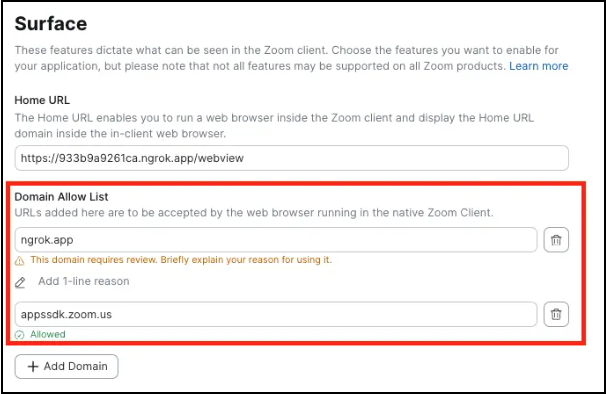
💡 Note: Provide a reason for each custom domain if prompted by the marketplace interface.
Create the Webview Interface
Create an HTML interface that initializes the Zoom SDK, enables users to compose messages, and displays chat context. This modal provides the interactive UI that users will engage with directly inside Zoom.
This setup leverages Zoom App SDK methods—including sendMessageToChat, getRunningContext, and getChatContext—to deliver a seamless, native experience within Chat. The SDK enables your app to display interactive modals with full context awareness and message-sending capabilities, powering rich, embedded workflows directly inside Zoom.
File Path
views/webview.html
Code Snippet
<!DOCTYPE html>
<html>
<head>
<meta charset="utf-8" />
<title>Zoom Workplace Chatbot Demo</title>

<script src="[https://appssdk.zoom.us/sdk.min.js](https://appssdk.zoom.us/sdk.min.js)" defer></script>

<style>
body {
  font-family: system-ui, -apple-system, Segoe UI, Roboto, sans-serif;
  margin: 24px;
  max-width: 600px;
  background: #f8f9fa;
}
h1 {
  margin-bottom: 20px;
  color: #333;
  text-align: center;
}
.demo-container {
  background: white;
  padding: 24px;
  border-radius: 12px;
  box-shadow: 0 2px 10px rgba(0, 0, 0, 0.1);
  margin-bottom: 20px;
}
.form-group {
  margin-bottom: 20px;
}
label {
  display: block;
  margin-bottom: 8px;
  font-weight: 600;
  color: #555;
}
textarea {
  width: 100%;
  min-height: 120px;
  padding: 12px;
  border: 2px solid #e1e5e9;
  border-radius: 8px;
  font-family: inherit;
  font-size: 14px;
  resize: vertical;
  box-sizing: border-box;
}
textarea:focus {
  outline: none;
  border-color: #0e72ed;
}
.button-group {
  display: flex;
  gap: 12px;
  margin-top: 20px;
}
button {
  padding: 12px 24px;
  border: none;
  border-radius: 8px;
  font-weight: 600;
  cursor: pointer;
  font-size: 14px;
  transition: background-color 0.2s;
}
.btn-primary {
  background: #0e72ed;
  color: white;
  flex: 1;
}
.btn-primary:hover {
  background: #0c5fbb;
}
.btn-secondary {
  background: #6c757d;
  color: white;
  flex: 1;
}
.btn-secondary:hover {
  background: #545b62;
}
.status {
  padding: 12px;
  border-radius: 8px;
  margin-top: 16px;
  text-align: center;
  font-weight: 500;
}
.success {
  background: #d4edda;
  color: #155724;
  border: 1px solid #c3e6cb;
}
.error {
  background: #f8d7da;
  color: #721c24;
  border: 1px solid #f1b0b7;
}
.info {
  background: #cce7ff;
  color: #004085;
  border: 1px solid #99d3ff;
}
.hint {
  color: #666;
  font-size: 13px;
  margin-top: 8px;
  font-style: italic;
}
.context-section {
  background: #f8f9fa;
  padding: 16px;
  border-radius: 8px;
  margin-top: 20px;
  border: 1px solid #e1e5e9;
}
.context-title {
  font-weight: 600;
  color: #333;
  margin-bottom: 12px;
  font-size: 16px;
}
.context-item {
  background: white;
  padding: 12px;
  border-radius: 6px;
  margin-bottom: 10px;
  border-left: 4px solid #0e72ed;
}
.context-item h4 {
  margin: 0 0 8px 0;
  color: #0e72ed;
  font-size: 14px;
}
.context-content {
  font-family: "Courier New", monospace;
  font-size: 12px;
  color: #666;
  background: #f8f9fa;
  padding: 8px;
  border-radius: 4px;
  white-space: pre-wrap;
  word-break: break-word;
}
.not-in-zoom {
  text-align: center;
  padding: 40px 24px;
  color: #721c24;
  background: #f8d7da;
  border: 1px solid #f1b0b7;
  border-radius: 12px;
  margin: 20px 0;
}
.not-in-zoom h2 {
  color: #721c24;
  margin-bottom: 16px;
}
</style>
</head>

<body>
<div id="not-in-zoom-message" class="not-in-zoom" style="display: none">
  <h2>⚠️ Zoom Client Required</h2>
  <p>
    This page is designed to run inside the Zoom desktop or mobile client.
  </p>
  <p>
    Please open this URL from within a Zoom chat or meeting to access the
    full functionality.
  </p>
</div>

<div id="main-content">
  <h1>🚀 Zoom Workplace Chatbot Demo</h1>

  <div class="demo-container">
    <div class="form-group">
      <label for="messageInput">Custom Message</label>
      <textarea
        id="messageInput"
        placeholder="Type your message here to send to the chat..."
      ></textarea>
      <div class="hint">
        Enter any text you want to send as a message to the current chat
      </div>
    </div>

    <div class="button-group">
      <button id="sendCustomBtn" class="btn-primary">
        Send Custom Message
      </button>
      <button id="sendContextBtn" class="btn-secondary">
        Send Chat Context
      </button>
    </div>

    <div class="hint" style="text-align: center; margin-top: 16px">
      This demo shows how Zoom Apps can interact with chat conversations
    </div>
  </div>

  <div class="context-section">
    <div class="context-title">📊 Context Information</div>
    <div class="context-item">
      <h4>Running Context</h4>
      <div id="runningContext" class="context-content">Not available</div>
    </div>
    <div class="context-item">
      <h4>Chat Context</h4>
      <div id="chatContext" class="context-content">Not available</div>
    </div>
  </div>

  <div id="status"></div>
</div>

<script>
/* globals zoomSdk */

let isInitialized = false;
let chatContext = null;
let runningContext = null;

// Helper to show status messages
function showStatus(message, type = "info") {
  const statusDiv = document.getElementById("status");
  statusDiv.innerHTML = `<div class="status ${type}">${message}</div>`;
  setTimeout(() => (statusDiv.innerHTML = ""), 3000);
}

// Helper to update context displays
function updateContextDisplays() {
  const runningContextEl = document.getElementById("runningContext");
  const chatContextEl = document.getElementById("chatContext");

  if (runningContext) {
    runningContextEl.textContent = JSON.stringify(
      runningContext,
      null,
      2
    );
  }

  if (chatContext) {
    chatContextEl.textContent = JSON.stringify(chatContext, null, 2);
  }
}

// Check if running in Zoom client
function checkZoomEnvironment() {
  if (typeof window.zoomSdk === "undefined") {
    document.getElementById("not-in-zoom-message").style.display = "block";
    document.getElementById("main-content").style.display = "none";
    return false;
  }
  return true;
}

// Helper to get signature from your backend
async function generateSignature(messageString) {
  const res = await fetch("/api/sign", {
    method: "POST",
    headers: { "Content-Type": "application/json" },
    body: JSON.stringify({ message: messageString }),
  });
  if (!res.ok) throw new Error("Signature request failed: " + res.status);
  return res.json();
}

// Send custom message function
async function sendCustomMessage() {
  const messageInput = document.getElementById("messageInput");
  const message = messageInput.value.trim();

  if (!message) {
    showStatus("Please enter a message first", "error");
    return;
  }

  if (!isInitialized) {
    showStatus("Zoom SDK not initialized yet", "error");
    return;
  }

  try {
    showStatus("Sending message...", "info");

    await zoomSdk.sendMessageToChat({
      message: message,
    });

    showStatus("✅ Message sent successfully!", "success");
    messageInput.value = ""; // Clear the input
    window.close();
  } catch (error) {
    console.error("Send message error:", error);
    showStatus("❌ Failed to send message", "error");
  }
}

// Send chat context function
async function sendChatContext() {
  if (!isInitialized) {
    showStatus("Zoom SDK not initialized yet", "error");
    return;
  }

  if (!chatContext) {
    showStatus("No chat context available", "error");
    return;
  }

  try {
    showStatus("Sending chat context...", "info");

    const contextMessage = `Chat Context Info:
📧 Chat Type: ${chatContext.chatType || "Unknown"}
👥 Participants: ${chatContext.participants?.length || 0}
💬 Content: ${chatContext.content || "No content"}`;

    await zoomSdk.sendMessageToChat({
      message: contextMessage,
    });

    showStatus("✅ Chat context sent successfully!", "success");
    window.close();
  } catch (error) {
    console.error("Send context error:", error);
    showStatus("❌ Failed to send chat context", "error");
  }
}

// Initialize the Zoom SDK
async function init() {
  if (!checkZoomEnvironment()) {
    return;
  }

  try {
    showStatus("🔄 Initializing Zoom SDK...", "info");

    const capabilities = [
      "getRunningContext",
      "getChatContext",
      "sendMessageToChat",
    ];

    const appInfo = await zoomSdk.config({
      version: "0.16.26",
      capabilities,
    });

    // Get running context
    runningContext = await zoomSdk.getRunningContext();

    // Get chat context if in chat
    if (appInfo.runningContext === "inChat") {
      chatContext = await zoomSdk.getChatContext();
      isInitialized = true;
      showStatus("✅ Ready! You can now send messages.", "success");
    } else {
      showStatus(
        "⚠️ This app works best when opened from a chat",
        "error"
      );
    }

    // Update context displays
    updateContextDisplays();
  } catch (error) {
    console.error("Initialization failed:", error);
    showStatus("❌ Failed to initialize Zoom SDK", "error");
  }
}

// Event listeners
window.addEventListener("DOMContentLoaded", () => {
  init();

  document
    .getElementById("sendCustomBtn")
    .addEventListener("click", sendCustomMessage);
  document
    .getElementById("sendContextBtn")
    .addEventListener("click", sendChatContext);

  // Allow Enter key to send message
  document
    .getElementById("messageInput")
    .addEventListener("keydown", (e) => {
      if (e.key === "Enter" && !e.shiftKey) {
        e.preventDefault();
        sendCustomMessage();
      }
    });
});
</script>
</body>
</html>