The Zoom Meeting SDK enables you to embed Zoom's complete meeting experience directly into your platform, allowing users to host and join meetings without leaving your application or webpage.
When a user wants to start a meeting, first retrieve the meeting details from your database. You can then connect the host to their meeting using one of two methods:
- Pass the
start_urldirectly to the host, which opens the meeting in their Zoom client. - Use the meeting information to initialize the Meeting SDK and programmatically start the meeting for the host directly within your platform.
Endpoint: Get User token
Granular Scopes: user:read:token, user:read:token:admin
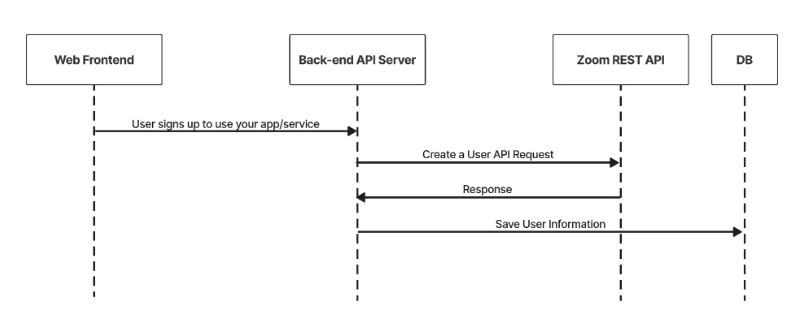
This workflow describes starting a meeting using Zoom Meeting Web SDK.
-
After creating a meeting, save the meeting's id and password to your database. You'll use the id to generate the SDK signature and the password to start the meeting.
-
To start the meeting, use the Get a User’s Token request to retrieve the user's authentication token (ZAK - Zoom Access Key).
-
Generate the signature used to authenticate the SDK. Take note of the following values:
- For
rolekey, use the value 1 for host. - For
mnkey, use the value of the meetingid. - You can use this sample code to generate the signature.
- For
-
Initialize the SDK using the
initmethod. Y -
Start the meeting using the
client.joinmethod. EachZoomMtg joinmethod call needs to be insideZoomMtg initmethod success callback. For the join method, take note of the following values:- For ZAK value, use the host’s ZAK token.
- For meetingNumber value, use the value of meeting id. The value must be the same used in the SDK signature.
For more information, see the start meeting code sample.
Sample API Call
CURL Command
curl --location --request POST 'https://api.zoom.us/v2/users/{userid}/token' \
  --header 'Content-Type: application/json' \
  --header 'Authorization: Bearer <token>' \
  --data-raw '{"type": "zak", "ttl": "7200"}'
Sample response
{
 "token":"6IjAwMDAwMSIsInptX3NrbSI6InptX"
}
Init SDK & Client.Join
Javascript example
ZoomMtg.init({
  leaveUrl: leaveUrl, // https://example.com/thanks-for-joining
  success: (success) => {
    ZoomMtg.join({
      sdkKey: sdkKey,
      signature: signature, // role in SDK signature needs to be 1
      meetingNumber: meetingNumber,
      passWord: passWord,
      userName: userName,
      zak: zakToken, // the host's ZAK token
      success: (success) => {
        console.log(success)
      },
      error: (error) => {
        console.log(error)
      }
    })
  },
  error: (error) => {
    console.log(error)
  }
})