To provide an additional layer of security for your Zoom meetings you can utilize registration . When utilizing registration each meeting or webinar participant will have a unique join_URL. These unique URL’s allow you to ensure that only registered participants can join and allows you to better track meeting and webinar participation.
Endpoint: N/A
Granular Scopes: N/A
-
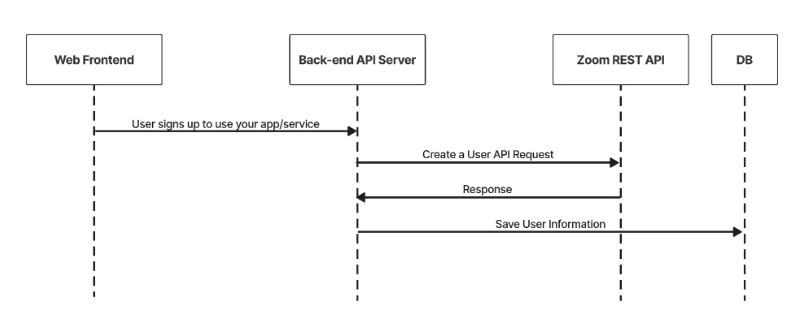
When a user signs up for or is assigned to use your service, you use the create a user API endpoint to create a Zoom user account for them.
-
Save the returned
idto your user table and associated with the user. When the user interacts with the Zoom platform you will use thisid.API Call Example
CURL Command:
curl --location --request POST 'https://api.zoom.us/v2/users' \
    --header 'Content-Type: application/json' \
    --header 'Authorization: Bearer <token>' \
    --data-raw '{"action": "custCreate", "user_info": {"email": "<email>", "first_name": "John","last_name": "Doe","type": 2}}'
Sample Response:
{
    "email": "dGljbw==@isv-domain.com",
    "first_name": "John",
    "id": "_SObcJT7Q52O58dcGd9KhQ",
    "last_name": "Doe",
    "type": 2
}
Save the returned
idto your user table and associate it with the user. When this user interacts with the Zoom platform they will use thisid. -
When a user creates a meeting you use the create a meeting API endpoint to create the meeting on their behalf. The path of this request requires the user's
id, and theidcreates the meeting for the specified user.For this workflow you need to specify registration settings in the body of the request. We recommend that you set registration to
requiredand approval tomanually approve.CURL command:
curl --location --request POST 'https://api.zoom.us/users/{userid}/meetings' \
--header 'Content-Type: application/json' \
--data-raw '{
    "duration": 60,
    "password": "123456",
    "settings":
    {
        "Approval_type": 1,
        "registration_type": 2,
        "start_time": "2022-03-25T07:32:55Z",
        "timezone": "America/Los_Angeles",
        "topic": "My Meeting",
        "type": 2
    }
}'
Sample response:
{
    "Settings":
    {
        "Approval_type": 1,
        "registration_type": 2,
        "start_time": "2022-03-25T07:32:55Z",
        "timezone": "America/Los_Angeles",
        "topic": "My Meeting",
        "type": 2
    },
    "agenda": "My Meeting",
    "created_at": "2022-03-25T07:29:29Z",
    "duration": 60,
    "h323_password": "123456",
    "host_email": "dGljbw==@isv.domain.com",
    "id": 92674392836,
    "join_url": "https://example.com/j/11111",
    "registration_url": "https://example.com/meeting/register/7ksAkRCoEpt1Jm0wa-E6lICLur9e7Lde5oW6",
    "start_time": "2022-03-25T07:29:29Z",
    "start_url": "https://example.com/s/11111",
    "timezone": "America/Los_Angeles",
    "topic": "My Meeting"
}
Save the returned
start_urlandidin your DB. You need these to for the host to start the meeting and to add registrants.