Create a meeting
When a user creates a meeting you use the create a meeting API endpoint. The path of this request requires the user's id. The id used in the path will create this meeting for the specified user.
Endpoint: Create a Meeting
Granular Scopes Required: meeting:write:meeting, meeting:write:meeting:admin
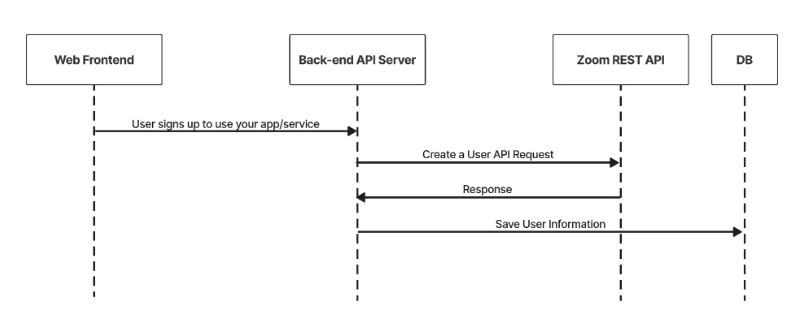
- When a user creates a meeting you use the create a meeting API endpoint. The path of this request requires the user's
id. Theidused in the path will create this meeting for the specified user. - The start_url, id and password returned should be saved in your DB. You will need these to provide the host the ability to start the meeting.
- The join_url _returned can be saved in your DB to provide participants to join the meeting.
Sample API Call
CURL request
curl --location --request POST 'https://api.zoom.us/users/{userid}/meetings' \
  --header 'Content-Type: application/json' \
  --data-raw '{
    "duration": 60,
    "password": "123456",
    "settings": {
     "start_time": "2022-03-25T07:32:55Z",
    "timezone": "America/Los_Angeles",
    "topic": "My Meeting",
    "type": 2
  }'
Sample response
{
    "Settings": {
        "Approval_type": 1,
        "registration_type": 2,
        "start_time": "2022-03-25T07:32:55Z",
        "timezone": "America/Los_Angeles",
        "topic": "My Meeting",
        "type": 2
    },
    "agenda": "My Meeting",
    "created_at": "2022-03-25T07:29:29Z",
    "duration": 60,
    "h323_password": "123456",
    "host_email": "dGljbw==@isv-domain.com",
    "id": 92674392836,
    "join_url": "https://example.com/j/11111",
    "registration_url": "https://example.com/meeting/register/7ksAkRCoEpt1Jm0wa-E6lICLur9e7Lde5oW6",
    "start_time": "2022-03-25T07:29:29Z",
    "start_url": "https://example.com/s/11111",
    "timezone": "America/Los_Angeles"
}