Create a user
The ISV program enables you to create users and meetings programmatically. This workflow demonstrates how to create an ISV compliant custCreate user as well as how to create and join meetings.
Endpoint: custCreate
Granular Scopes Required: user:write:admin, meeting:write:Admin
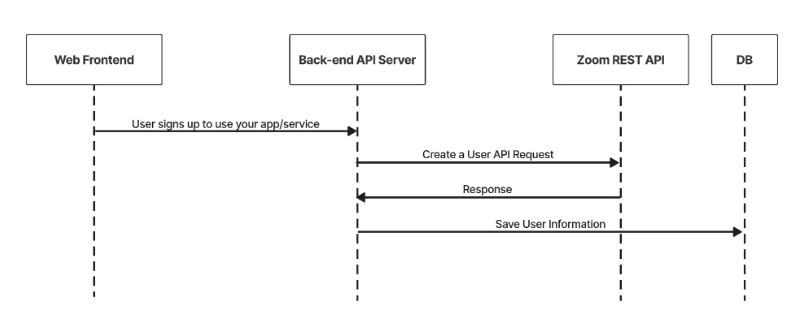
- When a user signs up for or is assigned to use your service, you use the create a user API endpoint to create a Zoom user account for them.
- For ISV, below are the required requirements for user creation*:
- For action field, the value must be custCreate.
- For email field, the email format should follow the following format
{UniqueIdentifier}@ISV.{aDomainYouOwn}.com. - For type field, the value must be 2. All users should be licensed to host a meeting.
- The id returned should be saved to your user table and associated with the user. When this user interacts with the Zoom platform you will use this id.
Sample API Call
CURL command:
curl --location --request POST 'https://api.zoom.us/v2/users' \
--header 'Content-Type: application/json' \
--header 'Authorization: Bearer <token>' \
--data-raw '{"action": "custCreate", "user_info": {"email": "<email>", "first_name": "John","last_name": "Doe","type": 2}}'
Sample Response:
{
    "id": "_SObcJT7Q52O58dcGd9KhQ",
    "first_name": "John",
    "last_name": "Doe",
    "email": "dGljbw==@isv.domain.com",
    "type": 2
}