Subscribe to webhooks (optional)
You can subscribe to Zoom's monetization webhooks to receive notifications about changes to users' subscriptions.
For example, that a trial subscription has been converted to a paid subscription or that a subscription has been renewed.
Prerequisite
- You have set up a payment account.
- You have created a user-managed general app.
- You have created at least one pricing plan.
Procedure
To subscribe to monetization events and receive notifications, ensure you are in the build flow Production view, go to Features > Access > Event Subscription > Add New Event Subscription > Add Events.
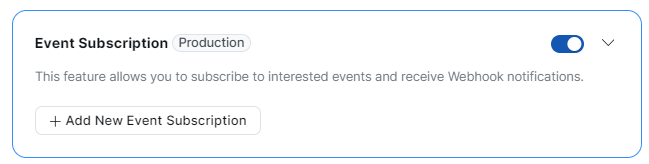
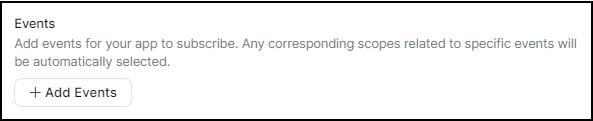
Select the System Events tab, and then Monetization.
The System Events tab is only available after you have created a pricing plan. If you don't see System Events displayed, create a pricing plan first.
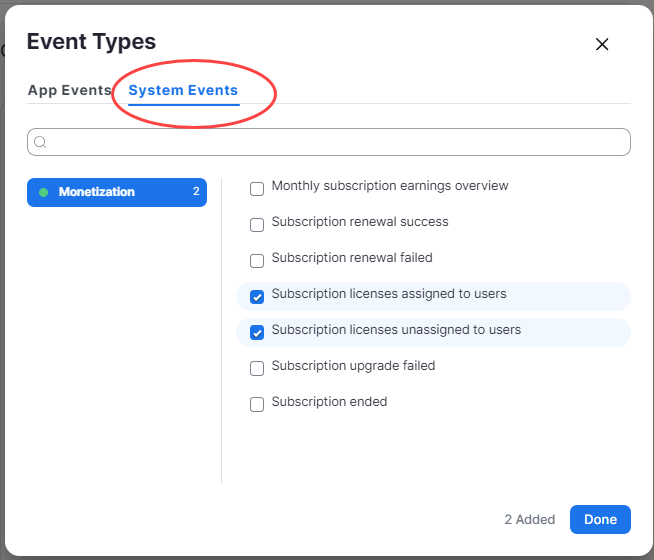
Note: We recommend that, at a minimum, you subscribe to these events, which notify you when users' licenses (based on the purchased price plans) have been assigned and unassigned:
- Subscription licenses assigned to users
- Subscription licenses unassigned to users
Available subscriptions
For webhook payloads information, see Monetization webhook payloads
- Subscription purchase success
- Subscription purchase failed
- Subscription upgraded
- Subscription upgrade failed
- Subscription downgraded
- Subscription canceled
- Trial subscription ended
- Trial subscription started
- Trial subscription will end in 3 days
- Trial subscription converted to paid
- Monthly subscription earnings overview - enables you to view subscription information in the Monetization dashboard.
- Subscription renewal failed
- Subscription renewal success
- Subscription licenses assigned to users
- Subscription licenses unassigned to users
- Subscription ended
If you have questions related to app monetization, go to Zoom Developers Forum - monetization.