In-meeting upgrade request
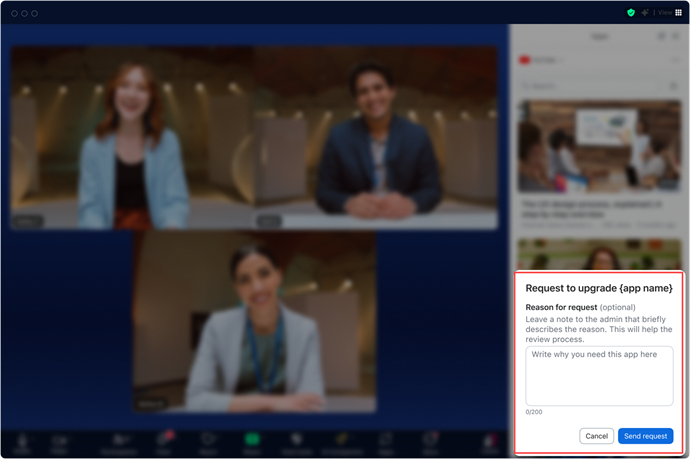
Starting with Zoom Client 6.4.0, users can request to purchase an app while in a Zoom meeting. By default, all monetized apps include a free plan. Users can submit a request to their admin to upgrade their plan without leaving the meeting or disrupting their workflow.
As a developer, you can enable this for your users by implementing the upgrade-request prompt for your app.
Prerequisites
- Zoom client 6.4.0 or higher.
- JS SDK v 0.16.27 or higher.
- You have created an app and the app offers a paid price plan.
To enable the promptUpgradeRequest API and the onUpgradeRequest event:
-
Login to the Zoom App Marketplace.
-
Select Manage to open the Created Apps page and then select the app you want to update.
-
Go to Surface > In-client app features.
-
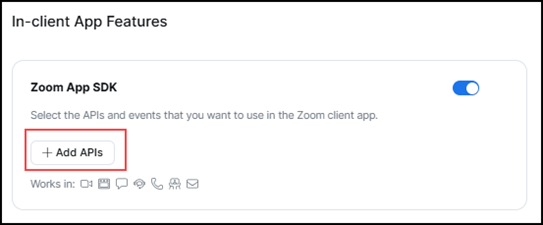
Enable Zoom App SDK and select Add APIs.
-
Select
promptUpgradeRequestandonUpgradeRequest, and then Done.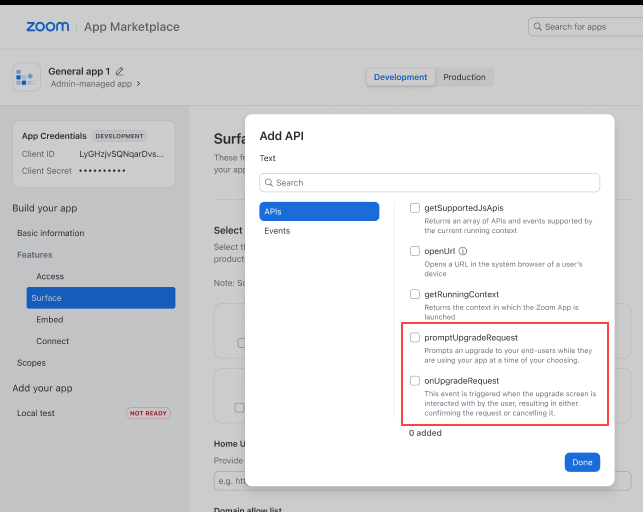
Because these changes include updates to APIs accessed by your app, you must submit your updated app for review by the Zoom Review Team before the changes are reflected in production.
-
On the Submit page:
- In the Release Notes for Users field, explain the changes to your users. We include your release notes in an email explaining why users need to reauthorize the app.
- Under the App discoverability section, choose if you want the app to be published to the Marketplace.
- Under the Activation section, choose whether you want the Review Team to activate your or app or if you will activate it.
- Select Submit.
Once your app is approved by the Marketplace Review team and activated, you can:
-
Use the promptUpgradeRequest, to display the upgrade request modal for users who have installed the app and are running it in their meetings.
Users can also initiate the upgrade request within the meeting without your prompt.
-
Use the onUpgradeRequest event listener to determine whether the users confirmed or cancelled the upgrade prompt.