Pricing plans
App monetization enables you to charge fees for and earn revenue from your apps on the Zoom Marketplace.
You can have up to four pricing plans per app.
Requirements
- You must offer a free plan.
- Paid subscriptions must be no less than $0.99.
Prerequisite
- You have set up a payment account.
- You have created a user-managed general app.
Procedure
-
Log into the Zoom App Marketplace > Manage.
-
Select your app, select Production view, and in the left navigation pane, select Monetization.
The build flow opens the Pricing page for your free plan.
You are required to offer a free plan for each monetized app.
-
Add a free plan, and save your plan.
Price. This field is disabled for the free pricing plan.
Feature. This field is optional, but for your paid plans you can use it to communicate to customers what services they are paying for. You can add up to five features.
-
(optional) Add a paid plan. Once you have created a free plan, you can add paid plans.
Paid plans provide you these additional options:
- Free trial period. Use this to enable customers to try your paid feature for free for a specified number of days.
- User limits. Set a minimum or maximum number of users that can use this plan.
- Price details - pricing tiers.
- Monthly - price for a license per month (calendar).
- Annual - price per license per year (calendar).
- Bulk - allows developers to offer different price levels for different volumes of licenses purchased.
-
Set up webhook notifications to receive notifications when customers have purchased a pricing plan for your app.
If you have questions related to app monetization, go to Zoom Developers Forum - monetization
Deleting pricing plans
To delete a pricing plan, go to the Monetization → Pricing page, and select the caret for the plan you want to delete.
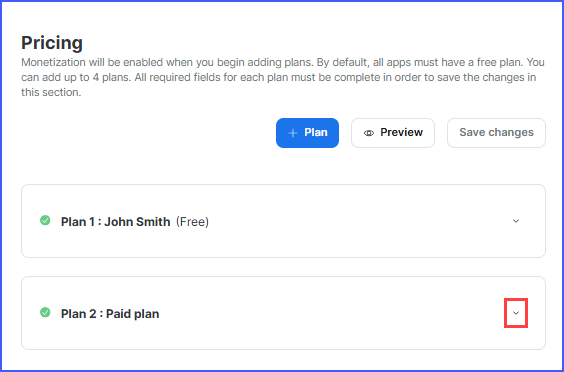
This expands the details for the pricing plan and displays the Delete plan button.
Select Delete plan to immediately delete the plan. There is no confirmation modal; make sure you are certain before deleting the plan.
Note
Deleting the plan removes the associated information. It does not remove any existing paid customers who have this plan.
Disabling Monetization
Monetization is enabled when you begin adding pricing plans for an app, therefore, to disable monetization, you need to delete all pricing plans associated with an app.
-
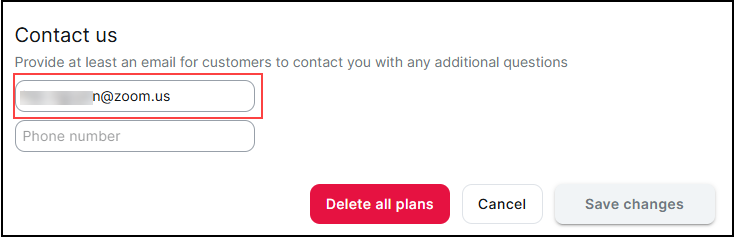
On the Monetization page for your app, make sure the email field under Contact us is filled in.
-
Click Delete all plans, and then Save changes.
Note
Deleting the plan removes the associated information. It does not remove any existing paid customers who have this plan.