The Beta Test section of the build flow enables you to test the app in your own account, and make the request to share the app with external users. For more information, see Sharing Private and Beta Apps.
Requirements for Beta:
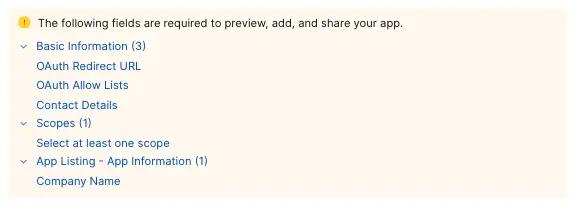
Preview App
Shows you how your application would be listed in the Zoom App Marketplace once published.
Assign test user licenses
Test monetization plans by assigning up to 5 test user licenses to internal team members. Learn more
Add App
This section includes a button you can use to authorize the app in production for your own account. See our full guide on OAuth 2.0 for more information
Share App
Under the Share App section, if you've completed all the requirements, the build flow automatically generates an authorization URL.
This section includes the link you can use to share to accounts outside yours. Ensure you meet Approval Conditions before requesting to share.
You can also see the current beta status of your application for both users in your account and external users.
Request Extension
We issue authorization URLs for a period of 4 weeks after which you can request two additional 4-week extensions. To request extensions for expired authorization URLs: in the Share App section, select Request Extension.
For more information see Authorization URL Expiry.