Persistent info on app build flow screens
For convenience and easy access, often used tasks and information about your app is available on all build flow screens.
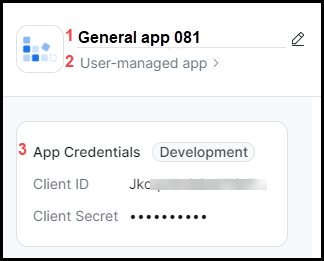
App name
By default, the build flow generates a generic name for your app. Example: General app 081.
To change your app's name, click the edit icon  , and update the name.
To save your changes, click anywhere outside of the app name field.
For more information, see App icon & app name.
App management type
You can select how you want your app to be managed. Clicking the field takes you to the Basic Information page where you can update your selection.
-
Admin-managed
Account admins add and manage the app. Depending on the scope, the app can access and manage the user data of users on their account.
-
User-managed
Individual users add and manage the app. The app has access to only the user's authorized data.
Note
For security reasons, the app management type affects the features and scopes available to your app. When you change the app management type, make sure you reconfirm the features and scopes you previously selected for your app are valid.
For more information, see App management.
App Credentials
You can view and copy the client ID and client secret.
For more information, see App credentials.
Local/Beta Test
The label for the Local Test and Beta Test dropdown menu is dynamic and updates according to the tab you're on.
Local Test when you're on the Development tab. Beta Test when you're on the Production tab.
The label changes represent how testing is handled when you're in development vs how it's handled when you are ready for production. The same is true with the available actions.
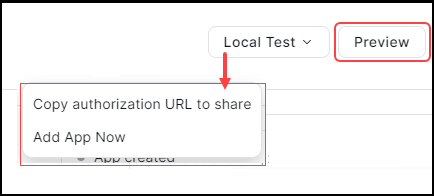
-
Copy authorization URL to share
To share your app with other users within your account, you can send them the authorization URL.
The authorization URL ensures compliance with Zoom's app sharing policy during testing. Make sure you are using the correct authorization URL in line with your development phase.
We limit the sharing of beta apps and restrict beta app access to only members within your Zoom account.
-
Add app now
Quick link to add your app to your account and you can start using it for testing.
Preview
See a preview of your app's listing page on the Zoom App Marketplace.
Actions menu
The actions menu contains dashboards and tools for app owners and developers.
It is available via the ellipsis icon  .
.
-
View metric details
This is an admin dashboard. You can view metrics for all apps under your account.
-
Manage collaborators
Add users from your account as collaborators. Collaborators can edit the app, receive email alerts, and view analytics. The collaborator must have the required app permissions.
For more information, see App Collaborators.
-
Transfer app ownership
Transfer the app to another user as owner.
For more information, see Transfer App Ownership.
-
View changelog
The changelog displays a historical list of all changes and updates to the app.
See Changelog.
Changelog
You can access the changelog from the actions menu. The changelog displays a historical list of all changes and updates to the app. You can filter by users and date range and export to a CSV file.
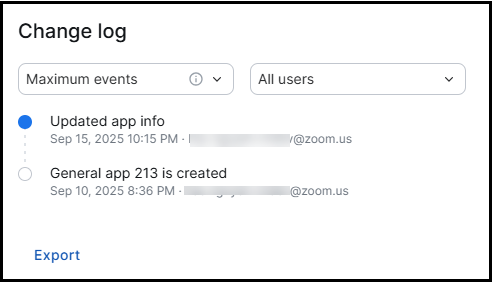
Filter by
- The maximum number of events.
- Events for the last 7, 30, or 90 days.
- All users or specific users.
Action categories
The changelog captures the following action categories with each category containing several actions. For brevity and readability we are not listing the specific actions here.
- Application lifecycle actions, such as create app, transfer ownership.
- Manifest operations, such as created app by manifest, updated app by manifest.
- OAuth and client configuration, such as updated scope, updated allow list.
- Event subscriptions and webhooks, such as added event subscription, updated event subscription.
- Chatbot configuration, such as created chatbot, updated chatbot.
- Shortcuts (legacy), such as created shortcuts, updated shortcuts.
- Custom actions, such as create, update, delete.
- JWT & SDK configuration, such as regenerate API secret.
- Monetization, such as created monetization, app monetized by developer.
- App listing and visibility, such as app list, unlisted, and deactivated.
- Conversion of app from legacy build flow UI to current.
Export
You can export the changelog data to a CSV file and view additional details, such as:
- Operator ID
- App ID
- App Name
- Old value
- New value
- Time
App Stage
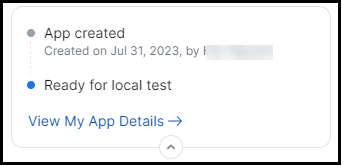
View app information such as:
- Creation date and creator name.
- Completeness.
- A summary of your app's details.
For more information, see Zoom App Marketplace review process.