After getting some hands-on experience with our SDK in the demo application, integrate the Meeting SDK for Windows into your own apps.
Required libraries
When developing your app, using our Meeting SDK for Windows requires the files inside these folders.
\lib\h\bin
When releasing or publishing your app, you only need to
include the files inside \bin.
Configure your project
-
In your project's Configuration Properties, on the General tab, set the path for the Output Directory and Intermediate Directory to
…\bin.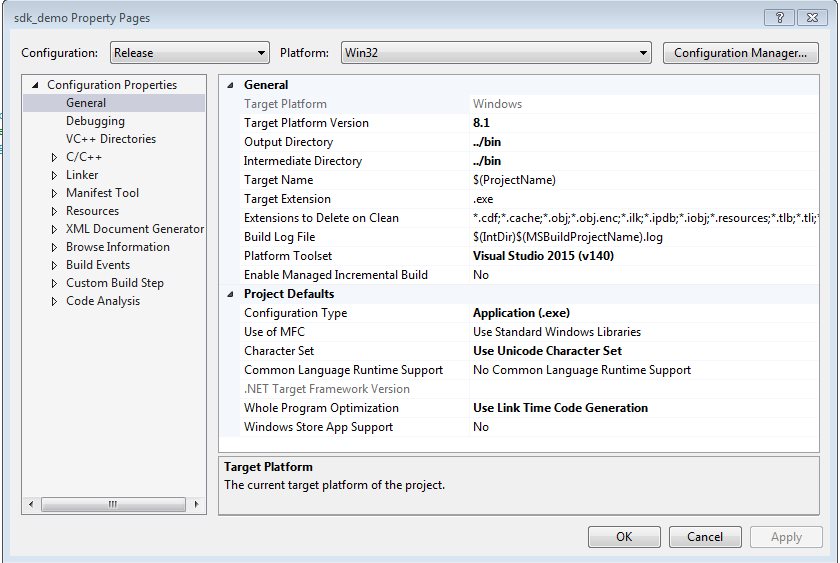
-
On the VC++ Directories tab, append
…\hto Include Directories and append…\libto Library Directories.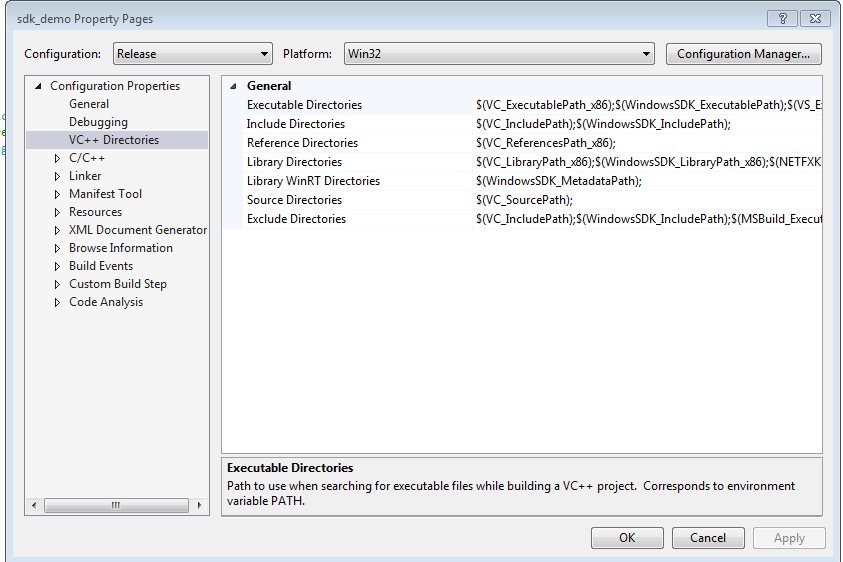
-
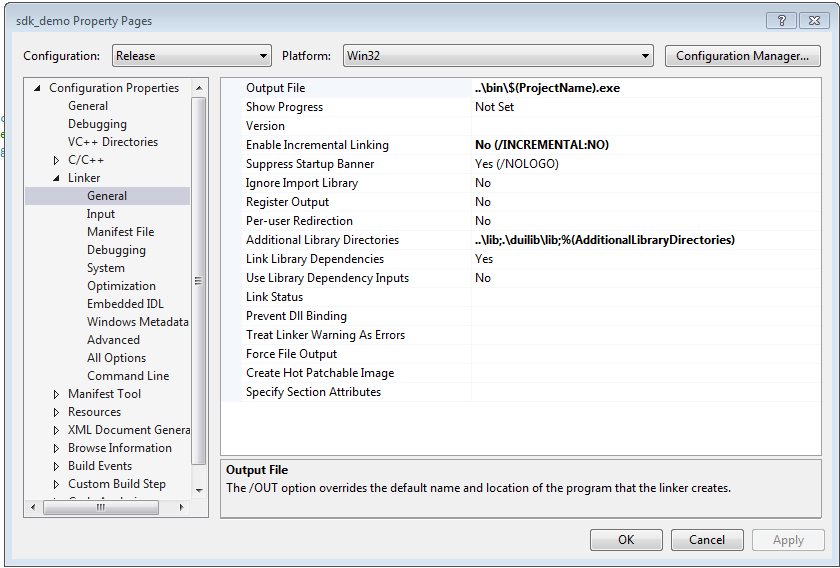
Under Linker > General, change Output file to your desired output file storage location.
-
Under C/C++, change Debug Information Format to None.
After importing the libraries and header files, you can start using Zoom services inside your Windows apps.
Create an installer and publish
Follow the official documentation for packaging a C++ app for Windows and complete these additional steps.
-
After importing the libraries and header files, run the command
cptinstall.exe -uninstallwith administrator privileges. This ensures that users who've installed an older package can use the share function normally. -
When publishing your app, copy different Microsoft runtime libraries to different locations based on the architecture.
For x86 architectures, copy these Microsoft runtime libraries to the bin and bin/aomhost directories.
concrt140.dll
msvcp140.dll
msvcp140_1.dll
msvcp140_2.dll
msvcp140_codecvt_ids.dll
vccorlib140.dll
vcruntime140.dll
api-ms-win-core-console-l1-1-0.dll
api-ms-win-core-console-l1-2-0.dll
api-ms-win-core-datetime-l1-1-0.dll
api-ms-win-core-debug-l1-1-0.dll
api-ms-win-core-errorhandling-l1-1-0.dll
api-ms-win-core-file-l1-1-0.dll
api-ms-win-core-file-l1-2-0.dll
api-ms-win-core-file-l2-1-0.dll
api-ms-win-core-handle-l1-1-0.dll
api-ms-win-core-heap-l1-1-0.dll
api-ms-win-core-interlocked-l1-1-0.dll
api-ms-win-core-libraryloader-l1-1-0.dll
api-ms-win-core-localization-l1-2-0.dll
api-ms-win-core-memory-l1-1-0.dll
api-ms-win-core-namedpipe-l1-1-0.dll
api-ms-win-core-processenvironment-l1-1-0.dll
api-ms-win-core-processthreads-l1-1-0.dll
api-ms-win-core-processthreads-l1-1-1.dll
api-ms-win-core-profile-l1-1-0.dll
api-ms-win-core-rtlsupport-l1-1-0.dll
api-ms-win-core-string-l1-1-0.dll
api-ms-win-core-synch-l1-1-0.dll
api-ms-win-core-synch-l1-2-0.dll
api-ms-win-core-sysinfo-l1-1-0.dll
api-ms-win-core-timezone-l1-1-0.dll
api-ms-win-core-util-l1-1-0.dll
api-ms-win-crt-conio-l1-1-0.dll
api-ms-win-crt-convert-l1-1-0.dll
api-ms-win-crt-environment-l1-1-0.dll
api-ms-win-crt-filesystem-l1-1-0.dll
api-ms-win-crt-heap-l1-1-0.dll
api-ms-win-crt-locale-l1-1-0.dll
api-ms-win-crt-math-l1-1-0.dll
api-ms-win-crt-multibyte-l1-1-0.dll
api-ms-win-crt-private-l1-1-0.dll
api-ms-win-crt-process-l1-1-0.dll
api-ms-win-crt-runtime-l1-1-0.dll
api-ms-win-crt-stdio-l1-1-0.dll
api-ms-win-crt-string-l1-1-0.dll
api-ms-win-crt-time-l1-1-0.dll
api-ms-win-crt-utility-l1-1-0.dll
ucrtbase.dll
API-MS-Win-core-xstate-l2-1-0.dll
For x64 architectures, remove the bin/aomhost directory and copy these Microsoft runtime
libraries into the same directory containing the SDK dlls.
concrt140.dll
msvcp140.dll
msvcp140_1.dll
msvcp140_2.dll
msvcp140_codecvt_ids.dll
vccorlib140.dll
vcruntime140.dll
api-ms-win-core-console-l1-1-0.dll
api-ms-win-core-console-l1-2-0.dll
api-ms-win-core-datetime-l1-1-0.dll
api-ms-win-core-debug-l1-1-0.dll
api-ms-win-core-errorhandling-l1-1-0.dll
api-ms-win-core-file-l1-1-0.dll
api-ms-win-core-file-l1-2-0.dll
api-ms-win-core-file-l2-1-0.dll
api-ms-win-core-handle-l1-1-0.dll
api-ms-win-core-heap-l1-1-0.dll
api-ms-win-core-interlocked-l1-1-0.dll
api-ms-win-core-libraryloader-l1-1-0.dll
api-ms-win-core-localization-l1-2-0.dll
api-ms-win-core-memory-l1-1-0.dll
api-ms-win-core-namedpipe-l1-1-0.dll
api-ms-win-core-processenvironment-l1-1-0.dll
api-ms-win-core-processthreads-l1-1-0.dll
api-ms-win-core-processthreads-l1-1-1.dll
api-ms-win-core-profile-l1-1-0.dll
api-ms-win-core-rtlsupport-l1-1-0.dll
api-ms-win-core-string-l1-1-0.dll
api-ms-win-core-synch-l1-1-0.dll
api-ms-win-core-synch-l1-2-0.dll
api-ms-win-core-sysinfo-l1-1-0.dll
api-ms-win-core-timezone-l1-1-0.dll
api-ms-win-core-util-l1-1-0.dll
api-ms-win-crt-conio-l1-1-0.dll
api-ms-win-crt-convert-l1-1-0.dll
api-ms-win-crt-environment-l1-1-0.dll
api-ms-win-crt-filesystem-l1-1-0.dll
api-ms-win-crt-heap-l1-1-0.dll
api-ms-win-crt-locale-l1-1-0.dll
api-ms-win-crt-math-l1-1-0.dll
api-ms-win-crt-multibyte-l1-1-0.dll
api-ms-win-crt-private-l1-1-0.dll
api-ms-win-crt-process-l1-1-0.dll
api-ms-win-crt-runtime-l1-1-0.dll
api-ms-win-crt-stdio-l1-1-0.dll
api-ms-win-crt-string-l1-1-0.dll
api-ms-win-crt-time-l1-1-0.dll
api-ms-win-crt-utility-l1-1-0.dll
ucrtbase.dll
vcruntime140_1.dll
For arm64 architectures, remove the bin/aomhost directory and copy these
Microsoft runtime libraries into the same directory containing the SDK dlls.
msvcp140.dll
msvcp140_1.dll
msvcp140_2.dll
msvcp140_atomic_wait.dll
msvcp140_codecvt_ids.dll
vccorlib140.dll
vcruntime140.dll
concrt140.dll
Now you can start using Zoom Meeting services inside your Windows applications.