UI settings
The code on this page only works with the default UI.
Meeting options
Many things in our Zoom Meeting UI are configurable. To change them, initialize a MeetingOption
instance and configure each option.
public static StartMeetingOptions getMeetingOptions() {
    // options setting sample : MeetingSettingActivity
    opts.no_driving_mode = true;                            // for disable zoom meeting ui driving mode
    opts.no_invite = true;                                  // for hide invite button on participant view
    opts.no_meeting_end_message = true;                     // for disable to show meeting end dialog when meeting is end.
    opts.no_titlebar = true;                                // for hide title bar on zoom meeting ui
    opts.no_bottom_toolbar = true;                          // for hide bottom bar on zoom meeting ui
    opts.no_dial_in_via_phone = true;
    opts.no_dial_out_to_phone = true;
    opts.no_disconnect_audio = true;
    opts.no_share = true;
    opts.invite_options = InviteOptions.INVITE_ENABLE_ALL;
    opts.no_audio = true;
    opts.no_video = true;
    opts.meeting_views_options = MeetingViewsOptions.NO_BUTTON_SHARE + MeetingViewsOptions.NO_BUTTON_VIDEO;
    opts.no_meeting_error_message = true;
    return meetingOptions;
}
This table lists options you can configure with MeetingOption.
| Type | Field | Description |
|---|---|---|
| int | invite_options | Refer to Invite options |
| int | meeting_views_options | Refer to Meeting view options |
| boolean | no_bottom_toolbar | Set to True to hide bottom toolbar |
| boolean | no_chat_msg_toast | Set to True to hide chat message toast |
| boolean | no_dial_in_via_phone | Set to True to hide the Call in by phone button |
| boolean | no_dial_out_to_phone | Set to True to hide the Call out button |
| boolean | no_discounnect_audio | Set to True to hide the Disconnect audio button |
| boolean | no_driving_mode | Set to True to hide the Driving mode |
| boolean | no_invite | Set to True to hide the Invite button |
| boolean | no_meeting_end_message | Set to True to hide the end meeting message |
| boolean | no_meeting_error_message | Set to True to hide the meeting error message |
| boolean | no_share | Set to True to hide the Share button |
| boolean | no_titlebar | Set to True to hide the meeting title bar |
| boolean | no_video | Set to True to hide the Video button |
| String | participant_id |
For more information about invite_options and meeting_view_options, see the sections below.
Start meeting options
StartMeetingOptions has all options available in MeetingOptions, plus the options in this table.
| Type | Field | Description |
|---|---|---|
| boolean | no_audio | Set to True to hide the "Audio" button |
Instant meeting options
InstantMeetingOptions has all options available in MeetingOptions. Refer to MeetingOptions for more information.
Join meeting options
JoinMeetingOptions has all options available in MeetingOptions, plus the options in this table.
| Type | Field | Description |
|---|---|---|
| boolean | no_audio | Set to True if you would to like hide "Audio" button |
| String | webinar_token |
Invite options
You can enable or disable items in the invitation list.
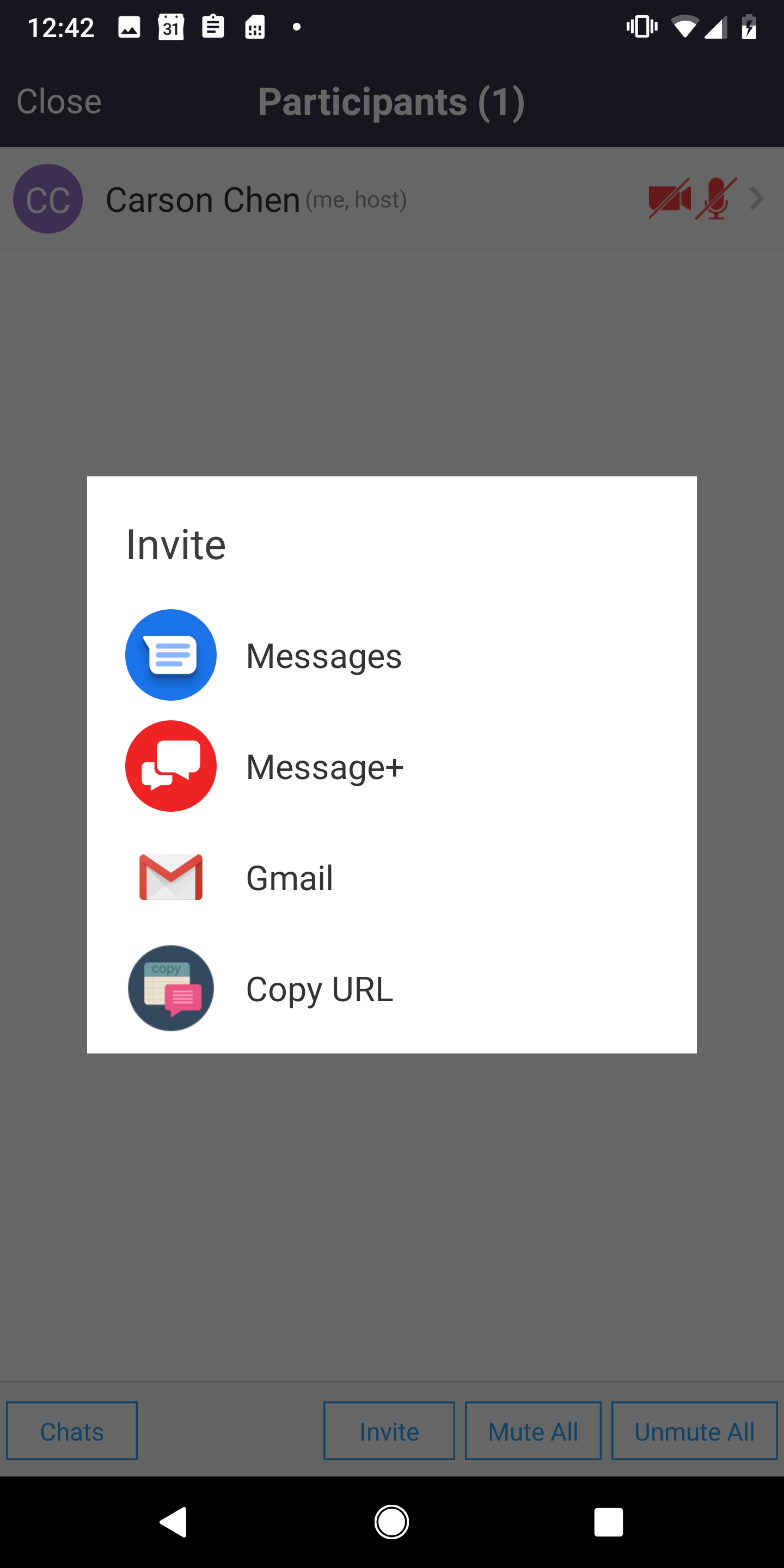
This table lists the available options.
| Type | Field |
|---|---|
| int | INVITE_COPY_URL |
| int | INVITE_DISABLE_ALL |
| int | INVITE_ENABLE_ALL |
| int | INVITE_VIA_EMAIL |
| int | INVITE_VIA_SMS |
How to use it
When configuring a MeetingOption object, insert these invite options:
// Same for StartMeetingOption and JoinMeetingOption
JoinMeetingOptions opts = new JoinMeetingOptions();
...
opts.invite_options = InviteOptions.INVITE_VIA_EMAIL + InviteOptions.INVITE_VIA_SMS;
...
Meeting view options
Enable or disable certain UI components in the default meeting UI by setting MeetingViewOptions.
| Type | Field |
|---|---|
| int | NO_BUTTON_AUDIO |
| int | NO_BUTTON_LEAVE |
| int | NO_BUTTON_MORE |
| int | NO_BUTTON_PARTICIPANTS |
| int | NO_BUTTON_SHARE |
| int | NO_BUTTON_SWITCH_AUDIO_SOURCE |
| int | NO_BUTTON_SWITCH_CAMERA |
| int | NO_BUTTON_VIDEO |
| int | NO_TEXT_MEETING_ID |
| int | NO_TEXT_PASSWORD |
How to use it
When configuring a MeetingOption object, you can insert these meeting
view options like this:
// Same for InstantMeetingOption and JoinMeetingOption
StartMeetingOptions opts = new StartMeetingOptions();
...
opts.meeting_views_options = MeetingViewsOptions.NO_BUTTON_SHARE + MeetingViewsOptions.NO_BUTTON_VIDEO;
...