Engagement scenarios
Simple engagement sequence / App launch
Consider this basic scenario where a Zoom Contact Center agent answers a new engagement and then launches your app.
If your Zoom App webview instance is not running, when it launches, it can:
- Call
getRunningContext()to determine if the app is running inside Zoom Contact Center. - Call
getEngagementContext()to get context data about the engagement. - Call
getEngagementStatus()to get status data about the engagement. - Subscribe to callback events for
onEngagementContextChangeandonEngagementStatusChange.
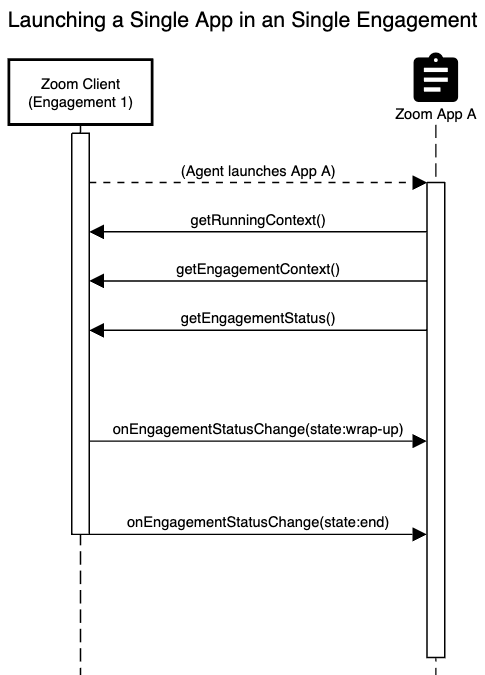
During the engagement, the Zoom client shares any status change updates via the onEngagementStatusChange event. In the diagram above, we can see updates telling the app that the engagement has gone into a wrap-up state (e.g. the engagement has been disconnected) and that the engagement has finally ended (e.g. the agent has completed disposition of the engagement).
Note: When you receive the onEngagementStatusChange(state:end) event, the engagement is no longer visible on the agent's desktop client, which means that your Zoom App UI is also no longer visible. However, your appwebview instance is still running to process the event. Your app should be designed to ensure all input is received by the agent prior to the agent ending the event. This may require end user training to make sure they finish their workflows prior to ending the engagement.
Launching multiple apps in an engagement
Agents can also launch multiple Zoom Apps while handling a single engagement. One of these apps could be your app, and the other app could be from another developer.
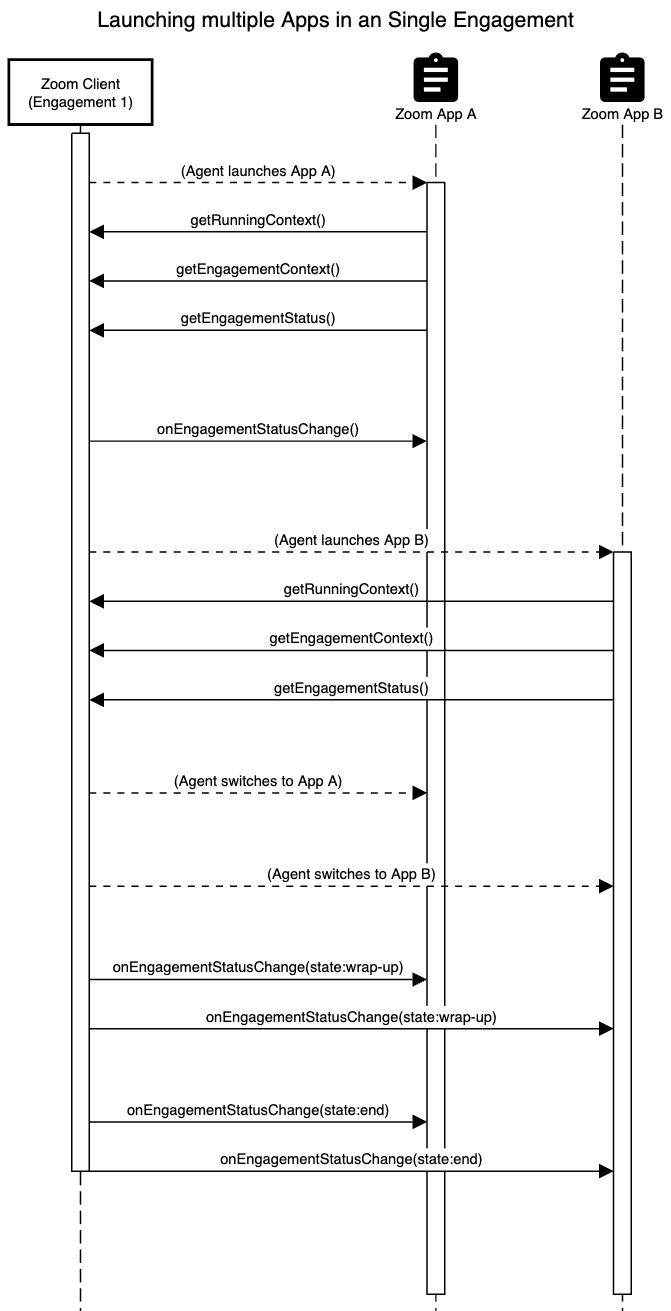
In this scenario, observe that the agent can switch to another app. In this example the agent is switching between App A and App B. There are no events sent when the app goes between foreground and background. The agent completes the engagement while App B is visible. In this example, App A is not visible during the engagement wrap-up and end state, however the App still receives these event notifications.
Context switching between active engagements
While a Zoom Contact Center agent can only handle a single voice/video engagement at a time, they can handle multiple engagements if they are also using messaging channels such as SMS, Web Chat, Social Messaging, or Email. Your app needs to be designed to handle context switching between multiple engagements. An example scenario is an agent that is handling multiple web chats, or an agent that is handling SMS and Voice engagements simultaneously.
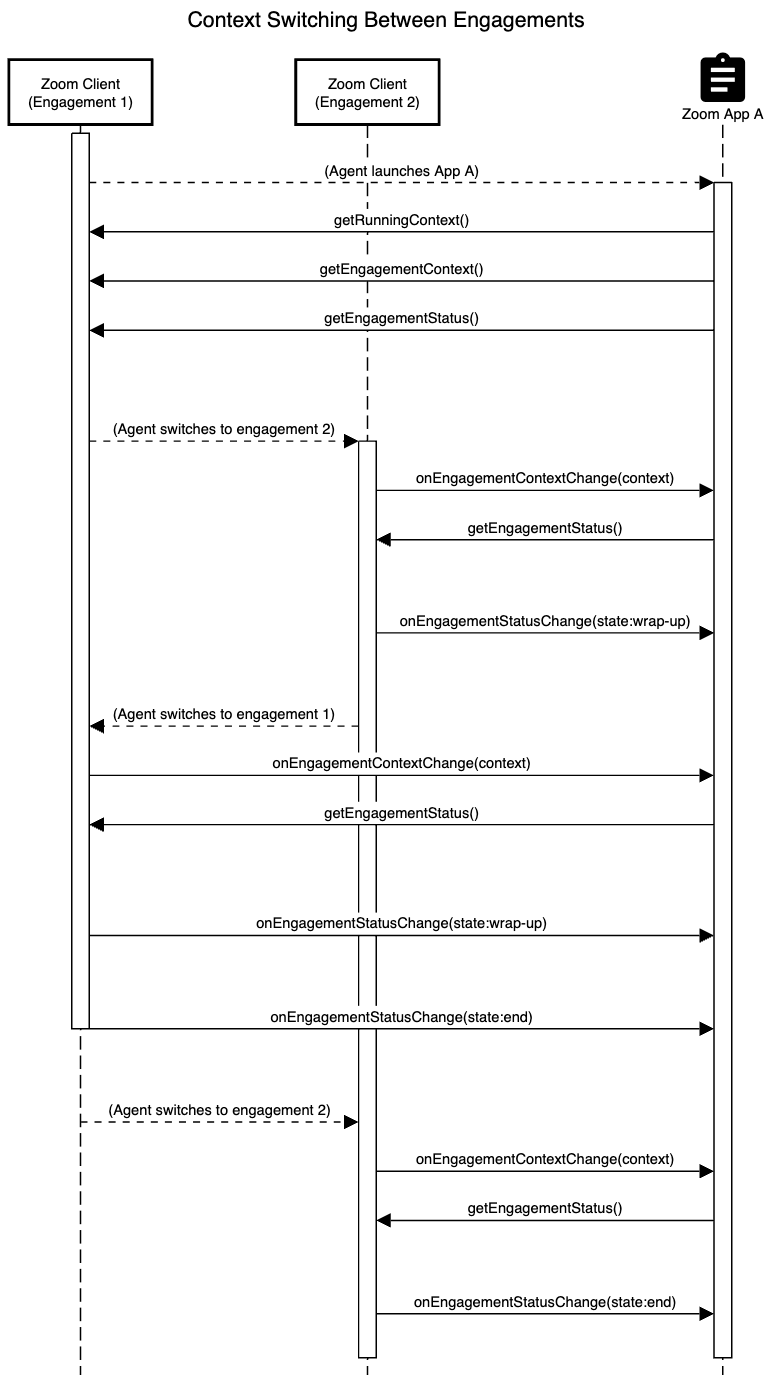
This diagram shows how an agent can switch between multiple engagements and the events that are sent to your app. When an agent switches to another engagement, if your app is already running, your webview instance will receive an onEngagementContextChange event letting you know the engagementId of the new engagement that is now visible to the agent.
You can receive multiple onEngagementContextChange events should the agent toggle between these, or other engagements. In this example, both Engagement 1 and Engagement 2 are being handled by the same Zoom App A webview instance. This means that you must maintain state in your application to allow the agent to seamlessly switch between the engagements.
In this scenario, the agent may have partially interacted with a workflow with your Zoom App in engagement 1, but prior to finishing the workflow the agent switched to engagement 2. In this scenario, you should be able to maintain the state of the partial workflow for Engagement 1 so that the agent can pick up and resume where they left off when they return back to Engagement 1.
As you are developing your app, to validate that your app can handle the engagement context switching, you can set up the web chat channel to allow you to handle multiple engagements.