Realtime Media Streams (RTMS) can deliver media and data over Secure Reliable Transport (SRT) connections instead of WebSocket connections. This topic explains how to connect directly to the RTMS server over SRT, without the RTMS SDK. Signaling stays on a secure WebSocket. SRT replaces the transport for data connections only.
Protocol V2 or later is required. You also need an SRT endpoint returned by a successful signaling handshake. The examples use a Zoom Meetings stream with audio and video available.
The signaling connection is a WebSocket connection, so it must use TLS 1.2 or 1.3. The SRT data connections aren't affected. For details, see TLS requirements.
Connection flow
Each data connection uses two handshakes:
- The SRT transport connection.
- The RTMS data handshake.
A successful SRT connection doesn't authorize or start media delivery on its own.
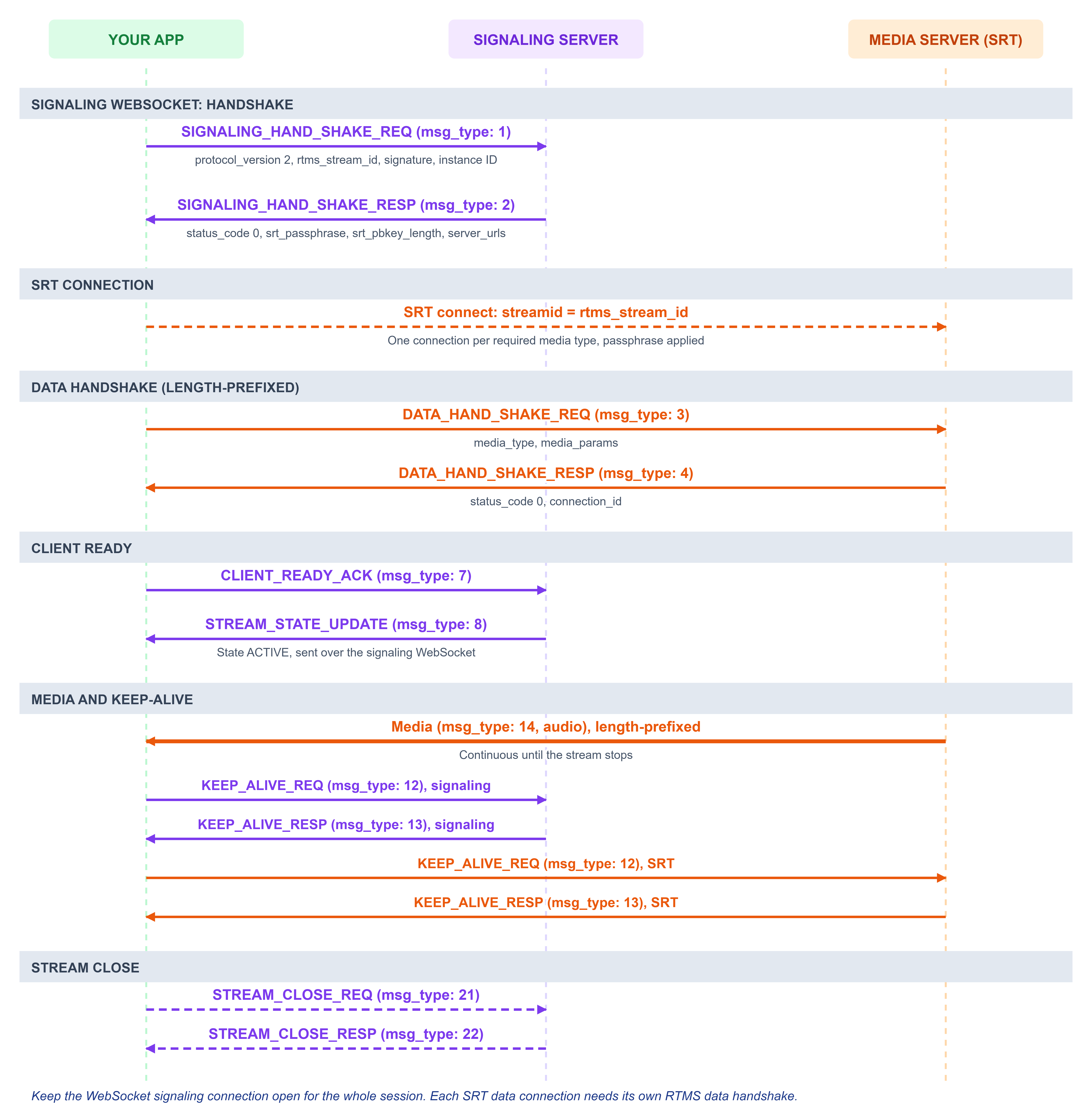
The diagram shows the order of the handshakes, connections, and messages. Each step is described in the sections below.
Keep the WebSocket signaling connection open for the whole session. Use the same message format, JSON or protobuf, for signaling and for all data connections. The transport can differ: WebSocket for signaling, SRT for data.
Prerequisites
Before you connect, make sure you have:
- An active RTMS stream, its instance identifier for your product, and the signature required by the RTMS authentication protocol.
- An SRT client with encryption and caller-mode support, with access to the UDP host and port that RTMS returns.
- Binary-safe handling for credentials, and the length-prefixed framing described in SRT message framing. A general-purpose SRT player doesn't implement the RTMS handshake or message format.
Negotiate SRT credentials on signaling
The signaling handshake returns the SRT endpoint and passphrase. Send the handshake over WebSocket, and read the endpoint and passphrase from the response.
JSON signaling example
Send this signaling handshake request over WebSocket.
{
    "msg_type": 1,
    "protocol_version": 2,
    "meeting_uuid": "meeting-123",
    "rtms_stream_id": "stream-123",
    "signature": "<RTMS authentication signature>",
    "sequence": 1001
}
A successful response that offers SRT looks like this.
{
    "msg_type": 2,
    "protocol_version": 2,
    "status_code": 0,
    "reason": "OK",
    "sequence": 1001,
    "media_server": {
        "server_urls": {
            "audio": "wss://rtms.example:443,srt://rtms.example:9000",
            "video": "wss://rtms.example:443,srt://rtms.example:9000"
        }
    },
    "srt_passphrase": "AAECAwQFBgcICQoLDA0ODxAREhMUFRYXGBkaGxwdHh8=",
    "srt_pbkey_length": 32,
    "payload_encrypted": false
}
Both the signaling and data handshakes must include exactly one non-empty instance identifier for your product: meeting_uuid for Zoom Meetings, webinar_uuid for Zoom Webinars, session_id for the Video SDK, engagement_id for Zoom Contact Center, or call_id for Zoom Phone. Use the same instance identifier and rtms_stream_id on both connections. The SRT passphrase doesn't replace the RTMS signature.
Validate the response and select an endpoint
Continue only if status_code is 0 and the negotiated protocol version is at least 2. For each required media type, do the following:
- Read its value in
media_server.server_urls. - Split that value on commas, and select the
srt://URL. A field can contain more than one transport option, so don't pass the whole comma-separated string to an SRT library. - Use the hostname and UDP port from that URL. Don't assume the SRT port matches the WebSocket port, or that different media types use different ports.
- Confirm that
srt_passphraseandsrt_pbkey_lengthare present and supported. For JSON, Base64-decode the passphrase once. For protobuf, use the bytes as they are. The passphrase is 32 opaque bytes.
The following table maps each returned media field to the media_type you send in the data handshake and the msg_type you receive on that connection:
| Returned field | media_type | msg_type |
|---|---|---|
audio | 1 | 14 |
video | 2 | 15 |
deskshare | 4 | 16 |
transcript | 8 | 17 |
chat | 16 | 18 |
Open a separate data connection for each media type you need. Even if two fields return the same SRT URL, each media type needs its own data handshake.
Keep these rules in mind:
- V2 rejects
media_type32 (ALL). Request only the media types that the stream grants. - If RTMS doesn't return an SRT URL for a required media type, SRT isn't available for that stream.
- You can use a returned WebSocket URL only if your application's transport policy allows it.
- Treat missing or malformed credentials as setup errors. Never substitute an empty passphrase.
Open the SRT connection
The client is the SRT caller, and it connects to the RTMS endpoint from the signaling handshake response. RTMS uses AES-256-CTR encryption by default, the standard SRT mode for this flow.
Set these SRT socket options before you connect. The stream ID, passphrase, and key length must match the values from the signaling handshake response, or the SRT connection can't set up encryption.
| Option | Required client behavior |
|---|---|
SRTO_TRANSTYPE | SRTT_FILE. This flow uses SRT stream mode, even though it carries real-time media. |
SRTO_STREAMID | The exact rtms_stream_id, such as stream-123. Don't use the meeting UUID, a media name, or a structured #!::... stream ID. |
SRTO_PASSPHRASE | The raw passphrase bytes that RTMS returned, with their exact byte length. |
SRTO_PBKEYLEN | The srt_pbkey_length value, in bytes, not bits. The AES-256-CTR profile uses 32, not 256. |
SRTO_ENFORCEDENCRYPTION | RTMS keeps this enabled by default (true). Don't allow an unencrypted fallback. Clients don't need to set it. |
Keep the socket bidirectional. The client must send its RTMS handshake and keep-alive replies on the same socket, even when media only flows downstream. Don't send an HTTP upgrade request or WebSocket frames over the SRT connection.
Your application must:
- Call
srt_startup()before connecting. - Resolve the returned endpoint into
peer. - Pass the decoded passphrase bytes and
srt_pbkey_lengthtoconnect_rtms_srt(). - Call
srt_close()to close each socket. - Call
srt_cleanup()when libsrt is no longer in use.
This C++ helper uses the public libsrt API.
#include <srt/srt.h>
#include <stdexcept>
#include <string>
#include <vector>

SRTSOCKET connect_rtms_srt(const sockaddr* peer, int peer_len,
                           const std::string& stream_id,
                           const std::vector<unsigned char>& passphrase,
                           int pbkey_length) {
    if (stream_id.empty() || stream_id.size() > 512 ||
        passphrase.size() != 32 ||
        (pbkey_length != 16 && pbkey_length != 24 && pbkey_length != 32)) {
        throw std::invalid_argument("Invalid SRT connection credentials");
    }
    SRTSOCKET sock = srt_create_socket();
    if (sock == SRT_INVALID_SOCK) {
        throw std::runtime_error(srt_getlasterror_str());
    }
    try {
        auto set = [&](SRT_SOCKOPT name, const void* value, int size) {
            if (srt_setsockflag(sock, name, value, size) == SRT_ERROR) {
                throw std::runtime_error(srt_getlasterror_str());
            }
        };
        SRT_TRANSTYPE type = SRTT_FILE;
        set(SRTO_TRANSTYPE, &type, sizeof(type));
        set(SRTO_STREAMID, stream_id.data(), static_cast<int>(stream_id.size()));
        set(SRTO_PASSPHRASE, passphrase.data(), static_cast<int>(passphrase.size()));
        set(SRTO_PBKEYLEN, &pbkey_length, sizeof(pbkey_length));
        if (srt_connect(sock, peer, peer_len) == SRT_ERROR) {
            throw std::runtime_error(srt_getlasterror_str());
        }
        return sock;
    } catch (...) {
        srt_close(sock);
        throw;
    }
}
Complete the RTMS data handshake
After the SRT connection opens, send the RTMS data handshake as the first message on that socket. Each message is framed as described in SRT message framing.
JSON audio example
Send this UTF-8 JSON body, prefixed with its length.
{
    "msg_type": 3,
    "protocol_version": 2,
    "meeting_uuid": "meeting-123",
    "rtms_stream_id": "stream-123",
    "signature": "<RTMS authentication signature>",
    "media_type": 1,
    "sequence": 2001,
    "media_params": {
        "audio": {
            "content_type": 2,
            "codec": 1,
            "sample_rate": 1,
            "channel": 1,
            "data_opt": 2,
            "send_rate": 20
        }
    }
}
RTMS responds with a handshake response that also has the length prefix.
{
    "msg_type": 4,
    "protocol_version": 2,
    "status_code": 0,
    "reason": "OK",
    "sequence": 2001,
    "connection_id": "conn-audio-1",
    "payload_encrypted": false,
    "media_params": {
        "audio": {
            "content_type": 2,
            "codec": 1,
            "sample_rate": 1,
            "channel": 1,
            "data_opt": 2,
            "send_rate": 20
        }
    }
}
This example requests L16 audio (codec: 1) at 16 kHz (sample_rate: 1), mono (channel: 1), with a separate audio stream for each user (data_opt: 2). Decode the audio using the media_params in the response.
Before you treat the connection as ready, check the data handshake response:
status_codeis0.- The protocol version is the one you expect.
payload_encryptedmatches the signaling response.
A data handshake can't change the signaling version or turn on payload encryption on its own. Don't add srt_passphrase or srt_pbkey_length to the RTMS data request. Those values belong to the transport setup.
Repeat the SRT connection and the RTMS handshake for each other media type you need, with that media type's endpoint and parameters. All data connections for a stream use the same signaling credentials. The connection_id identifies a data connection. It isn't the SRT SRTO_STREAMID value. If you need a connection-specific video subscription, send it on the signaling connection and include that data connection's connection_id.
Signal readiness and receive media
After every required data handshake succeeds, send a CLIENT_READY_ACK message over the WebSocket signaling connection.
{
    "msg_type": 7,
    "rtms_stream_id": "stream-123"
}
RTMS responds with a STREAM_STATE_UPDATE message on the same connection. It reports the stream as active.
{
    "msg_type": 8,
    "rtms_stream_id": "stream-123",
    "state": 1,
    "timestamp": 1780000000000
}
Process each complete SRT record according to its msg_type. The media format depends on the message encoding:
| Payload | JSON body | Protobuf body |
|---|---|---|
| Audio, video, or deskshare without application-layer encryption | Base64 media in content.data | Raw media bytes in content.data |
| Transcript or chat without application-layer encryption | Text string | UTF-8 text in bytes |
| Application-layer encrypted media or text | Base64 encryption envelope | Raw encryption envelope bytes |
This JSON example is an audio message with two sample bytes.
{
    "msg_type": 14,
    "content": {
        "user_id": 10001,
        "user_name": "Ada",
        "source": 1,
        "data": "AAA=",
        "length": 2,
        "timestamp": 1780000000000
    }
}
Send the message body with the SRT length prefix in front of it. For the framing rules, see SRT message framing. The packet size in this example is illustrative. Real audio packet sizes depend on the negotiated format and delivery cadence.
content.length is the number of decoded media bytes in content.data. When application-layer encryption is on, it's the number of encryption envelope bytes instead. It doesn't include the serialized message or the length prefix.
SRT transport encryption and payload_encrypted are separate settings. The signaling and data handshake examples use encrypted SRT transport with payload_encrypted set to false. Application-layer encryption is negotiated during the signaling handshake. For details, see Signaling handshake request. The SRT passphrase isn't an application-layer media key.
Respond to keep-alives
RTMS sends keep-alive requests on the signaling connection and on each active data connection. Respond to every request to keep the connections open. A keep-alive request in JSON has this format.
{
    "msg_type": 12,
    "sequence": 7,
    "timestamp": 1780000001000
}
Your reply uses the same message format.
{
    "msg_type": 13,
    "sequence": 7,
    "timestamp": 1780000001000
}
Follow these rules when you reply.
- Reply on the same connection that sent the request. For the message fields, see Keep-alive request and Keep-alive response.
- Echo the timestamp and sequence from the request. Don't generate a new timestamp.
- Add the SRT length prefix to replies on SRT. Send replies on WebSocket as ordinary WebSocket messages.
- Keep processing keep-alives when no media is arriving. Don't block the receive loop on media decoding or storage.
SRT's own transport keep-alives don't replace these RTMS messages.
Reconnect and end the session
If a connection drops, use the table below to decide what to do next.
| Situation | Client action |
|---|---|
| A data connection drops while signaling is still active | Reopen the SRT connection for that media type with the current endpoint and credentials, then repeat the RTMS data handshake. Reconnect promptly while the stream is still active. |
| Signaling drops, or a new signaling handshake succeeds | Treat the earlier data setup as obsolete. Complete signaling again, use the new endpoints and passphrase, and rebuild the required data connections before you send readiness. |
A replacement data response returns a new connection_id | Replace the old connection_id. Re-establish any connection-specific video subscription on signaling with the new ID. |
The stream is terminated with a stop_reason of 10–19 or 24 | Restart the entire RTMS connection process from the beginning. |
The stream is terminated with any other stop_reason | Close the data and signaling connections, and don't restart the stream. For example, stop_reason 8 (stream revoked) requires you to delete assets immediately. |
A data-only reconnect doesn't negotiate a new SRT passphrase or application-layer key. A new successful signaling handshake returns a new SRT credential, so don't reuse a credential from an earlier handshake.
Start each replacement data connection with an empty framing buffer. Reconnecting doesn't guarantee that media lost during the interruption is delivered again. Follow stream state and interruption events on signaling.
To end the whole stream, send STREAM_CLOSE_REQ (msg_type: 21) with the rtms_stream_id over signaling, and handle the STREAM_CLOSE_RESP (msg_type: 22). Release the SRT sockets and credentials when the stream ends.
Troubleshoot
Transport failures happen before the RTMS data handshake, so they may not produce an RTMS error response. Record the SRT error separately from RTMS status codes. Don't include credentials or authentication signatures in logs.
| Symptom or status | Check and client action |
|---|---|
| No SRT endpoint or credential in the signaling response | Confirm protocol V2 and status_code 0. Use only the returned endpoints, and use WebSocket only if your transport policy allows it. |
| SRT connection times out | Check DNS, the returned UDP port, firewall and NAT reachability, and that signaling is still active. |
| SRT encryption or key-management failure | Check the exact SRTO_STREAMID, the latest passphrase, Base64 decoding for JSON or raw bytes for protobuf, the explicit byte length, and that SRTO_PBKEYLEN is in bytes. Keep enforced encryption on. |
| SRT rejects the mode | Use SRTT_FILE and SRTO_MESSAGEAPI set to false. Don't use the library's default live or message mode. |
| SRT connects, but no RTMS handshake response arrives | Send the msg_type 3 handshake right after connecting, with a 4-byte big-endian body length. Check the JSON or protobuf body format, partial writes, and the instance identifier and signature. |
RTMS status 2 (INVALID_RTMS_STREAM_ID) | Verify the stream ID and that the stream hasn't ended. The SRT stream ID and the RTMS handshake stream ID must refer to the same stream. |
RTMS status 3 (INVALID_SIGNATURE) | Provide the valid RTMS authentication signature. The SRT passphrase isn't a signature. |
RTMS status 4 (INVALID_PAYLOAD) | Check the required handshake fields, exactly one instance identifier, and the message body structure. |
RTMS status 16 (DUPLICATE_MEDIA_DATA_CONNECTION) | Check for an existing or pending connection for that media type. Avoid starting duplicate reconnect attempts at the same time. |
RTMS statuses 17 to 39 (media parameter errors) | Correct the media-specific parameters and enum values. For example, sample rate is an enum, not a value in Hz. |
RTMS status 48 (MEDIA_DATA_TYPE_ALL_NOT_SUPPORTED) | Open a separate connection for each media type, and remove media_type 32. |
RTMS status 50 (PROTOBUF_V2_REQUIRED) | Request protocol V2 or later for protobuf signaling. |
RTMS status 51 (DATA_HANDSHAKE_REQUIRES_ACTIVE_SIGNAL) | Complete the signaling handshake successfully before the data handshakes. |
RTMS status 52 (HANDSHAKE_MESSAGE_FORMAT_MISMATCH) | Use the same JSON or protobuf format on the data connection as on signaling. The transport can differ. |
| Connections succeed, but no media arrives | Complete the required data handshakes, send readiness on signaling, check the stream state, and keep processing both connections. Some media only appears when related activity occurs. |
| Connection drops even though media is arriving | Respond to RTMS keep-alives on every connection. Receiving media doesn't replace the required replies. |