Show or hide the meeting option bar

To show or hide the meeting option bar, implement a hideOrShowToolbar method.
public void hideOrShowToolbar(boolean hidden) {
    removeCallbacks(autoHidden);
    if (hidden) {
        setVisibility(View.INVISIBLE);
    } else {
        postDelayed(autoHidden, 3000);
        setVisibility(View.VISIBLE);
        bringToFront();
    }
    if (null != mCallBack) {
        mCallBack.onHidden(hidden);
    }
}
You can configure the toolbar within this method, such as setting a longer delay time, add other actions, and more. To use this method, bind it with an action. For instance, if you want to show or hide the option bar when the user taps the screen, implement this code.
class GestureDetectorListener extends GestureDetector.SimpleOnGestureListener {

    public GestureDetectorListener() {
        super();
    }

    @Override
    public boolean onSingleTapUp(MotionEvent e) {

        if (mDrawingView.isAnnotationStarted() || remoteControlHelper.isEnableRemoteControl()) {
            meetingOptionBar.hideOrShowToolbar(true);
            return true;
        }
        ...
        if (mMeetingService.getMeetingStatus() == MeetingStatus.MEETING_STATUS_INMEETING) {
            meetingOptionBar.hideOrShowToolbar(meetingOptionBar.isShowing());
        }
        return true;
    }
}
Configure buttons
The buttons in the meeting option bar are configurable. You can customize the icon or redefine the behavior of each button. For example, you can alter the initial icon of a button and its appearance when the audio status change.
public void updateAudioButton() {
    if (mInMeetingAudioController.isAudioConnected()) {
        if (mInMeetingAudioController.isMyAudioMuted()) {
            mAudioStatusImg.setImageResource(R.drawable.icon_meeting_audio_mute);
        } else {
            mAudioStatusImg.setImageResource(R.drawable.icon_meeting_audio);
        }
    } else {
        mAudioStatusImg.setImageResource(R.drawable.icon_meeting_noaudio);
    }
}
You can do the same thing for other buttons, such as Share, Video, Switch Camera, and more.
public void updateShareButton() {
    if (isMySelfWebinarAttendee()) {
        mBtnShare.setVisibility(View.GONE);
    } else {
        mBtnShare.setVisibility(View.VISIBLE);
        if (mInMeetingShareController.isSharingOut()) {
            mMeetingShareText.setText("Stop share");
            mShareStatusImg.setImageResource(R.drawable.icon_share_pause);
        } else {
            mMeetingShareText.setText("Share");
            mShareStatusImg.setImageResource(R.drawable.icon_share_resume);
        }
    }
}

public void updateVideoButton() {
    if (mInMeetingVideoController.isMyVideoMuted()) {
        mVideoStatusImg.setImageResource(R.drawable.icon_meeting_video_mute);
    } else {
        mVideoStatusImg.setImageResource(R.drawable.icon_meeting_video);
    }
}

public void updateSwitchCameraButton() {
    if (mInMeetingVideoController.isMyVideoMuted()) {
        mBtnSwitchCamera.setVisibility(View.GONE);
    } else {
        mBtnSwitchCamera.setVisibility(View.VISIBLE);
    }
}
Customize the Show More menu
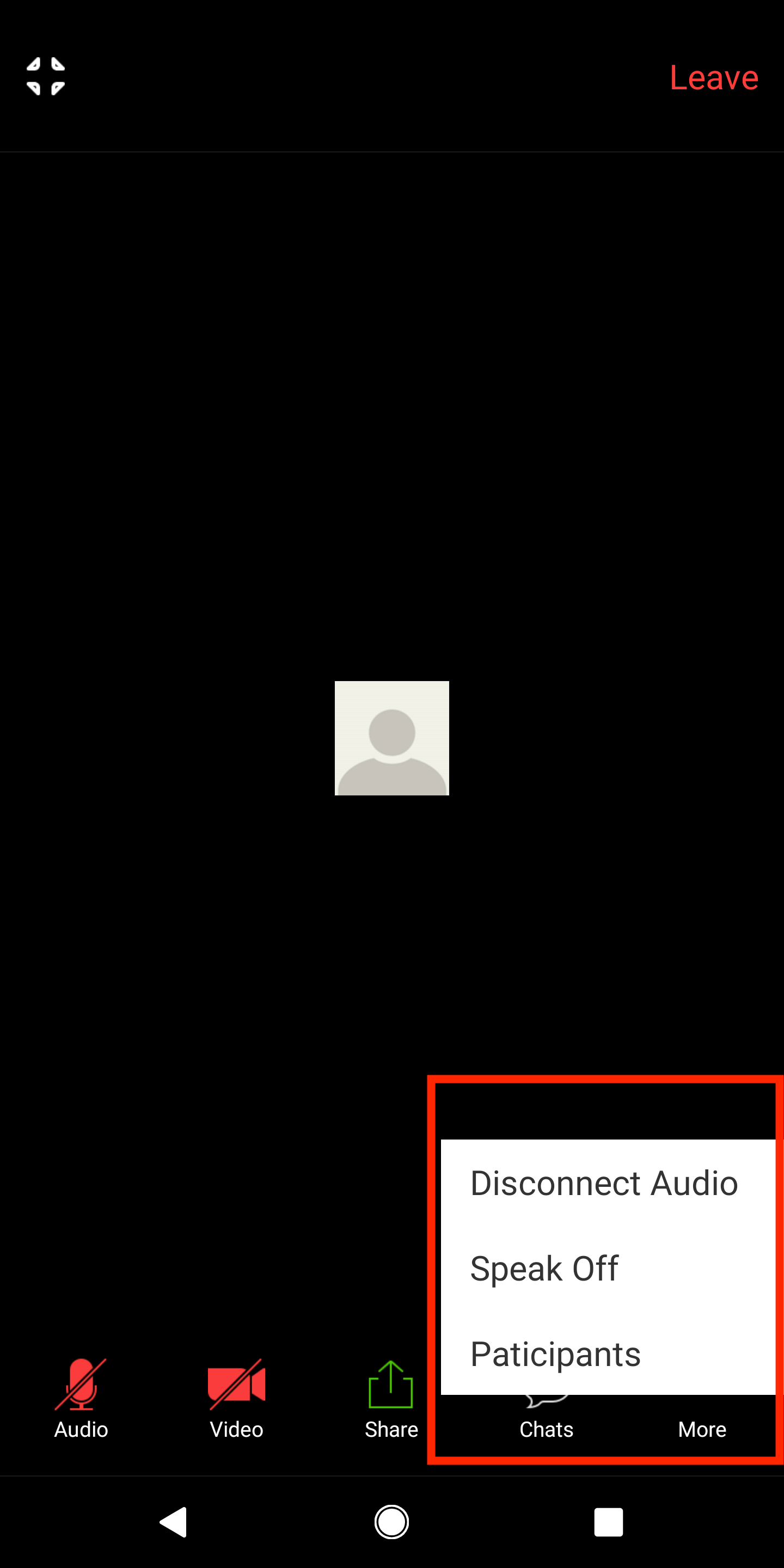
To customize the Show More menu, implement a showMoreMenuPopupWindows method
that creates and configures the pop more menu.
private void showMoreMenuPopupWindow() {
    final SimpleMenuAdapter menuAdapter = new SimpleMenuAdapter(mContext);
    if (mInMeetingAudioController.isAudioConnected()) {
        menuAdapter.addItem(new SimpleMenuItem(MENU_DISCONNECT_AUDIO, "Disconnect Audio"));
    }

    if (mInMeetingAudioController.canSwitchAudioOutput()) {
        if (mInMeetingAudioController.getLoudSpeakerStatus()) {
            menuAdapter.addItem(new SimpleMenuItem(MENU_SPEAKER_OFF, "Speak Off"));
        } else {
            menuAdapter.addItem(new SimpleMenuItem(MENU_SPEAKER_ON, "Speak On"));
        }
    }

    if (!isMySelfWebinarAttendee())
        menuAdapter.addItem((new SimpleMenuItem(MENU_SHOW_PLIST, "Participants")));

    if (isMySelfWebinarHostCohost()) {
        if (mInMeetingWebinarController.isAllowPanellistStartVideo()) {
            menuAdapter.addItem((new SimpleMenuItem(MENU_DISALLOW_PANELIST_START_VIDEO, "Disallow panelist start video")));
        } else {
            menuAdapter.addItem((new SimpleMenuItem(MENU_AllOW_PANELIST_START_VIDEO, "Allow panelist start video")));
        }

        if (mInMeetingWebinarController.isAllowAttendeeChat()) {
            menuAdapter.addItem((new SimpleMenuItem(MENU_DISALLOW_ATTENDEE_CHAT, "Disallow attendee chat")));
        } else {
            menuAdapter.addItem((new SimpleMenuItem(MENU_AllOW_ATTENDEE_CHAT, "Allow attendee chat")));
        }
    }

    View popupWindowLayout = LayoutInflater.from(mContext).inflate(R.layout.popupwindow, null);

    ListView shareActions = (ListView) popupWindowLayout.findViewById(R.id.actionListView);
    final PopupWindow window = new PopupWindow(popupWindowLayout, ViewGroup.LayoutParams.WRAP_CONTENT, ViewGroup.LayoutParams.WRAP_CONTENT);
    window.setBackgroundDrawable(getResources().getDrawable(R.drawable.bg_transparent));
    shareActions.setAdapter(menuAdapter);
    shareActions.setOnItemClickListener(new AdapterView.OnItemClickListener() {
        @Override
        public void onItemClick(AdapterView<?> parent, View view, int position, long id) {

            SimpleMenuItem item = (SimpleMenuItem) menuAdapter.getItem(position);

            switch (item.getAction()) {
                case MENU_DISCONNECT_AUDIO:
                    if (null != mCallBack) {
                        mCallBack.onClickDisconnectAudio();
                    }
                    break;
                case MENU_SHOW_PLIST:
                    if (null != mCallBack) {
                        mCallBack.onClickChats();
                    }
                    break;
                case MENU_AllOW_ATTENDEE_CHAT:
                    mInMeetingWebinarController.allowAttendeeChat();
                    break;
                case MENU_AllOW_PANELIST_START_VIDEO:
                    mInMeetingWebinarController.allowPanelistStartVideo();
                    break;
                case MENU_DISALLOW_ATTENDEE_CHAT:
                    mInMeetingWebinarController.disallowAttendeeChat();
                    break;
                case MENU_DISALLOW_PANELIST_START_VIDEO:
                    mInMeetingWebinarController.disallowPanelistStartVideo();
                    break;
                case MENU_SPEAKER_OFF:
                case MENU_SPEAKER_ON: {
                    if (null != mCallBack) {
                        mCallBack.onClickSwitchLoudSpeaker();
                    }
                    break;
                }
            }
            window.dismiss();
        }
    });

    window.setFocusable(true);
    window.setOutsideTouchable(true);
    window.update();
    if (null != mCallBack) {
        mCallBack.showMoreMenu(window);
    }
}