Create Contact Center Apps for PWA
Zoom PWA (Progressive Web Client) allows an application to operate as a Zoom App inside the Zoom web client. Creating apps for Zoom PWA follows the standard process for creating a Contract Center app.
In this article, we call out only information specific to creating apps for Zoom PWA.
Prerequisites
- You have read the procedure to create a Contact Center app.
- You have a Zoom account.
- Zoom PWA client 5.14.10 or higher.
- Zoom Apps SDK 0.16.12 or higher.
Step 1 - Create a Contact Center app with PWA support
-
Follow the steps to Create a Contact Center App.
-
To enable PWA client support for Contact Center:
-
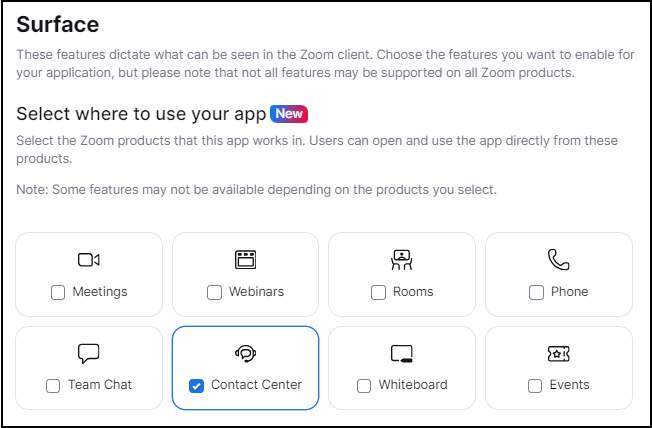
Go to the Features page > Surface.
-
Under Select where to use your app, select Contact Center.
-
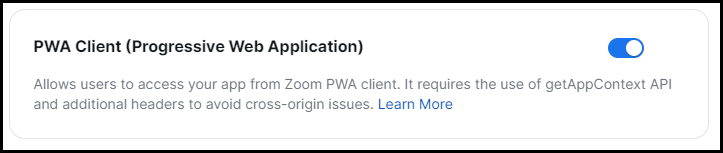
Scroll down to the Zoom client support section, and enable PWA Client.
-
Step 2 - Download and Install Zoom Apps SDK
Download and install the Zoom Apps SDK. Add appssdk.zoom.us to the script-src in Content-Security-Policy. See sample code for headers below.
Step 3 - Get the app context token
Use the getAppContext() API to get the latest app context token from the PWA client. The API returns a token that contains signed app context data for secure backend validation.
Note: Do not use the
x-zoom-app-contextheader. The header is usually sent by the Zoom client, however, it is not sent by the PWA client. Remove any usage of this header from the backend.
-
Call
getAppContext()API after config(). -
Pass the context via a
GETrequest to the backend. -
Decrypt the app context in the backend, and use the decrypted app context information as required.
Add cross-origin headers:
"cross-origin-embedder-policy":"require-corp" "cross-origin-resource-policy":"cross-origin" -
Remove X-Frame headers from your app configuration:
X-Frame-Options "DENY";
frame-ancestors 'none'; Content-Security-Policy
Example Context Security Policy
Frontend:
add_header Content-Security-Policy "default-src 'none'; object-src 'none'; worker-src 'none'; connect-src 'self'; script-src 'self' appssdk.zoom.us";
add_header Strict-Transport-Security "max-age=31536000";
add_header X-Content-Type-Options "nosniff";
add_header Referrer-Policy "strict-origin-when-cross-origin";
add_header Cross-Origin-Resource-Policy "cross-origin";
add_header Cross-Origin-Embedder-Policy "require-corp";
Backend:
securityHeaders: {
strictTransportSecurity: 'max-age=31536000',
xContentTypeOptions: 'nosniff',
contentSecurityPolicy: 'default-src 'none'; object-src 'none'; worker-src 'none'; connect-src 'self' ${isDevelopment ? ' ws: wss:' : '' }; script-src 'self' appssdk.zoom.us ; font-src 'self'; img-src 'self';
referrerPolicy: 'no-referrer',
crossOriginResourcePolicy: 'cross-origin',
crossOriginEmbedderPolicy: 'require-corp',
},
Cookie sessions
Make these changes if you have set up a Cookie Session.
- Add
sameSite: 'none'in Cookie Session. - Add
secure: true, in Cookie Session. - Remove
httpOnly: truefrom Cookie Session (if present).