When a Contact Center video call gets connected, the Contact Center SDK sends the user a rejoin link in a text message. The user then opens the link in a browser, sees a webpage displaying the rejoin link, and follows that link to reconnect them to that video call in the your Contact Center-integrated app for Android.
Configure the Rejoin video call function
To have your users open their rejoin app using a browser, create a web page or site displaying a link with a fixed host address and additional parameters. The Contact Center SDK generates the parameters used in the rejoin link displayed on this site.
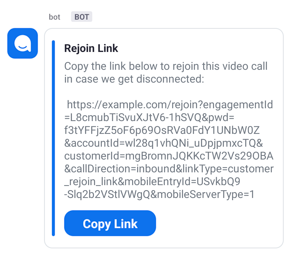
In the Contact Center video chat, the meeting participant receives a message containing a link to rejoin their meeting. If we use the example rejoin website of https://example.com/rejoin, the link in the message will look like:
https://example.com/rejoin/?engagementId=OLlXkCbZQY-0yEn6ftgC2A&pwd=IsvRan98DQBIKMmoaAMlAab8Ae6avet6&accountId=wl28q1vhQNi_uDpjpmxcTQ&customerId=CpzYH6IgT-S8PI9gXFMTPQ&callDirection=inbound&linkType=customer_rejoin_link&mobileEntryId=USvkbQ9-Slq2b2VStlVWgQ&mobileServerType=1
For more information, see the official Android app documentation and Android deep link documentation .
This golang sample code is for a local server test where the local server is example.com.
package main

import (
	"fmt"
	"log"
	"net/http"
)

const scheme string = "myscheme"
const host string = "rejoin"

// In the example, the href is ``myscheme://rejoin?engagementId=OLlXkCbZQY-0yEn6ftgC2A&pwd=IsvRan98DQBIKMmoaAMlAab8Ae6avet6&accountId=wl28q1vhQNi_uDpjpmxcTQ&customerId=CpzYH6IgT-S8PI9gXFMTPQ&callDirection=inbound&linkType=customer_rejoin_link&mobileEntryId=USvkbQ9-Slq2b2VStlVWgQ&mobileServerType=1`. This deep link launches your Contact Center-integrated app.
func rejoin(w http.ResponseWriter, r *http.Request) {
	r.ParseForm()
	w.Header().Set("Content-Type", "text/html; charset=utf-8")
	str := "<a style=' color:#666; font-size:80px;' href='%s://%s?%s'>rejoin video</a>"
	fmt.Fprintf(w, str, scheme, host, r.URL.RawQuery)
}

func main() {
	mux := http.NewServeMux()
	mux.HandleFunc("/rejoin/", rejoin)
    // To use an app link for android, you will need assetlinks.json which contains your app package name and sha256_cert_fingerprints
	mux.Handle("/.well-known/assetlinks.json", http.StripPrefix("/.well-known/", http.FileServer(http.Dir("./json"))))

	server := &http.Server{
		Addr:    ":443",
		Handler: mux,
	}
    // Use openssl to generate a secure certificate for "https"
	if err := server.ListenAndServeTLS("./cert/localhost.pem", "./cert/localhost-key.pem"); err != nil {
		log.Fatal(err)
	}
}
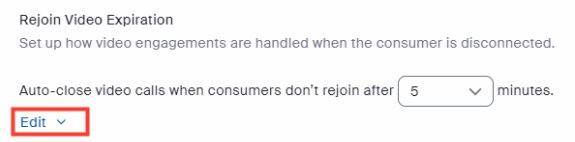
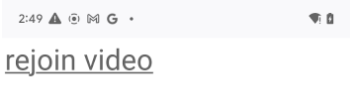
If your server is correctly configured, the link with the text "rejoin video" displays on the website. After that, set the URL to your rejoin website link, such as https://example.com/rejoin. In the Zoom Contact Center web portal, select Contact Center Management > Preferences > Account > Voice and Video Engagements > Rejoin Video Expiration > Edit.
The rejoin link itself will appear like this in meeting participants' browsers:
Add configuration to AndroidManifest.xml.
- Export CCRejoinActivity and set the intent-filter for deep links. The intent-filter should use the same android:host and android:scheme. In the server code, the link in the a tag is
myscheme://rejoin?engagementId=OLlXkCbZQY-0yEn6ftgC2A&pwd=IsvRan98DQBIKMmoaAMlAab8Ae6avet6&accountId=wl28q1vhQNi_uDpjpmxcTQ&customerId=CpzYH6IgT-S8PI9gXFMTPQ&callDirection=inbound&linkType=customer_rejoin_link&mobileEntryId=USvkbQ9-Slq2b2VStlVWgQ&mobileServerType=1. - To use an app link, add an intent-filter for the app link.
<activity
    android:name="us.zoom.contactscenter.activity.CCRejoinActivity"
    android:exported="true">
    <!--intent-filter for deep link-->
    <intent-filter>
        <action android:name="android.intent.action.VIEW" />
        <category android:name="android.intent.category.DEFAULT" />
        <category android:name="android.intent.category.BROWSABLE" />

        <data
            android:host="rejoin"
            android:scheme="myscheme" />
    </intent-filter>
    <!--intent-filter for app link-->
    <intent-filter>
        <action android:name="android.intent.action.VIEW" />
        <category android:name="android.intent.category.DEFAULT" />
        <category android:name="android.intent.category.BROWSABLE" />
        <data
            android:host="example.com"
            android:pathPattern="/rejoin/.*"
            android:scheme="https" />
    </intent-filter>
</activity>
When your app is completely configured, select the rejoin video link on the website to open your app and rejoin your video call.