Features
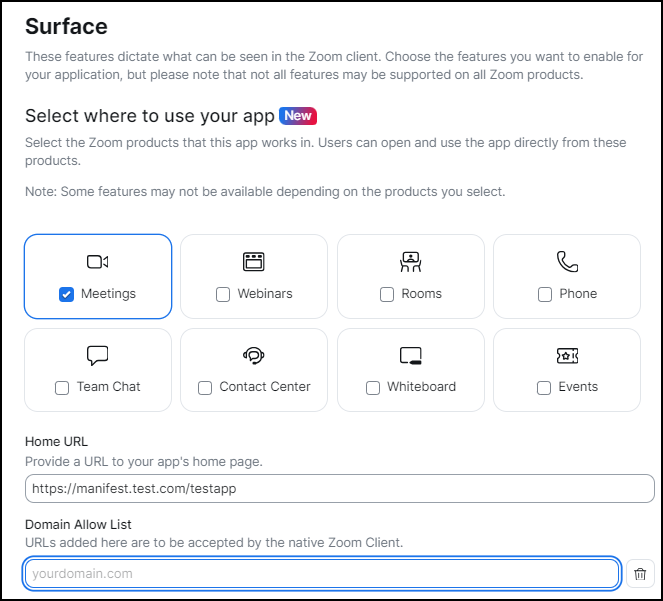
The information in the Features section of the manifest JSON represent these values on the Features page of the app build-flow:
- Products
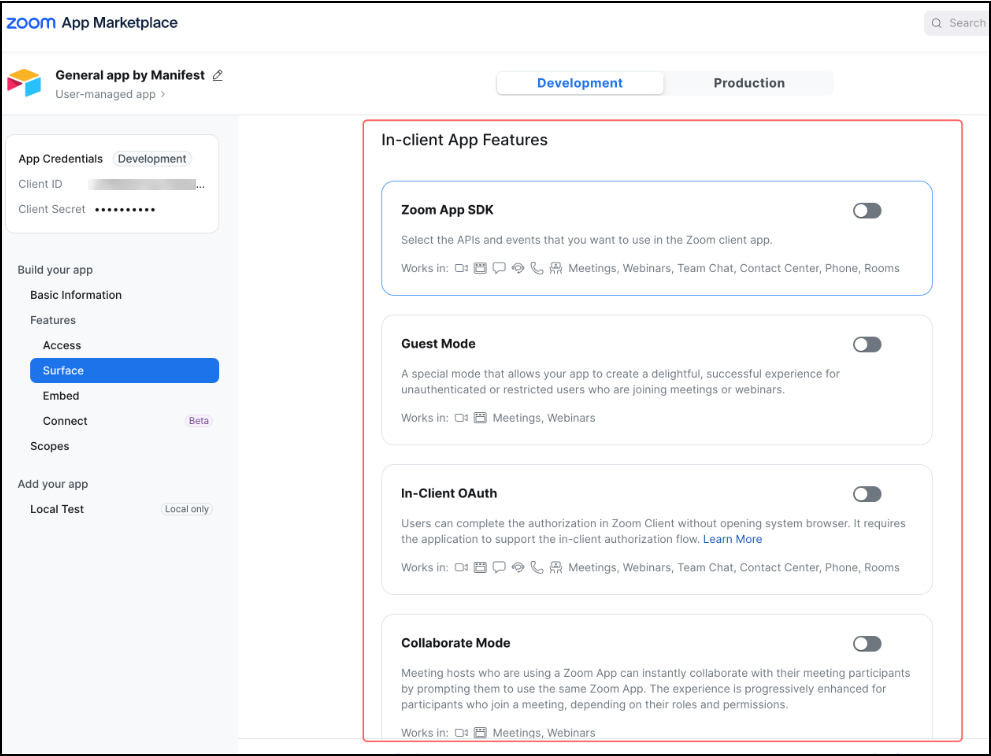
- In-client app features
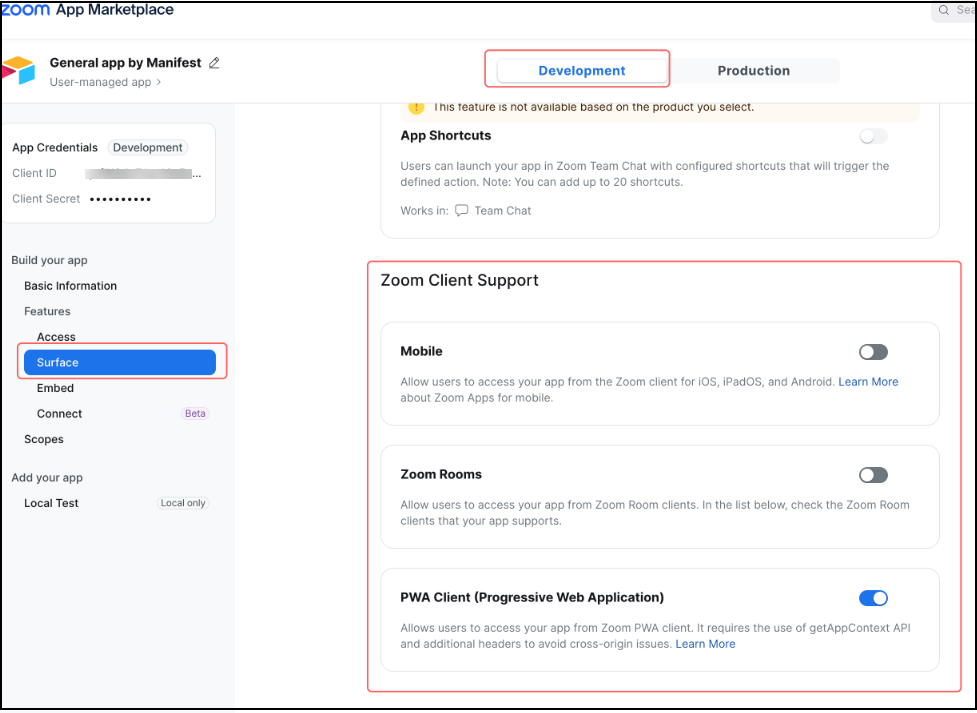
- Zoom client support
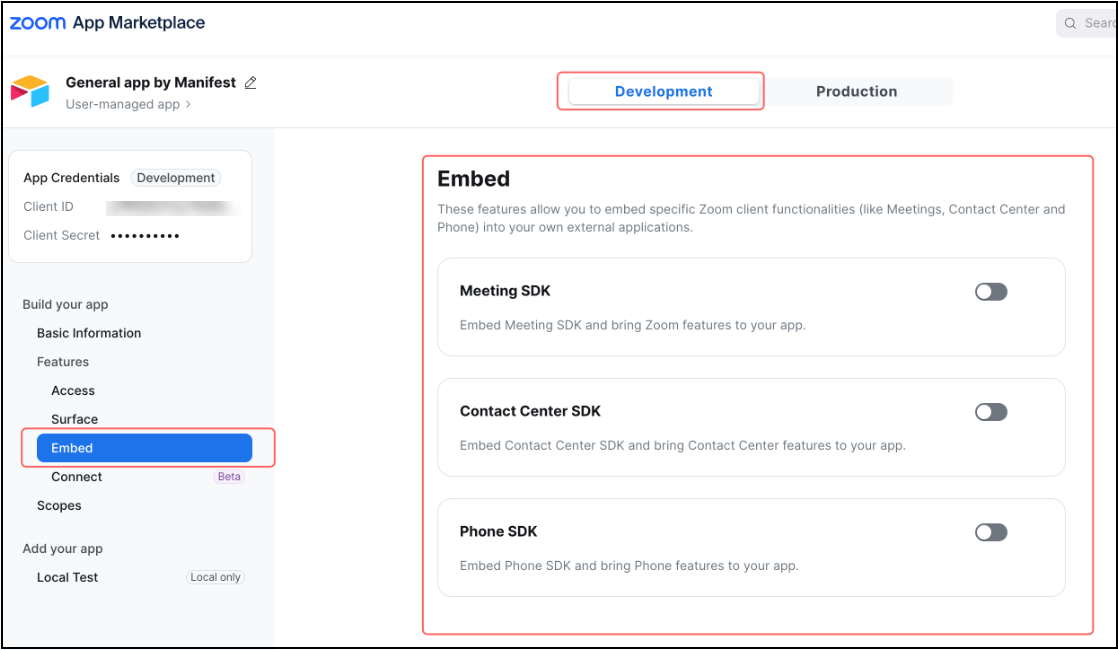
- Embed features
- Zoom chat subscription
- Event subscription
Products
The information in the Products section of the manifest JSON represent the values on the Products page of the app build-flow.
Manifest JSON
{
    "features": {
        "products": [
            "ZOOM_MEETING",
            "ZOOM_CHAT",
            "ZOOM_PHONE",
            "ZOOM_ROOM",
            "ZOOM_WEBINAR",
            "ZOOM_CONTACT_CENTER",
            "ZOOM_WHITEBOARD",
            "ZOOM_EVENTS"
        ],
        "development_home_uri": "https://sample.domain.us/",
        "production_home_uri": "https://sample.domain.us/",
        "domain_allow_list": [
            {
                "domain": "zoom.us",
                "explanation": "reason"
            }
        ],
        "connector": {},
        "in_client_feature": {},
        "zoom_client_support": {},
        "embed": {},
        "team_chat_subscription": {},
        "event_subscription": {}
    }
}
Field descriptions
| Field | Description | Values | Required |
|---|---|---|---|
products | Select the Zoom products that this app works in. | ZOOM_MEETING, ZOOM_CHAT, ZOOM_PHONE, ZOOM_ROOM, ZOOM_WEBINAR, ZOOM_CONTACT_CENTER, ZOOM_WHITEBOARD, ZOOM_EVENTS | Yes |
development_home_uri | Provide a URL to your app's home page. | user entry | No |
production_home_uri | Provide a URL to your public app's home page. | user entry | No |
domain_allow_list | URLs added here are to be accepted by the native Zoom Client. | user entry | No |
In-client app features
The information in the In-client app features section of the manifest JSON represent the values on the Surface > In-client app features page of the app build-flow.
Manifest JSON
{
    "features": {
        // ...
        "in_client_feature": {
            "zoom_app_api": {
                "enable": true,
                "zoom_app_apis": ["getSupportedJsApis", "onShareApp"]
            },
            "guest_mode": {
                "enable": true,
                "enable_test_guest_mode": true
            },
            "in_client_oauth": {
                "enable": true
            },
            "collaborate_mode": {
                "enable": true,
                "enable_screen_sharing": true,
                "enable_play_together": true
            }
        }
        // ...
    }
}
Field descriptions
| Field | Description | Values | Required |
|---|---|---|---|
zoom_app_api.enable | If need to use APIs and events in Zoom client. | true or false | No |
zoom_app_api.zoom_app_apis | Select the APIs and events that you want to use in the Zoom client app. Zoom Apps SDK | use entry | No |
guest_mode.enable | A special mode that allows your app to be used by unauthenticated or restricted users who are joining meetings or webinars. See guest mode. | true or false | No |
guest_mode.enable_test_guest_mode | Test the Guest Mode feature before publishing your app. | true or false | No |
in_client_oauth.enable | Users can complete the authorization in Zoom Client without opening the system browser. | true or false | No |
collaborate_mode.enable | Meeting hosts who are using a Zoom App can instantly collaborate with their meeting participants by prompting them to use the same Zoom App. | true or false | No |
collaborate_mode.enable_screen_sharing | This enables screen sharing of the app canvas from the user who initiated the collaborate mode. | true or false | No |
collaborate_mode.enable_play_together | Enable this to change the calls to action in the interface from "Collaborate" to "Play Together". This is especially relevant if your app is a game. This does not change functionality, but simply renames the button and other support copy. | true or false | No |
Zoom client support
The information in the In-client app features section of the manifest JSON represent the values on the Surface > Zoom Client Support page of the app build-flow.
Manifest JSON
{
    "features": {
        // ...
        "zoom_client_support": {
            "mobile": {
                "enable": true,
                "apple_developer_program_team_id": "1234567890"
            },
            "zoom_room": {
                "enable": true,
                "enable_personal_zoom_room": true,
                "enable_shared_zoom_room": true,
                "enable_digital_signage": true,
                "enable_zoom_rooms_controller": true
            },
            "pwa_client": {
                "enable": true
            }
        }
        // ...
    }
}
Field descriptions
| Field | Description | Value | Required |
|---|---|---|---|
mobile.enable | Allow users to access your app from the Zoom client for iOS, iPadOS, and Android. Learn More. | true or false | No |
mobile.apple_developer_program_team_id | Provide your Apple Developer Program Team ID. This is required for using your app on Apple devices.(Only for iOS and iPadOS) | user entry | No |
zoom_room.enable | Allow users to access your app from Zoom Room clients. | true or false | No |
zoom_room.enable_personal_zoom_room | Zoom Room devices, including Zoom for Home, that are assigned to individual users and support touch interactions. Learn more. | true or false | No |
zoom_room.enable_shared_zoom_room | Zoom Room devices that are shared by users in an organization and support touch interactions. | true or false | No |
zoom_room.enable_digital_signage | Zoom Room screens that share a content playlist when the room is not in a meeting. Learn more. | true or false | No |
zoom_room.enable_zoom_rooms_controller | Devices used to control meetings taking place on Zoom Rooms. Learn more. | true or false | No |
Embed features
The information in the Embed section of the manifest JSON represent the values on the Features > Embed page of the app build-flow.
Manifest JSON
{
    "features": {
        // ...
        "embed": {
            "meeting_sdk": {
                "enable": true,
                "enable_device": true,
                "devices": [
                    "ZOOM_ROOM_COMPUTER",
                    "ZOOM_ROOM_CONTROLLER",
                    "OTHER_DEVICES"
                ]
            },
            "contact_center_sdk": {
                "enable": true
            },
            "phone_sdk": {
                "enable": true
            }
        }
        // ...
    }
}
Field descriptions
| Field | Description | Values | Required |
|---|---|---|---|
meeting_sdk.enable | Embed Meeting SDK and bring Zoom features to your app. | true or false | No |
meeting_sdk.enable | This feature allows your users to authorize and log in to your app on selected devices with a code or a URL. | true or false | No |
meeting_sdk.devices | Display Devices | ZOOM_ROOM_COMPUTER, ZOOM_ROOM_CONTROLLER, OTHER_DEVICES | No |
contact_center_sdk.enable | Embed Contact Center SDK and bring Contact Center features to your app. | true or false | No |
phone_sdk.enable | Embed Phone SDK and bring Phone features to your app. | true or false | No |
phone_sdk.fcm_token | FCM server key | Q to Irving, how to get token | No |
Zoom Chat subscription
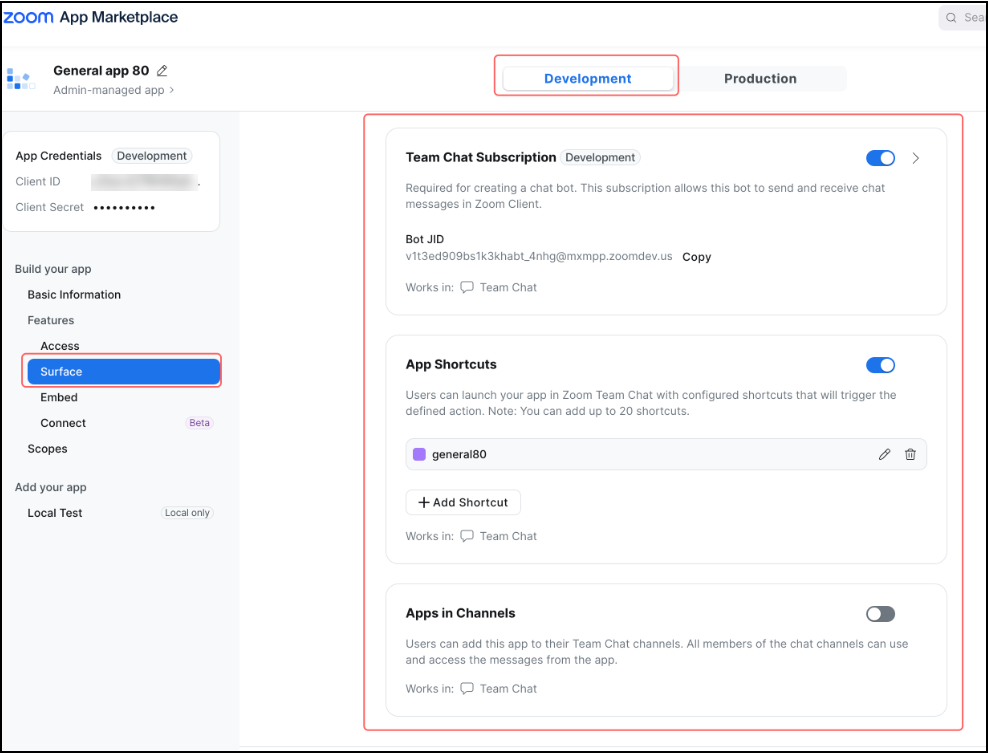
The information in the Zoom Chat subscription section of the manifest JSON represent the values on the Surface > Zoom Chat Subscriptions page of the app build-flow.
Manifest JSON
{
    "features": {
        // ...
        "team_chat_subscription": {
            "enable": true,
            "enable_support_channel": false,
            "slash_command": {
                "command": "testManifest",
                "command_hints": [
                    {
                        "description": "12",
                        "usage_hint": "12"
                    },
                    {
                        "description": "23",
                        "usage_hint": "23"
                    }
                ],
                "enable_add_to_channel": false,
                "development_message_url": "https://sample.domain.us",
                "production_message_url": "https://sample.domain.us",
                "sender_type": "zoom",
                "welcome_msg": {
                    "title": "title",
                    "body": "body"
                },
                "trust_domain_list": [
                    {
                        "domain": "zoom.us",
                        "unfurling": true
                    },
                    {
                        "domain": "google.com",
                        "unfurling": false
                    }
                ]
            },
            "shortcuts": [
                {
                    "action_label": "actionName",
                    "action_id": "actionCommandId",
                    "action_types": ["COMPOSE_BOX"],
                    "action_usage": "DIALOG",
                    "dialog_config": {
                        "title": "www",
                        "size": "S"
                    }
                }
            ]
        }
        // ...
    }
}
Field descriptions
| | | | |
| Field | Description | Values | Required |
|---|---|---|---|
enable | Required for creating a chat bot. This subscription allows this bot to send and receive chat messages in Zoom Client. | true or false | No |
enable_support_channel | Users can add this app to their Chat channels. All members of the chat channels can use and access the messages from the app. | true or false | No |
slash_command.command | Name of your slash command that users can invoke to interact with this bot | use entry | No |
slash_command.development_message_url | The following scopes are automatically selected once you create a Chat Command: Required imchat:bot | use entry | No |
slash_command.production_message_url | The following scopes are automatically selected once you create a Chat Command: Required imchat:bot | use entry | No |
slash_command.command_hints[].usage_hint | A string hint about how to use the slash command for users. | use entry | No |
slash_command.command_hints[].description | A string containing a description of the slash command that will be displayed to users. | use entry | No |
slash_command.trust_domain_list | Enter any known domains that are safe for users to access when referenced in your chatbot messages. Check unfurling next to a domain input for your app to provide correspondent link preview. | use entry | No |
slash_command.sender_type | Send a first message by Zoom App Marketplace or Your App"zoom"/"own" | use entry | No |
slash_command.welcome_msg | Zoom App Marketplace will send a Webhook event to your app when this chatbot app is installed. You shall respond with your custom welcome message. works when slash_command.sender_type="zoom" | use entry | No |
slash_command.enable_add_to_channel | Once enabled, Zoom Chat channel admins can add this app to chat channels. Any required scopes will be automatically selected. This feature cannot be disabled after this app is published on Zoom App Marketplace. | use entry | No |
shortcuts[].shortcut_id | The primary key of shortcut | use entry | Yes (when updating shortcut) |
shortcuts[].action_label | The action name will appear in Zoom Chat. Name it in a simple and clear way | use entry | Yes (for each shortcut included) |
shortcuts[].action_id | The command ID will be used to identify your app shortcuts. This is not visible to your users. | use entry | Yes (for each shortcut included) |
shortcuts[].action_type | The command ID will be used to identify your app shortcuts. This is not visible to your users. | use entry | Yes (for each shortcut included) |
shortcuts[].dialog_config.title | The dialog title reflects the action name. | use entry | No |
shortcuts[].dialog_config.size | Choose the action dialog size to better fit your content."S"/"M"/"L" | use entry | No |
Event subscription
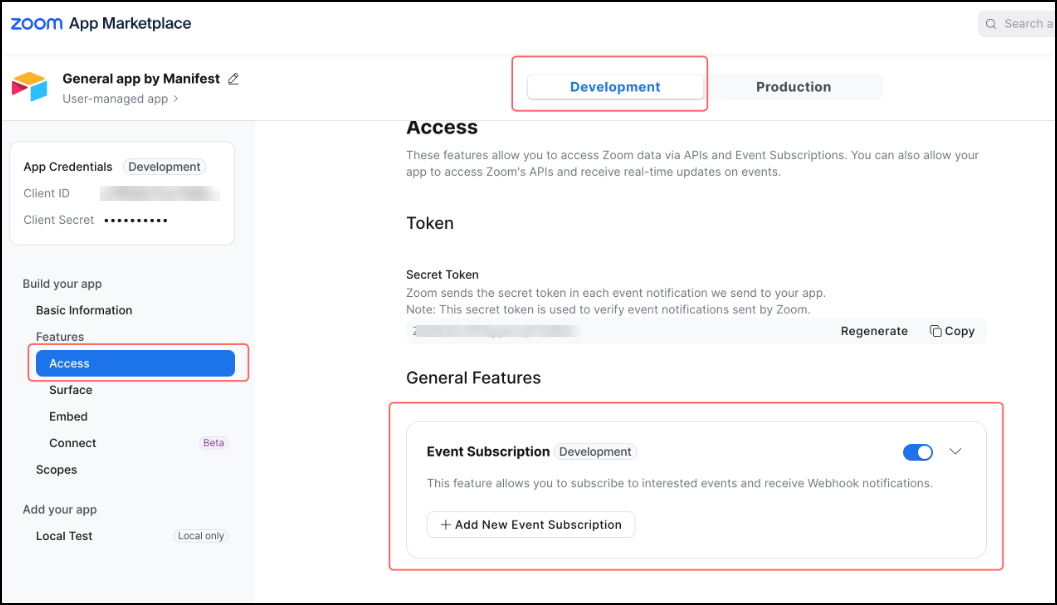
The information in the Event subscription section of the manifest JSON represent the values on the Access > Event Subscriptions page of the app build-flow. For more information, refer to the webhooks documenation for the specific product.
Manifest JSON
{
    "features": {
        // ...
        "event_subscription": {
            "enable": true,
            "events": [
                {
                    "subscription_name": "subscription_name",
                    "event_types": ["meeting.started", "meeting.ended"],
                    "development_webhook_url": "https://webhook.site/xxxxxxx",
                    "production_webhook_url": "https://webhook.site/xxxxxxxx",
                    "development_event_custom_header": null,
                    "production_event_custom_header": null,
                    "development_event_custom_header": {
                        "custom_header_type": 0, // 0-DEFAULT, 1-BASE_AUTH, 2-OAUTH, 3-CUSTOM_kEY_VALUE
                        "username": "",
                        "password": "",
                        "client_id": "",
                        "client_secret": "",
                        "token_url": "",
                        "custom_header_key": "",
                        "custom_header_value": ""
                    },
                    "production_event_custom_header": {
                        "custom_header_type": 0, // 0-DEFAULT, 1-BASE_AUTH, 2-OAUTH, 3-CUSTOM_kEY_VALUE
                        "username": "",
                        "password": "",
                        "client_id": "",
                        "client_secret": "",
                        "token_url": "",
                        "custom_header_key": "",
                        "custom_header_value": ""
                    }
                }
            ]
        }
        // ...
    }
}
Field descriptions
| Field | Description | Value | Required |
|---|---|---|---|
enable | This feature allows you to subscribe to interested events and receive Webhook notifications. | true or false | No |
events[].subscription_id | The primary key of subscription | auto generated | Yes ( when update subscription) |
events[].development_webhook_url | Provide a URL to receive subscribed event notifications. This is for testing in your local environment. | user entry | Yes (ifenable= true) |
events[].production_webhook_url | Provide a URL to receive subscribed event notifications. This is for testing in your local environment. | user entry | No |
events[].subscription_name | Name this particular event subscription. | user entry | Yes (if enable= true) |
events[].event_types | Add events for your app to subscribe. Any corresponding scopes related to specific events will be automatically selected. | user entry | Yes (if enable= true) |
Resources
- Manifests Overview
- Manifest Schema
- Manifest Template
- Details of the Display Information section
- Details of the OAuth Information section