Introducing the Zoom Telehealth Starter-Kit for web, Powered by the Video SDK
We are excited to introduce an open-source starter application for creating a customized virtual healthcare experience on the Web, powered by the Zoom Video SDK.
Customizable and built to cater to virtual healthcare settings, this application can be adapted for primary care doctors, mental health counselors, specialty doctors, and more. With the Telehealth Starter Kit, we want to give developers an easy-to-implement solution and solid foundation for building innovative products for the healthcare space.
The source code is availasble on GitHub, and you can also view a live demo here.
Architecture and Tech-Stack
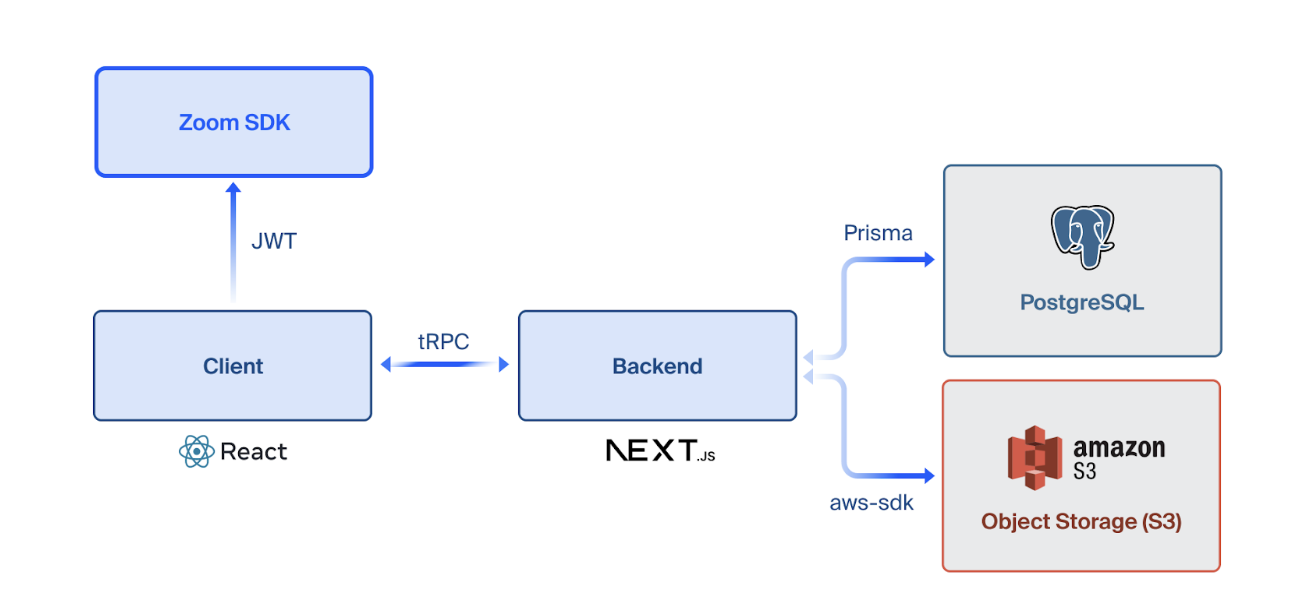
The Telehealth Starter Kit is built with modern tools like Next.js, React, Prisma, Tailwind, and tRPC, making it easy to deploy and maintain while also being fully customizable to fit your brand. You can read about why we chose these technologies in our “t3 tech stack” blog.
The Zoom Video SDK (for web) provides an in-session experience for video, audio, chat, transcription, and recording.
Features
You can sign up for the starter kit as a healthcare provider or a patient, with each having different features available to them.
General
- Log in with an OAuth Provider like Google or Microsoft Outlook
- Schedule appointments
- View upcoming and past appointments
- Video conferencing for each appointment
- In-session chat
- Record sessions
- Live transcriptions
- ustomizable in-session action menu
- Customizable landing page
- Customizable theme colors to match your brand
- Invite link for appointments
- Custom onboarding to store metadata
Healthcare provider
- View patients details and reports
- Add notes to an appointment patterned off of SOAP format
- Access patient data from within the sessions
Patient
- PDF document upload and download
- View and edit profile details/metadata
- Live captions during appointment
- Search for healthcare provider by name
How to get started
You can clone the repo from our GitHub and customize the project to fit your needs and branding.
Prerequisites
- A Zoom Video SDK Account (sign up here)
- Node.js LTS
- Bun (or npm/pnpm)
Getting started
- Clone the repo: git clone https://github.com/zoom/VideoSDK-Web-Telehealth
- Install the dependencies:
- cd Zoom-Telehealth
- bun install # or npm install
- Copy the .env.example file as .env and fill in the required values for your PostgreSQL database, OAuth Provider (we’re using Github as an example), S3 details (to store files) and finally Zoom SDK and API details (for audio, video, chat, transcriptions and recordings).
- Run the app with bun dev # or npm run dev
- Open http://localhost:3000 with your browser
You can find detailed instructions in the readme of the repo, with a short video walking through these steps included on the application landing page.
The colors for the app can be edited in src/styles/globals.css. You can change the favicon and logo by replacing the files in public/ directory. You can also read about how to deploy your Next.js app here.
Conclusion
We aim to keep this app updated by adding new features. If there’s something you’d like to see in a future release, please open a feature request on GitHub or contribute to the project by opening a pull request. We look forward to your contributions.
If you need help or encounter any issues, you can ask questions in the Zoom Developer Forum, or open an issue on GitHub.
Disclaimers: Use of this sample app is subject to our Terms of Use. This sample app is not designed to be a compliant solution for use with protected health information (PHI) under the Health Insurance Portability and Accountability Act (HIPAA).