

A teammate misses the planning meeting and heads out to visit a customer. The launch has moved to Monday, and two checkout bugs still need fixing. A short audio recap lets them catch up on the way.
You can now build this with two API calls. Send the meeting transcript to the Zoom Summarizer API for a concise recap, then pass that recap to the newly released Zoom Text-to-Speech API. You can try it on Zoom.ai or make the API calls right from your terminal.
Prerequisites
- A Zoom developer account on the Build platform
- Zoom AI Services credentials: an API key or JWT. See Get credentials.
- Node.js 24+ to run the quickstart app
- cURL and FFmpeg to run the examples from your terminal
Try it in the quickstart
The AI Services quickstart includes a playground with a Text-to-Speech page. Clone the repository, add your credentials, and start the server:
git clone https://github.com/zoom/ai-services-quickstart.git
cd ai-services-quickstart
npm install
cp .env.example .env    # add ZOOM_API_KEY and ZOOM_API_SECRET
npm start
In a second terminal, start the playground:
cd playground && npm install && npm run dev
Open http://localhost:5173/tts/fast. Paste a recap, choose a voice, and select Synthesize speech. The audio starts playing as it arrives. When the stream completes, you can replay the recap or download it as a WAV file.
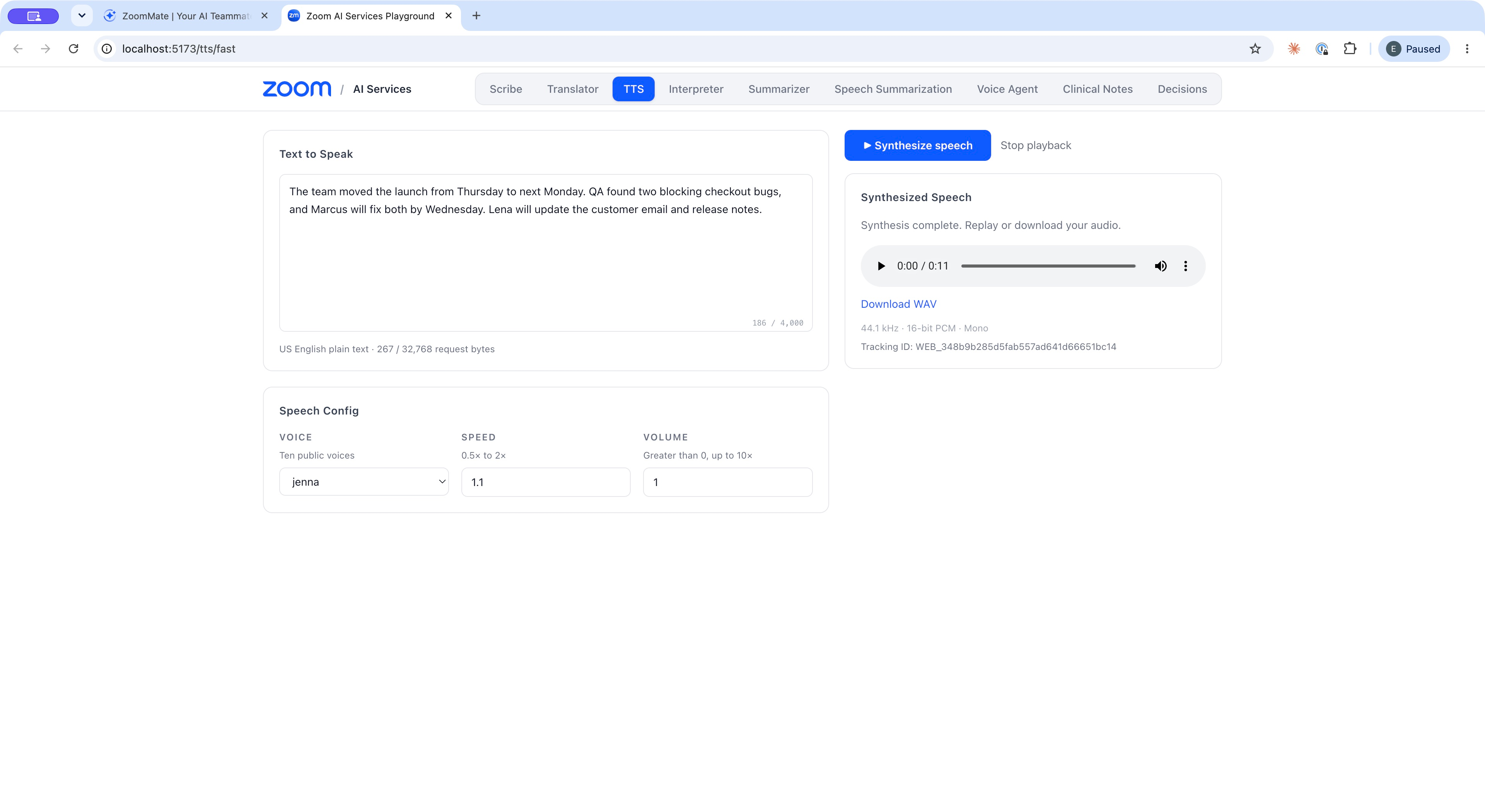
A meeting recap synthesized with the jenna voice at 1.1× speed, ready to replay or download as a WAV file.
Summarize the meeting
Send the meeting transcript to the Summarizer Fast mode endpoint with the recap task. Set TOKEN to your API key or JWT:
curl --fail-with-body -X POST "https://api.zoom.us/v2/aiservices/summarizer/summarize" \
  -H "Authorization: Bearer $TOKEN" \
  -H "Content-Type: application/json" \
  -d '{
    "input": {
      "text": "Priya: The beta build is ready, but QA found two blocking bugs in checkout. Marcus: We can fix both by Wednesday. Priya: Then we move the launch from Thursday to next Monday. Lena: I will update the customer email and the release notes."
    },
    "config": {
      "summary_type": "conversation",
      "task": "recap",
      "language": "en-US"
    }
  }'
The recap is in result.recap. Summarizer returns Markdown, so remove heading markers, bold markers, and list bullets before sending the text to Text-to-Speech. Otherwise the voice can read symbols aloud or pause in unexpected places.
function toSpeakableText(markdown) {
    return markdown
        .replace(/^#+\s*/gm, '')
        .replace(/\*\*(.+?)\*\*/g, '$1')
        .replace(/^\s*[-*]\s+/gm, '')
        .replace(/\n{2,}/g, '\n')
        .trim();
}
Synthesize the recap
Send the cleaned recap to the Text-to-Speech Fast mode endpoint. Every field except input is optional. This example uses the jenna voice at 1.1 times the normal speed. Replace the sample input with the recap from your Summarizer response:
curl --fail-with-body --no-buffer -X POST "https://api.zoom.us/v2/aiservices/tts/synthesize" \
  -H "Authorization: Bearer $TOKEN" \
  -H "Content-Type: application/json" \
  --dump-header recap.headers \
  --output recap.pcm \
  -d '{
    "input": "The team moved the launch from Thursday to next Monday. QA found two blocking checkout bugs, and Marcus will fix both by Wednesday. Lena will update the customer email and release notes.",
    "voice": "jenna",
    "speed": 1.1
  }'
The response body is raw audio: signed 16-bit little-endian mono PCM at 44.1 kHz, with no WAV header. If the request fails, recap.pcm contains the JSON error instead, and cURL exits with an error. Convert successful audio to a WAV file to play it:
ffmpeg -f s16le -ar 44100 -ac 1 -i recap.pcm recap.wav
Choose a voice and speed
| Setting | Values | Default |
|---|---|---|
voice | alex, ariel, ava, brooke, hazel, jenna, mark, reid, scott, or tony | jenna |
speed | 0.5 to 2.0 | 1.0 |
volume | Greater than 0, up to 10 | 1.0 |
The Text-to-Speech overview describes each voice's accent and character. Try several voices with one of your own recaps; a calm voice at 1.0 suits a detailed status update, while a faster setting works for a short daily digest.
Stream the recap to your listeners
Call the API from your backend, where your credentials stay private. The quickstart's src/routers/tts.ts forwards the request and pipes the audio stream to the browser as it arrives:
const upstream = await fetch(`${ZOOM_API_BASE_URL}/aiservices/tts/synthesize`, {
    method: 'POST',
    headers: { Authorization: `Bearer ${generateJWT()}`, 'Content-Type': 'application/json' },
    body,
    signal: controller.signal,
});
res.setHeader('Content-Type', upstream.headers.get('content-type')!);
Readable.fromWeb(upstream.body).pipe(res);
When the listener disconnects, the quickstart aborts the controller to cancel synthesis.
In the browser, the playground reads the response stream and queues each chunk for playback as it arrives. Network reads don't always end on a sample boundary, so the decoder in playground/src/lib/pcm.ts saves any leftover byte for the next read before converting samples:
const reader = response.body.getReader();
while (true) {
    const { value, done } = await reader.read();
    if (done) break;
    chunks.push(value);
    player.append(value); // decode 16-bit samples and queue them for playback
}
player.finish();
That's all you need to have meeting summaries delivered as audio recaps to your teammates.