Adding scalability and independence to dynamic provisioning environments with Server-to-Server(S2S) OAuth
In this article we are going to tackle the tricky beast of managing access tokens in dynamic provisioning environments, where change is the only constant. Excitingly, we've recently unveiled a new way of dealing with token management in situations where multiple servers each need their own tokens. It's time to say good-bye to indexes and hello to a unique token for each server!
The challenge of limited indexes in token management:
Previously, working with dynamic provisioning environments would mean assigning indexes to associate specific tokens with respective servers.
For example:
https://zoom.us/oauth/token?grant_type=account_credentials&account_id=<account_id>&token_index=<index_number>
Issues would arise; however, with a limited number of indexes when the number of servers exceeded the available index range. We heard your feedback that scaling infrastructure while maintaining a coherent token management strategy became complex, requiring constant reassignment and reallocation of indexes. In a real world scenario, we can compare this to finding a parking spot in a high traffic area where the streets are crowded with cars!
Token management 2.0: no indexes, no problem:
So, we thought, why not ditch those pesky indexes? Welcome to the new era of generating Server-to-Server OAuth tokens without indexes. Now, servers in dynamic environments can stand tall with their own unique tokens, making way for a more scalable and streamlined approach to token management. Each request to the Server-to-Server OAuth token endpoint will generate a new token, keeping the previous one intact until its expiry time.
Let's consider a dynamic provisioning environment where new servers are spun up or retired frequently. In the previous approach, every server had to be assigned an index, which would generate a token for that index. With the changed behavior, however, the index parameter is no longer needed. Servers can acquire their own tokens without affecting previously generated tokens.
For instance, suppose Server A spins up and requests a token and if another server, Server B, spins up later and requests a token, it will get a separate token distinct from Server A. Server A will receive a unique access token. Each server will now have its own token, simplifying token management and eliminating index conflict. The tokens will function independently of each other.
Here is an example demonstrated in the GIF below:
- Retrieve an S2S access token and use on the List users API endpoint
- Grab a new token with the same credentials and call List meetings endpoint
- Make a request to "List users" again with the first S2S access token
- See successful response because previous token is valid until expiry, despite having generated a new token in step 2
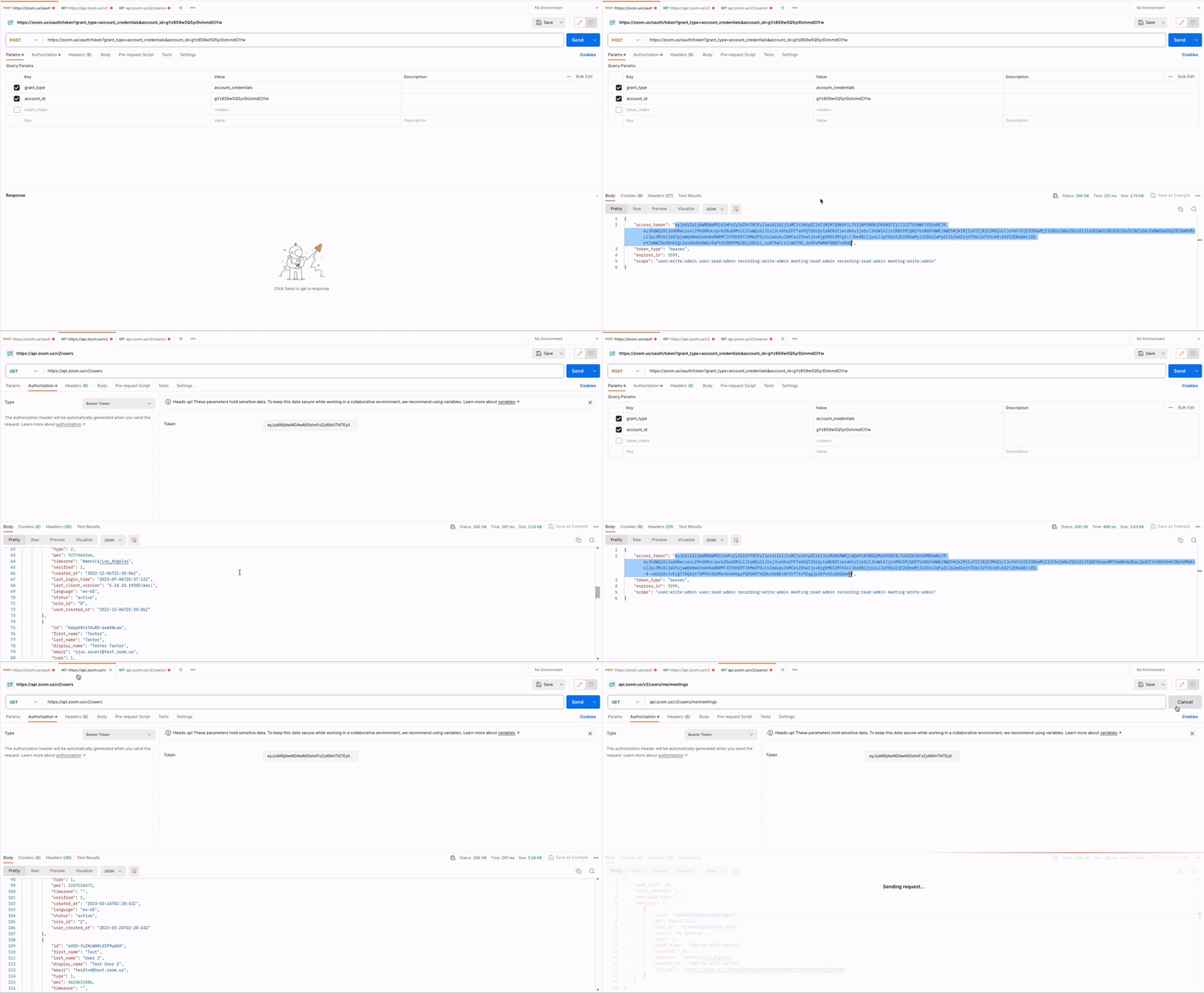
Summary: Concurrently generated S2S tokens are still valid until expiry without having to use token index.
Benefits of dynamic provisioning environments:
In dynamic provisioning environments, tokens can now be beneficial in a variety of ways as a result of this new behavior:
- Scalability: As the number of servers increases or decreases, each server can obtain its specific token without being restricted by a limited number of available indexes.
- Simplicity: Eliminating indexes simplifies the token management process, reducing complexity and potential errors caused by index allocation.
- Independence: Each server operates with its own token, ensuring that changes or issues with one server's token do not impact other servers' functionality.
Conclusion:
Embracing server-to-server OAuth token management is like opening the door to a more efficient and streamlined future for dynamic provisioning environments. By giving each server the power to acquire its own token, we're boosting scalability, simplicity, and independence. It's a win-win for developers and servers alike!
To navigate these new waters smoothly, check out our comprehensive documentation: Create a Server to server OAuth app and Using Server to server OAuth app. You can also take advantage of the pre-built Server to Server OAuth requests in our Postman public workspace. Go forth and make the most of this update! If you run into isues, please reach out to us on the Zoom Developer Forum.