Zoom Phone Smart Embed guide
Zoom Phone Smart Embed is a fast and flexible solution that enables developers to quickly embed a softphone for Zoom Phone Services in their third-party Web application.
- Developers can embed this app with a code snippet in third-party web applications.
- Administrators can allow third-party applications to use the app when they install it and configure approved domains.
- End users can sign in to the Zoom Phone Smart Embed in their third-party app with their Zoom credentials.
Zoom Phone Smart Embed offers these features for users:
- Sign in or sign out option in the softphone layout for third-party app users.
- Click numbers in third-party web apps or enter them in the softphone.
- Third-party apps that receive calls.
- Call control to mute, record, or hang up the call in the softphone.
- Call history to access recordings and voicemails.
You can access the Zoom Phone Smart Embed app in the Zoom App Marketplace.
Prepare your environment
Before you can use Zoom Phone Smart Embed, you must have:
- Zoom Phone license.
- Zoom Phone configured.
- Zoom client version 5.9.0 or higher.
- Automatic calling from third-party application.
- To use Zoom SMS, you must add 10DLC compliance for conversational messaging.
Administrators must be able to:
-
Access Zoom to install or uninstall the Zoom Phone Smart Embed app.
-
Enable automatic calling for their users from their third-party application.
To turn on this setting:
- Sign in to the Zoom web portal as an administrator with the privilege to edit account settings.
- In the navigation menu, select Account Management, then Account Settings.
- Choose the Zoom Phone tab.
- Enable the toggle for Automatically Call From Third Party Apps.
Confirm platform support
We support these platforms:
- Browser-based apps
- Browser-based webapps: Edge, Chrome, Safari, Firefox
- SAAS CRM's with CTI frameworks
Integrate Zoom Phone Smart Embed
In this section, we show you how to add Zoom Phone Smart Embed app in your web applications and widgets that control the Smart Embed, such as click-to-call, receive calls, notifications for inbound and outbound calls, auto call logging, and support for custom notes pages.
Add a Zoom Phone Smart Embed app to a web application
Developers can add Zoom Phone Smart Embed with a code snippet in third-party web applications.
Choose one of the following to embed the Zoom Phone Smart Embed into your third-party app:
-
Embed the app using an Iframe:
<iframe src="https://applications.zoom.us/integration/phone/embeddablephone/home" id="zoom-embeddable-phone-iframe" allow="clipboard-read; clipboard-write https://applications.zoom.us" ></iframe>Note: Minimum pixels : 350(width) * 580(height)
-
Embed the app using a script
<script src="https://vaapplicationscontent.zoom.us/phoneSdk/static/smart-embed/js/sdk.js"></script>
The app floats on your page, and you can drag or minimize it.
Note: To embed the Zoom Phone Smart Embed app in a chrome-extension, pass your domain through the originDomain parameter. Then inform the admin to add this domain to the approved domain list.
Examples
iframe:
<iframe
    src="https://applications.zoom.us/integration/phone/embeddablephone/home?originDomain=chrome-extension://jkcjffekboifojeeicdhclbbkamlmoca"
    id="zoom-embeddable-phone-iframe"
    allow="clipboard-read; clipboard-write https://applications.zoom.us"
></iframe>
script:
<script>
    var PHONESDKIFRAMEURL =
        "https://applications.zoom.us/integration/phone/embeddablephone/home?originDomain=chrome-extension://jkcjffekboifojeeicdhclbbkamlmoca";
</script>
<script src="https://vaapplicationscontent.zoom.us/phoneSdk/static/smart-embed/js/sdk.js"></script>
Use API and events to control the Smart Embed
Zoom Phone Smart Embed provides APIs and events that enable developers to features such as:
- Widget initialization
- Click-to-call
- Receive a call
- Inbound and outbound call notifications
- Auto call logging
- Support to add a custom notes page to a softphone
APIs
- Initialize the widget
onZoomPhoneIframeApiReady– Triggers when the Zoom Phone iframe finishes loading.zp-init-config– Use thispostMessagetype to initialize the widget with configuration options.
- Make a call from a third-party app
zp-make-call– Use thispostMessagetype to make a call from a third-party app.
- Send an SMS from a third-party app
zp-input-sms– Use thispostMessagetype to send an SMS from a third-party app.
- Receive events from the Smart Embed
zp-call-ringing-event– Triggers when a call starts ringing.
Initialize the widget
To initialize the widget, use these configurations.
function onZoomPhoneIframeApiReady(a) {
    document.querySelector('iframe#zoom-embeddable-phone-iframe').contentWindow.postMessage({
      type: 'zp-init-config',
      data: {
        enableSavingLog: false,
        enableAutoLog: false,
        enableContactSearching: false,
        enableContactMatching: false,
        enableAISummary: true,
        notePageConfiguration: <Configuration JSON>
          // Optional. Build your note page with the fields listed in "Add Notes" section
        disableInactiveTabCallEvent: true
          // Events will only be sent out in the last active tab
      }
    }, 'https://applications.zoom.us');
};
Note: onZoomPhoneIframeApiReady triggers when the iframe finishes loading. Call all widget APIs only after this function runs.
Make a call from a third-party app
You can use this API to enable the click-to-dial option from a third-party app.
document.querySelector('iframe#zoom-embeddable-phone-iframe').contentWindow.postMessage({
    type: 'zp-make-call',
    data: {
      number: <phone number>,
      callerId: <outgoing caller ID (optional)>,
      autoDial: <whether to initiate the call immediately or copy the number (optional and the default is true)>
    }
}, 'https://applications.zoom.us');
Send an SMS from a third-party app
You can use this API to send SMS from a third-party app.
document.querySelector('iframe#zoom-embeddable-phone-iframe').contentWindow.postMessage({
    type: 'zp-input-sms',
    data: {
      number: <to phone number>
       message: <message content>
    }
}, 'https://applications.zoom.us');
Receive events from the Smart Embed
The Zoom Phone Smart Embed provides some events based on the postMessage API.
Use this code to receive events:
window.addEventListener("message", (e) => {
    const data = e.data;
    if (data) {
        switch (data.type) {
            case "zp-call-ringing-event": // listen to all the event types that you need
                console.log(data.data);
                break;
        }
    }
});
Events
Call events
zp-call-ringing-event– Fires when a call starts to ring.zp-call-connected-event– Fires when a call connects.zp-call-ended-event– Fires when a call ends.zp-call-log-completed-event– Fires when a call log is completed in Zoom.zp-call-recording-completed-event– Fires when a call recording completes.zp-call-voicemail-received-event– Fires when the system receives a voicemail.
AI event
zp-ai-call-summary-event– Fires when the AI-generated call summary is created, updated, or deleted.
SMS event
zp-sms-log-event– Fires when the system sends or receives an SMS.
Call logging event
zp-save-log-event– Fires when a user manually saves a call log (Save Log button).
Contact integration events
zp-contact-search-event– Fires when a user searches for a contact by typing in the input area.zp-contact-match-event– Fires when the system attempts to match contacts by phone number on Incoming, Outgoing, History, and Voicemail pages.
Notes event
zp-notes-save-event– Fires when a user saves notes in the note page.
Call events
zp-call-ringing-event
This event fires when a call starts to ring. At this stage, there is only a call ID, which is not a unique id for a call log.
{
  "id": <event id, can be used for deduplication and idempotence verification>,
  "type": "zp-call-ringing-event",
  "data": {
    "callId": <call id>,
    "direction": "inbound" | "outbound",
    "caller": {
      "name": <caller name>,
      "phoneNumber": <caller phone number>,
      "extensionNumber": <caller extension number>,
      "extensionId": <caller extension id>,
      "extensionType": <caller extension type>
    },
    "callee": {
      "name": <callee name>,
      "phoneNumber": <callee phone number>,
      "extensionNumber": <callee extension number>,
      "extensionId": <callee extension id>,
      "extensionType": <callee extension type>
    },
    "dateTime": <event time>,
    "forwardedBy": {
      "name": <forward user name>,
      "extensionNumber": <forward user extension number>,
      "extensionType": <forward user extension type> //Enum: //"user" "callQueue" "autoReceptionist" "commonAreaPhone" "sharedLineGroup" //"zoomRoom" "ciscoRoom/PolycomRoom" "contactCenter"
    }
  }
}
zp-call-connected-event
This event fires when a call connects.
{
  "id": <event id, can be used for deduplication and idempotence verification>,
  "type": "zp-call-connected-event",
  "data": {
    "callId": <call id>,
    "direction": "inbound" | "outbound",
    "caller": {
      "name": <caller name>,
      "phoneNumber": <caller phone number>,
      "extensionNumber": <caller extension number>,
      "extensionId": <caller extension id>,
      "extensionType": <caller extension type>
    },
    "callee": {
      "name": <callee name>,
      "phoneNumber": <callee phone number>,
      "extensionNumber": <callee extension number>,
      "extensionId": <callee extension id>,
      "extensionType": <callee extension type>
    },
    "dateTime": <event time>,
    "forwardedBy": {
      "name": <forward user name>,
      "extensionNumber": <forward user extension number>,
      "extensionType": <forward user extension type>
    }
  }
}
zp-call-ended-event
This event fires when a call ends.
{
  "id": <event id, can be used for deduplication and idempotence verification>
  "type": "zp-call-ended-event",
  "data": {
    "callId": <call id>,
    "direction": "inbound" | "outbound",
    "caller": {
      "name": <caller name>,
      "phoneNumber": <caller phone number>,
      "extensionNumber": <caller extension number>,
      "extensionId": <caller extension id>,
      "extensionType": <caller extension type>
    },
    "callee": {
      "name": <callee name>,
      "phoneNumber": <callee phone number>,
      "extensionNumber": <callee extension number>,
      "extensionId": <callee extension id>,
      "extensionType": <callee extension type>
    },
    "dateTime": <event time>,
    "forwardedBy": {
      "name": <forward user name>,
      "extensionNumber": <forward user extension number>,
      "extensionType": <forward user extension type>
    },
    "result": <Statusofthecall> // Enum: "missed" | "rejected" | "ended"
  }
}
zp-call-log-completed-event
This event fires when a call log completes in Zoom. callLogId is a unique ID for a call log.
{
  "id": <event id, can be used for deduplication and idempotence verification>,
  "type": "zp-call-log-completed-event",
  "data": {
    "callId": <call id>,
    "callLogId": <calllog id>,
    "caller": {
      "name": <caller name>,
      "number": <caller  number>,
      "numberType": <caller number type> // 1 — extension number. 2 — phone number. 3 — Customized emergency number.
    },
    "callee": {
      "name": <callee name>,
      "number": <callee number>,
      "numberType": <callee number type> // 1 — extension number. 2 — phone number. 3 — Customized emergency number.
    "result": <Status of the call>,
    "direction": "inbound" | "outbound",
    "duration": <call duration time>,
    "dateTime": <event time>
  }
}
Result
- Answered by other member: Returns if you enable the simultaneous distribution option for a call queue, and if a member of the queue answers the call.
- Busy: Returns if the phone line of the callee is busy.
- Call Cancel: Returns if the call is canceled.
- No Answer: Returns if the callee did not answer the call.
- Park: Returns if the call is parked.
- Rejected: Returns if the callee declines the call.
- Blocked
- Voicemail
- Wrong Number
- International Disabled
- Internal Error
- Restricted Number
- Call Connected
zp-call-recording-completed-event
This event fires when the recording of a call completes.
{
  "id": <event id, can be used for deduplication and idempotence verification>,
  "type": "zp-call-recording-completed-event",
  "data": {
    "callId": <call id>,
    "callLogId": <call log id>,
    "caller": {
      "name": <caller name>,
      "number": <caller number>,
      "numberType": <caller number type> // 1 - internal 2 - external
    },
    "callee": {
      "name": <callee name>,
      "number": <callee number>,
      "numberType": <callee number type> // 1 - internal 2 - external
    },
    "direction": "inbound" or "outbound",
    "recordingUrl": <the url to play recording, it will redirect to a recording detail page where can play the audio>,
    "dateTime": <event time>
  }
}
zp-call-voicemail-received-event
This event fires when a call's voicemail arrives.
{
  "id": <event id, can be used for deduplication and idempotence verification>,
  "type": "zp-call-voicemail-received-event",
  "data": {
    "callId": <call id>,
    "callLogId": <call log id>,
    "caller": {
      "name": <caller name>,
      "number": <caller number>,
      "numberType": <caller number type> // 1 - internal 2 - external
    },
    "callee": {
      "name": <callee name>,
      "number": <callee number>,
      "numberType": <callee number type> // 1 - internal 2 - external
    },
    "voicemailUrl": <the url to play voicemail, it will redirect to a voicemail detail page where can play the audio>,
    "dateTime": <event time>
  }
}
AI events
zp-ai-call-summary-event
This event fires when the system generates, updates, or deletes a call's AI summary.
{
    "type": "zp-ai-call-summary-event",
    "data": {
        "callId": <call id>,
        "deleted": <Boolean>,
        "edited": <Boolean>,
        "callSummary": <Quick recap>,
        "nextSteps": <Next steps>,
        "detailedSummary": <Summary>,
        "modifiedTime": <modified time>
    }
}
SMS event
zp-sms-log-event
This event fires when you send or receive an SMS message.
{
  "id": <event id, can be used for deduplication and idempotence verification>,
  "type": "zp-sms-log-event",
  "data": {
    "sessionId": <SMS session id>,
    "messageId": <SMS message id>,
    "dateTime": <event time>,
    "sender": {
      "phoneNumber": <sender phone number>
    },
    "receivers": [
      {
        "phoneNumber": <receiver phone number, it may contains a batch of receivers>
      }
    ],
    "message": <message body>,
    "attachments": [
      {
        "type": <file type>, // Enum: OTHER, PNG, GIF, JPG, AUDIO, VIDEO
        "fileUrl": <the url to view file, it will redirect to a file detail page>,
      }
    ],
    "status": <message status> // Enum: Delivered/Not delivered/Received
    "direction": "inbound" or "outbound"
  }
}
Log calls to a third-party app
Enable the call logging service
Send a message to the Smart Embed to enable call logging.
enableSavingLog: when this value is true, it displays the Save Log button on each call log item in the History tab.enableAutoLog: when this value is true, it displays the auto log calls setting in the Settings page.
Save a call log
When the enableSavingLog is set to true, zp-save-log-event fires when the user chooses the Save Log on the History page.
zp-save-log-event
{
  "type": "zp-save-log-event",
  "data": {
    "callId": <call id>,
    "callLogId": <call log id>,
    "caller": {
      "name": <caller name>,
      "number": <caller number>,
      "numberType": <caller number type> // 1 — extension number. 2 — phone number.
    },
    "callee": {
      "name": <callee name>,
      "number": <callee number>,
      "numberType": <callee number type> // 1 — extension number. 2 — phone number. 3 — Customized emergency number.
    },
    "result": <Status of the call>,
    "direction": "inbound" or "outbound"
    "duration": <call duration time>,
    "dateTime": <event time>,
    "recordingUrl": <the url to play recording, it will redirect to a recording detail page where can play the audio>,
    "voicemailUrl": <the url to play voicemail, it will redirect to a voicemail detail page where can play the audio>,
      "callSummary": <Quick recap>,
      "nextSteps": <Next steps>,
      "detailedSummary": <Summary>
  }
}
Enable automatic call logging
When the user enables auto logging in Settings, it adds the parameter enableAutoLog: true in all the following call events:
zp-call-ringing-event,
zp-call-connected-event,
zp-call-ended-event,
zp-call-log-completed-event,
zp-call-recording-completed-event, and
zp-call-voicemail-received-event.
Integrate contacts from a third-party app
Search contacts
When enableContactSearching is true, the widget supports searching contacts through the number or name on both Keypad and SMS.
zp-contact-search-event
This event fires when user types in the input area.
{
  "type": "zp-contact-search-event",
  "data": {
    "requestId": <request id>,
    "searchString": <search String>
  }
}
Search the contacts by the searchString in your application. Then post the search result with the following response message:
document.querySelector('iframe#zoom-embeddable-phone-iframe').contentWindow.postMessage({
    type: 'zp-contact-search-response',
    data: {
      responseId: <data.requestId>
      contacts: [{
        number: <third party contact number>,
        displayName: <display name>
      }];
    }
}, 'https://applications.zoom.us');
Match contacts
When enableContactMatching is true, the widget matches contacts by phone number on Incoming, Outgoing, History, and Voicemail pages.
zp-contact-match-event
This event fires on the above pages.
{
  "type": "zp-contact-match-event",
  "data": {
    "requestId": <request id>,
    "phoneNumbers": [<phone number array>]
  }
}
Match contacts with phone numbers in third-party applications and post the match result through the following response message.
document.querySelector('iframe#zoom-embeddable-phone-iframe').contentWindow.postMessage({
    type: 'zp-contact-match-response',
    data: {
      responseId: <data.requestId>
      contacts: {
        <phone number>:{
          id: <contact id>,
          name: <display name>
        }
      };
    }
}, 'https://applications.zoom.us');
Add notes
Build your note page with the structure below and add the note configuration JSON string to the notePageConfiguration parameter in the widget initialization message.
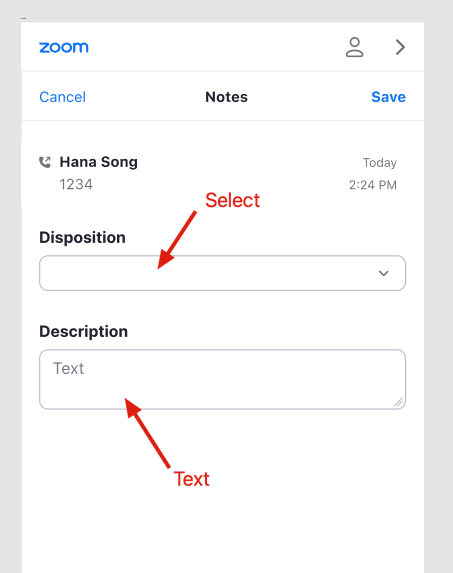
Build the JSON notes structure
The widget displays text and select fields.
Text
{
  "fieldName": <field title>, // String, Required
  "fieldType": "text", // Required
  "placeholder": <placeholder text>, // String, Optional
}
Select
{
  "fieldName": <field title>, // String, Required
  "fieldType": "select", // Required
  "placeholder": <placeholder text>, // String, Optional
  "selectOptions": [ // Array(Object), Required
      {
        "label": <option label>, // String, Required
        "value": <option value> // String, Required
      }
  ]
}
JSON example
[
    {
        "fieldName": "Disposition",
        "fieldType": "select",
        "selectOptions": [
            {
                "label": "mock_label_1",
                "value": "mock_value_1"
            },
            {
                "label": "mock_label_2",
                "value": "mock_value_2"
            },
            {
                "label": "mock_label_3",
                "value": "mock_value_3"
            }
        ],
        "placeholder": "Select an option"
    },
    {
        "fieldName": "Description",
        "fieldType": "text",
        "placeholder": "Enter notes"
    }
]
Save notes
zp-notes-save-event
After you enable a note, this event fires when you choose Save in the note page.
{
    "type": "zp-notes-save-event",
    "data": {
        "callId": "<call id>",
        "notesData": {
            "<fieldName>": "<fieldValue>"
        }
    }
}