Suspending and Disabling Apps
When deemed necessary, Zoom may suspend or disable an app on the Zoom Marketplace. Herein, we explain the difference between suspending an app and disabling an app, and what developers can expect.
Per the Marketplace Developer Agreement section 2.10:
Suspension and Removal - Zoom may suspend or disable your use of or access to the Marketplace, or remove your Application from the Marketplace or from within Zoom's services or products, at any time, for any reason, without prior notice, liability, or other obligation to you. Zoom will use commercially reasonable efforts to notify you of any such action.
Suspending apps
Suspending an app hides the app listing from the Zoom Marketplace and prevents new authorizations. It maintains existing subscriber connections and subscribers can continue to use the app. The App Review Team suspends apps when they are found to be non-functional, have security or compliance concerns, or developers are not actively supporting the subscribers of the app. Additionally we suspend apps during the process of removing or unpublishing the app.
Disabling apps
Disabling an app removes the app listing from the Zoom Marketplace, prevents new authorizations and prevents use for existing subscribers. We disable apps when we have determined critical privacy or security concerns, and must take action to prevent misuse of customer data.
Enabling apps
You can submit a request to have your disabled or suspended app be enabled.
-
Login to the Zoom App Marketplace and select Manage to open the Created Apps page.
-
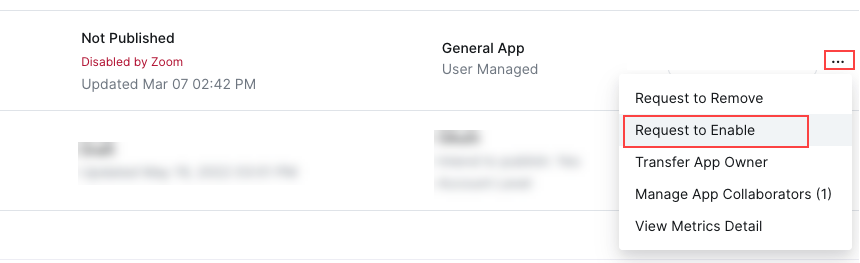
Hover over your app's row and select the action menu ellipsis (...).
-
In the action menu, select Request to Enable.
-
On the App submission page, complete any required fields and information, and then select Submit to Enable.