# Submit apps for review
To submit your app for review, go to your app's build flow **App Submission** page.
## Verify domains
We perform a one-time verification to make sure that the domain where you receive Zoom callbacks is owned by you.
The build flow reads these URL fields, which you've entered as part of the app listing information for your app:
- Privacy Policy URL
- Terms of Use URL
- Redirect URL for OAuth
- Zoom Chat Subscription Bot URL
- Webhook Callback URL
- Home URL
And displays the unique domains under **Verify Domains**.
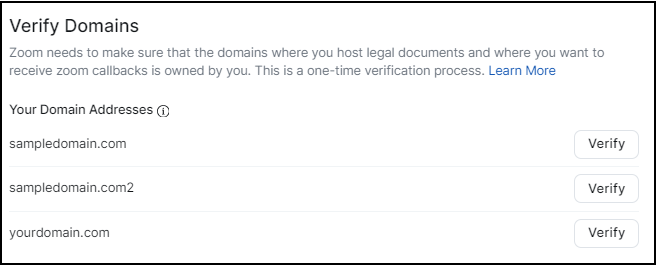
Select **Verify** for each domain address.
The build flow provides several methods to verify your domain addresses.
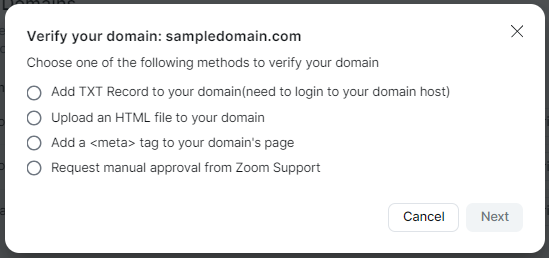
Select the method to use to verify the domain, and complete the steps in the instructions.
- **Add TXT record to your domain**. Requires you to have permission to login to your domain host and update the TXT record.
- **Upload an HTML file to your domain**. Requires you to have permission to login to your domain's web server and upload the HTML file to the root folder.
- **Add a `` tag to your domain's page**. Requires you to have permission to login to your domain's homepage and add `` data to the ``section.
- **Request manual approval from Zoom support**. This is a good option to choose if you do not have permission to update your domain host, web server, or homepage.
For more information, see [Verify your domains](/docs/build-flow/verify-domains/).
## Provide release notes for the app reviewer
The release notes field is your opportunity to include any notes or information that would help the app reviewer review your app. This may help to both expedite the review and make it more effective.
## Publishing app preference
By default, after the app review team approves your app they will publish it to the Marketplace for general availability.
The [Publish the app by myself](/docs/distribute/app-submission/self-publish) option enables you to choose when to release your app to the Marketplace.
## Test account and credentials
Provide any login credentials the app review team would need to access your app or domain to test your app.
## Marketplace Development Agreement
Read the Marketplace Development Agreement and confirm the information you provided is true and correct.
---
## Resources
[Build flow overview](/docs/build-flow/)
[Create a general app](/docs/build-flow/create-oauth-apps/)
[Publish your apps](docs/distribute/app-submission/submit-apps-review/)
[Check app review status](/docs/build-flow/check-review-status/)
[Persistent info](/docs/build-flow/persistent-app-info/)