EU & Discoverability
EU availability
For developers of all apps that serve users in the EU, Zoom is legally required to collect and display this information on the app's listing page:
- Business name
- Business address
- Business telephone number
- Business email address
- Self-certification to comply with applicable rules
Zoom is legally required to collect the following information. Zoom maintains this information, but does not display it on the app's listing page, it is not visible to users.
Your payment account details:
- Name of your banking institution.
- The last four digits of the account.
- A copy of an identification document or any other electronic identification for your business. The document can be a means of personal identification of the developer or a corporate identification, such as articles of incorporation or a public regulatory filing, such as an SEC Form 10-K.
- Trade register number. If you are registered in a trade register(DUNS) or similar public register, your registration number or equivalent means of identification in that register. A DUNS number is acceptable. A DUNS (Data Universal Numbering System) number is a unique nine-digit number that identifies a business at a specific location. While you are not required to have a DUNS number, you can obtain one for free from Dun & Bradstreet.
If you're certain that you're not a trader as defined by the DSA, email us at integration.testers@zoom.us. We'll help you remove these required fields from your build flow so you can submit.
EU opt out
You can choose to opt out if you do not want this information associated with your app or do not want your app to be available in the EU marketplace.
Opting out results in the following:
Existing EU users or subscribers of your app may not be immediately affected on February 17. EU law requires us to begin suspending opted-out apps and those that don't provide the required information on that date. The suspension timeline may vary as we communicate with developers and restrict EU access for apps that opt out or don't attempt to comply.
App discoverability
Select whether your app is discoverable in the Zoom App Marketplace or is unlisted:
-
Publish my app to the Zoom App Marketplace - make your app available publicly on the Marketplace.
-
Set my app as "Unlisted" - Unlisted apps are not searchable in the Zoom Marketplace. This is a good option for limiting the availability of your app, such as, to within your company or to a specific group of users.
You can distribute unlisted apps by sharing either its authorization URL, its appID, or via a link to its listing page in an active app notifier (AAN).
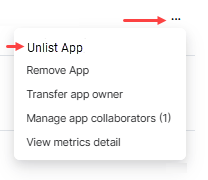
You can list and unlist your published app any time, and it does not require an update request or Marketplace review. Go to the Created Apps page, clicking the action ellipses (...) for your app, and selecting List app or Unlist app.