Key connector archival API authentication
You must have a CMK Hybrid license to use the Key connector archival API endpoint. See Zoom Customer Managed Key for details.
To authenticate requests to this endpoint, you must set up a separate JWKS certificate. Follow these steps to do so.
-
Generate a public and private key using one of the following algorithms.
- RSA: 2048 or 4096
- ECDSA: ES256
- Ed25519: EdDSA
-
Generate a JWK (JSON Web Key) from the public key that contains the following information.
- Key use: "sig"
-
Make a JWKS (JSON Web Key Set) with 1 or more keys. See the following example for details.
{ "keys": [ { "kty": "RSA", "use": "sig", "kid": "key_version_1", "alg": "RS256", "n": "2TOIva-KaA6xwuIXT3DEgHe_mc9aJHg6WqZj6HGbZR0y6fcfEwsBrt-1rRCZXk-Hz9-GW7hl1T40zHOsgbbssxGKeqtytToernR4ATvW4OjykvkbS1KRNQubSBdXxNrvmjgw-Ny4FzlxNOXTULLS-cpRHjifqvrzPnRNj8k2wxV3W6FhBpodIG_shZ-w0pVMGsZZ_IqtMMG9OhOOvsddN7SJRb_CxleVfBAZQd2qWci4ZDi2ytRza_Of64Ynqxzp6nXV8EhmK-9V2TXH_Zl67f6ZmB0GtGMtySMLekMKo7Z4ghtUxKVWG_qucH89xWI3izVmXM4cozKBExEuTP3c5w", "e": "AQAB" }, { "kty": "RSA", "use": "sig", "kid": "key_version_2", "alg": "RS256", "n": "tUHZA2ijQ-ymt6lEKCkMokX0KJIAt-6BTg7mSJz7PT-ZwDG_s5tza3Rdi8xHBXQcRlPrtIZSC-FR5xBmS3sxsg_gjgU9uvHNIcz6DyP1m8HggubhADLs_x0D1HHag7KiH_8QbzmKwnFc7z2scxpzpk_1lFcQAmCLy1jTosOHxNVDNh5X4kbVwK1MKHp1mMdfZGHfFAv8en02fQ0xJW29NYRKkiyQMQEkxJzN9rVrnqdrkIlqu4OTU7seZwddNult2ZZ32CrwwweEN81iYuet89xjP8fDArKbM6leVqIEgtQqx-Q9-M5pHydC1kfpBfbwzsRH5trMGfaxCiVtkKHBEw", "e": "AQAB" } ] } -
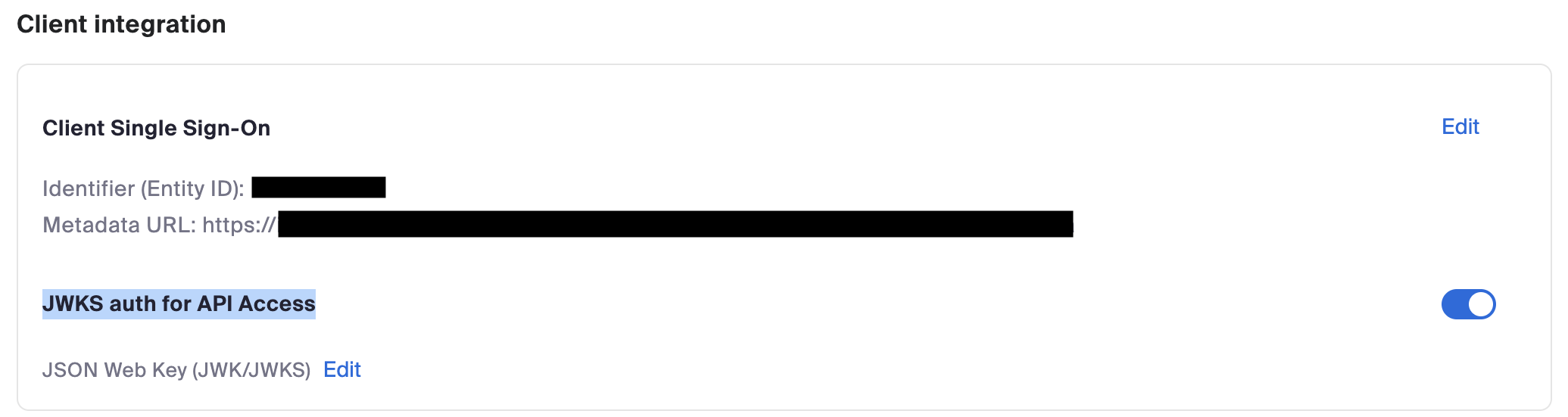
Add the JWKS to the corresponding section in the Admin Web Portal under Advanced→Security → Client Integration → JWKS auth for API Access.
-
Create a JWT and sign it using your private key. See the following example for details.
// JWT Header: { "kid": "xxxxxxxx" // KID corresponding to the key in the JWKS } // JWT Payload: { "aid": "0ts1BoJQQ7KhN889-XumcA", // Zoom account ID "iss": "0ts1BoJQQ7KhN889-XumcA", // Zoom account ID "aud": "keyconnector", // constant "scp": [ "cmkhybrid.read.plain_key.admin" ], "iat": 1776149420, // Creation date in UNIX Time "exp": 1776235820 // Expiration date in UNIX Time } -
Use the JWT as a bearer token to the Key Connector API.
See the CMK Hybrid Decryption Quickstart (Python) sample for an example.