

Realtime Media Streams (RTMS) gives you access to data across meetings, webinars, Video SDK, and Contact Center — and now, we are excited to announce that we are bringing the same streaming architecture to Zoom Phone. RTMS for Zoom Phone enables real-time capabilities to analyze phone conversations.
With RTMS, your team can:
- Stream live audio to a customer-managed LLM for real-time analysis
- Stream conversations to a third-party recorder to support your organization's call recording workflows and needs
- Support fraud detection efforts by streaming active call audio to AI-powered analysis tools
RTMS for Zoom Phone delivers structured, live, per-participant audio and transcript data over WebSockets, giving you the building blocks to create intelligent tools that analyze calls and respond in real time.
Why RTMS for Zoom Phone?
RTMS has proven itself as a game-changer for Zoom Meetings — providing unprocessed, real-time media to feed your own AI models without requiring meeting bots, disrupting active meetings, or locking data into Zoom's systems.
Now we are extending that same architecture to Zoom Phone. Whether your organization uses Zoom Phone for sales, support, healthcare, financial services, or internal operations; RTMS lets you build solutions that analyze calls as they happen.

Building with RTMS for Phone
RTMS for Zoom Phone opens up a wide range of real-time use cases. Here are a few that you can explore:
- Quality monitoring and coaching: Access separated audio streams for both sides of the call simultaneously. Build real-time scoring, compliance flagging, and coaching tools based on your call data.
- Custom transcription and translation: Route raw audio to any speech-to-text provider you choose and own your transcription pipeline.
- Compliance and regulated-industry records: Stream call data directly into your external systems in real time, removing the need to rely on post-call file transfers.
Get started building today
Before you start using RTMS with Zoom Phone, make sure you have:
- An active Zoom Developer Pack subscription with sufficient credits. For pricing and concurrent stream limits, see Developer pricing .
- A Zoom Phone license for the user you want to enable RTMS for.
To use RTMS with Zoom Phone, create a general OAuth app and add the phone RTMS events and scopes to it. Either a user-managed or admin-managed app works, but only user-managed apps can be surfaced within the Zoom client.
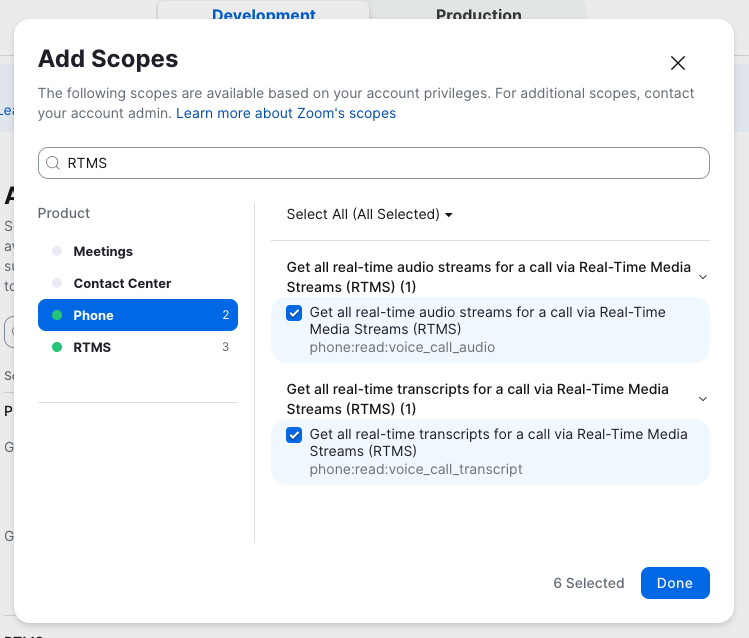
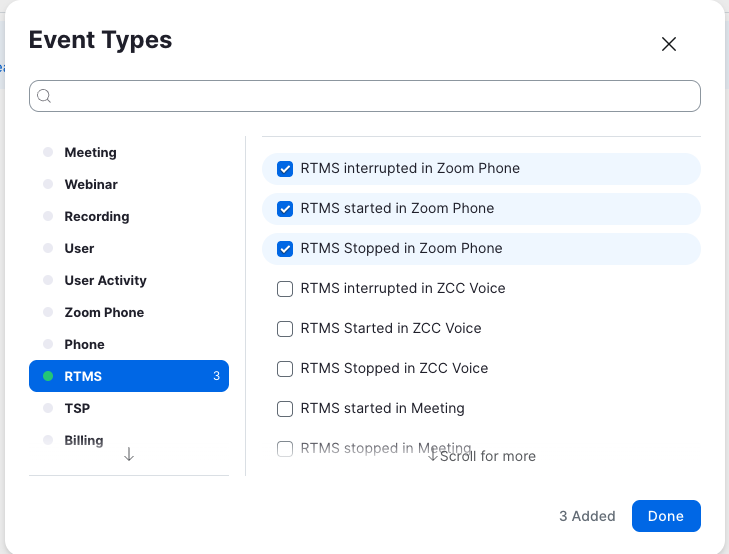
Once you are set up to receive RTMS webhook events and your app has the right RTMS scopes, you can establish your WebSocket connection within your codebase to begin receiving and RTMS streams.

For guidance on getting started, review our documentation for a step-by-step walkthrough.
Conclusion
Realtime Media Streams for Zoom Phone is a powerful new addition to Zoom's developer platform, enabling flexible, self-tailored integrations that give developers the flexibility to address their unique use cases.
RTMS streams raw data to your infrastructure, giving you the flexibility to determine how and where it's processed downstream. And with a unified platform, the same RTMS architecture now powers Zoom Meetings, Zoom Contact Center, Video SDK, and Zoom Phone.