

When building a business ecosystem using Zoom Contact Center, AI/ML innovation is no longer optional, but essential. With that in mind, we are excited to introduce Realtime Media Streams (RTMS) for Zoom Contact Center (ZCC) Voice channel (agent-side). It delivers structured, live, per-participant data through WebSockets, helping developers to build intelligent tools that analyze conversations and deliver precise, real-time responses.
Building with RTMS for Zoom Contact Center
RTMS for Zoom Contact Center enables powerful, real-time capabilities that help teams design smarter, more effective customer engagement experiences built natively within Zoom. With RTMS, teams can:
- Strengthen security with voiceprint capture for real-time fraud detection
- Empower agents in real time using live conversation analysis to surface the most relevant knowledge base content
- Elevate quality and coaching with synchronized access to both agent and customer audio streams
Agents can confidently deliver precise assistance more quickly, improving customer satisfaction and reducing call duration.
Designed with Contact Center builders in mind
RTMS for ZCC provides developers with customizable feature access, giving you complete control over how you access and utilize data. To deliver this structured media, ZCC RTMS offers:
- Continuous delivery through WebSocket streaming
- Per-participant streams for access to each side of the conversation
- Uninterrupted streams during transfer, conference, and BMW
- Automatic stream initialization for standardized control
- RTMS event control endpoint for customized control
Once capturing begins, developers receive real-time access to audio packets and live transcriptions. An example use case highlighted in the image below shows how RTMS can enable your Contact Center application to deliver targeted prompts to the agent's UI based on keyword detection, while integrated AI services (of your choice or design) are used to assess customer sentiment and determine optimal escalation timing. Behind the scenes, transcriptions flow seamlessly to AI services for immediate storage, translation, processing, and voice recognition.

Get started building today
With your RTMS-enabled account, you can add the feature to any existing application on the marketplace or create a new one. Once your app is configured and activated, simply integrate it into the Contact Center queue(s) where you need access.
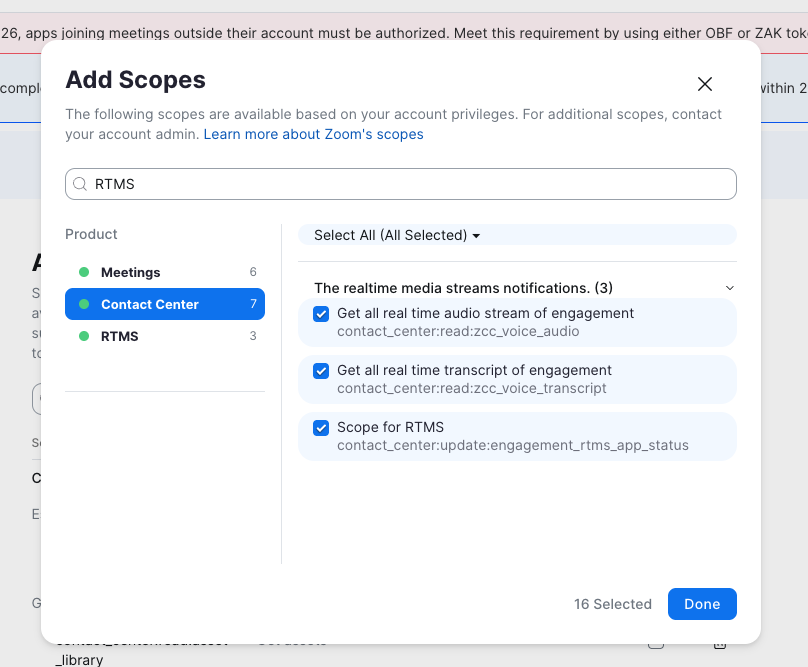
From there, establish your WebSocket connection within your codebase to begin receiving streams. You can customize your connection request to receive audio only, transcriptions only, or both. Once your WebSocket connections are established, you can start receiving and managing RTMS streams.

For guidance on getting started, review our documentation for a step-by-step walkthrough.
Conclusion
Realtime Media Streams for Zoom Contact Center represents a significant leap forward in contact center technology, empowering developers to build intelligent, responsive solutions that enhance both agent performance and customer satisfaction. By providing structured, per-participant data through WebSocket streaming, RTMS enables you to create applications that deliver fraud detection, live agent assistance, quality assurance, and much more. Start exploring with RTMS for Zoom Contact Center to take your customer service experiences to another level of quality assrance and live agent assistance.