

The Zoom Video SDK gives you access to splits the main session into multiple smaller independent sessions known as subsessions (similar to the Zoom Meeting SDK's breakout room). Participants in the main session can choose to join any one of the subsessions available and later on return back to the main session.
The iOS (UIKit) quickstart blog covered integrating the Zoom Video SDK with audio, video, and basic in-session controls. If you haven't completed that guide, start there first.
This post builds on the same UIKit sample app to show how to:
- Understand the 3 roles for subsession
- (Host) Configuring the subsession prelist
- (Manager) Managing subsession
- (Participant) Joining/Leave subsession and other control.
The result is to introduce subsession to split up participants into smaller sessions to have their own discussion/gathering. The completed project is available on GitHub .
SDK contents
The Zoom Video SDK for iOS includes several XCFramework bundles located under /Sample-Libs/lib. You only need to include the frameworks required for your specific use case.
Required for this tutorial:
ZoomVideoSDK.xcframeworkZoomTask.xcframework
We will use the same XCFrameworks from the UIKit quickstart sample app. No additional Zoom libraries are required for this implementation.
Subsession roles
There are 3 subsession roles (host, manager and participant) and it's the same with the roles in main session.
For the host role, the functions available are as followed:
- Add subsessions to prelist
- Get the prelist
- Remove 1 or many subsessions from the prelist created
- Clear the entire prelist
- Commit (save) the created prelist
- Get the committed prelist
- Withdraw (destory) the committed prelist
For the manager role, the functions available are as followed:
- Start/Stop subsession
- Broadcast a message to all subsessions
For the participant role, the functions available are as followed:
- Join into a specific subsession
- Return to main session
- Request for host's help
It is important to know that a host also has access to the manager and participant control while the manager has access to the participant control.
Add subsession to bottom navigation bar
Before we allow participants to join into any of the available subsessions, let's add the subsession buttons and the necessary changes into SessionViewController.swift and SessionViewControllerExtension.swift

/// Under SessionViewControllerExtension.swift, add/update the following changes
private func setupTabBar() {
    tabBar.delegate = self
    tabBar.isHidden = true

    let subsessionBarItem = UITabBarItem(title: "Subsessions", image: UIImage(systemName: "rectangle.3.group"), tag: ControlOption.subsession.rawValue)
    let leaveSessionBarItem = UITabBarItem(title: "Leave Session", image: UIImage(systemName: "phone.down"), tag: ControlOption.leaveSession.rawValue)
    tabBar.items = [toggleVideoBarItem, toggleAudioBarItem, subsessionBarItem, leaveSessionBarItem]
}

/// Under SessionViewController.swift, add/update the following changes
enum ControlOption: Int {
    case toggleVideo, toggleAudio, subsession, leaveSession // Add subsession
}

extension SessionViewController: UITabBarDelegate {

    func tabBar(_ tabBar: UITabBar, didSelect item: UITabBarItem) {
        tabBar.selectedItem = nil

        switch item.tag {
        case ControlOption.toggleVideo.rawValue:
            handleVideoToggle(tabBar)
        case ControlOption.toggleAudio.rawValue:
            handleAudioToggle(tabBar)
        case ControlOption.subsession.rawValue: // Add subsession
            handleSubsessionToggle()
        case ControlOption.leaveSession.rawValue:
            // Let's also add a isInSubSession check to see if user can leave session
            if ZoomVideoSDK.shareInstance()?.getSession()?.getMySelf()?.isInSubSession() == true {
                showError(message: "You must leave the subsession before leaving the session.", dismiss: false)
                return
            }
            tabBar.isUserInteractionEnabled = false
            ZoomVideoSDK.shareInstance()?.leaveSession(false)
        default:
            break
        }
    }

    // ...

    private func handleSubsessionToggle() {
        let subsessionVC = SubsessionViewController()
        subsessionVC.subsessionManager = subsessionManager
        subsessionVC.subsessionParticipant = subsessionParticipant
        subsessionVC.onRequireSessionVideoRefresh = { [weak self] in
            self?.scheduleVideoCanvasRefresh(forceRestartLocalVideo: true, refreshRemoteUsers: true, minInterval: 0.5)
        }
        let navController = UINavigationController(rootViewController: subsessionVC)
        navController.modalPresentationStyle = .fullScreen
        present(navController, animated: true)
    }
}
Host: Configuring the subsession prelist
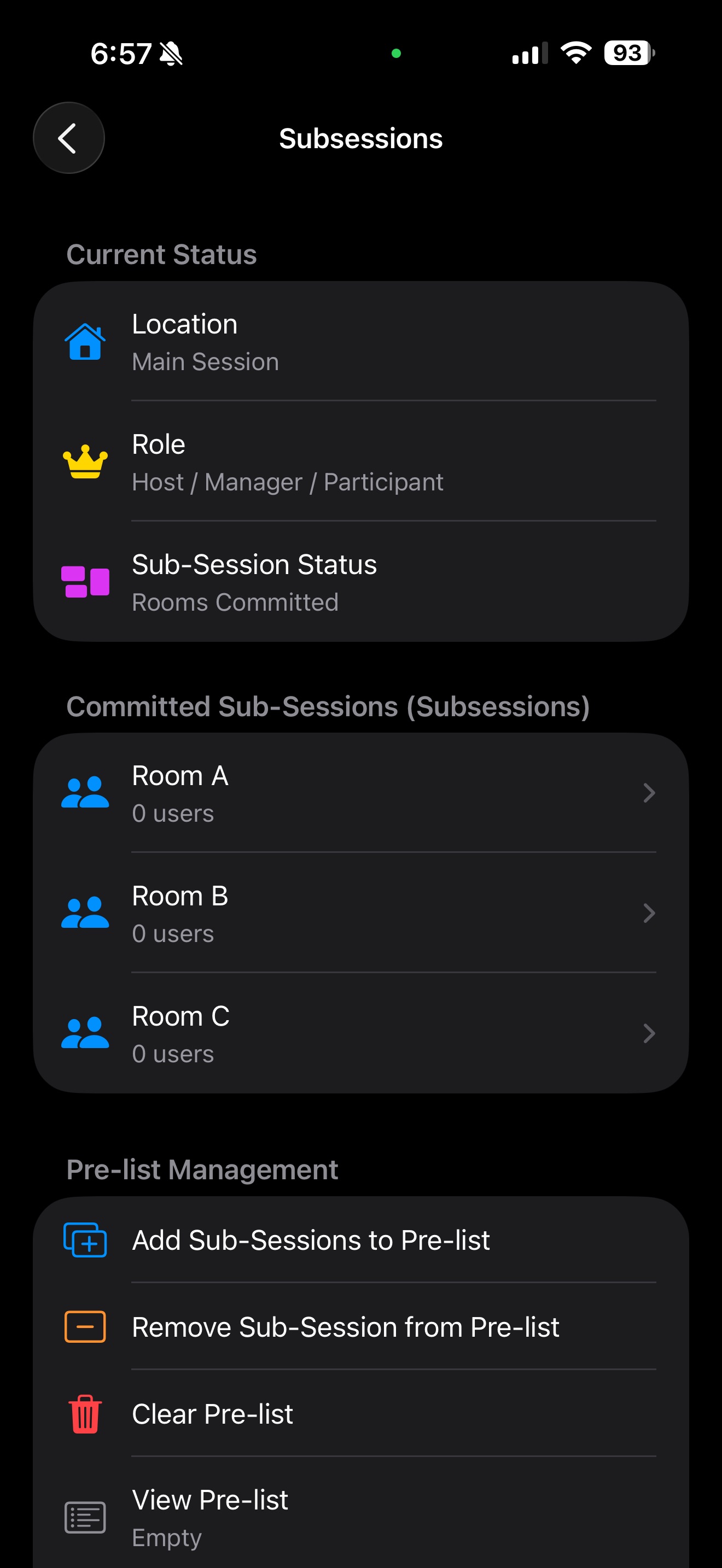
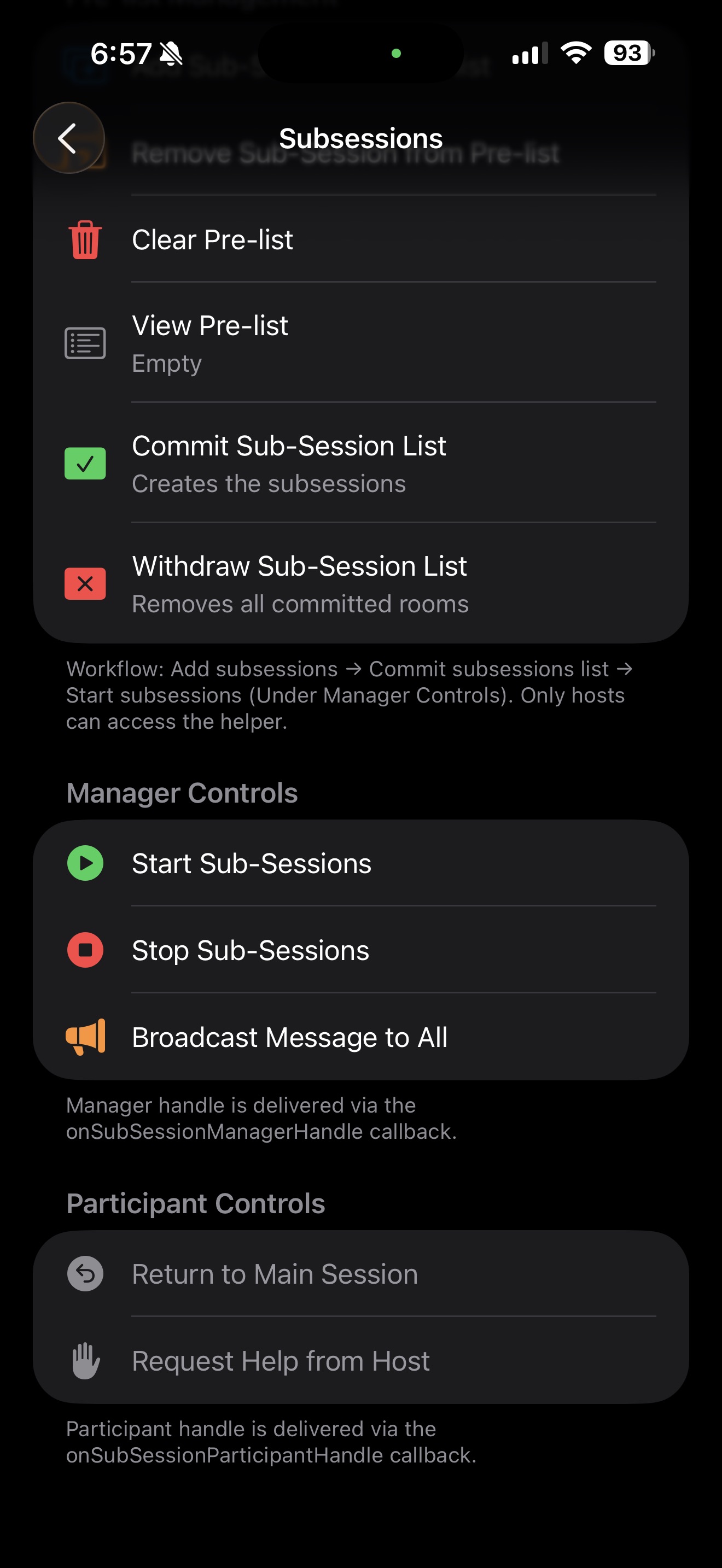
Next, we will create the UI and logic in 2 new files SubsessionViewController.swift and SubsessionViewControllerExtension.swift. We will be creating table view of the entire available subsessions features and grouped it accordingly to status info, committed subsession, pre-list management, manager controls and lastly participant controls.
We will first focus on the host controls since the prelist management is the very first thing of a subsession.
/// SubsessionViewController.swift

class SubsessionViewController: UIViewController {

    // MARK - Properties

    var tableView: UITableView = .init(frame: .zero, style: .insetGrouped)
    var committedSubsessions: [ZoomVideoSDKSubSessionKit] = []
    var preListNames: [String] = []
    var currentStatus: ZoomVideoSDKSubSessionStatus = .none
    var subsessionManager: ZoomVideoSDKSubSessionManager?
    var subsessionParticipant: ZoomVideoSDKSubSessionParticipant?
    var previousDelegate: ZoomVideoSDKDelegate?
    var onRequireSessionVideoRefresh: (() -> Void)?

    var currentSubSession: ZoomVideoSDKSubSessionKit?

    // MARK - Helper Methods

    var subsessionHelper: ZoomVideoSDKSubSessionHelper? {
        ZoomVideoSDK.shareInstance()?.getsubSessionHelper()
    }

    var session: ZoomVideoSDKSession? {
        ZoomVideoSDK.shareInstance()?.getSession()
    }

    var myUser: ZoomVideoSDKUser? {
        session?.getMySelf()
    }

    var isHost: Bool {
        myUser?.isHost() ?? false
    }

    var isManager: Bool {
        subsessionManager != nil
    }

    var isInSubSession: Bool {
        myUser?.isInSubSession() ?? false
    }

    // MARK: - Lifecycle

    override func viewDidLoad() {
        super.viewDidLoad()
        title = "Subsessions"
        view.backgroundColor = .systemGroupedBackground
        setupUI()
    }

    override func viewWillAppear(_ animated: Bool) {
        super.viewWillAppear(animated)
        previousDelegate = ZoomVideoSDK.shareInstance()?.delegate
        ZoomVideoSDK.shareInstance()?.delegate = self
        reloadHandles()
        reloadData()
    }

    // MARK: - Data

    func reloadData() {
        let freshList = subsessionHelper?.getCommittedSubSessionList() ?? []
        if !freshList.isEmpty {
            committedSubsessions = freshList
        } else if committedSubsessions.isEmpty {
            if let sessionVC = previousDelegate as? SessionViewController,
               !sessionVC.committedSubsessions.isEmpty {
                committedSubsessions = sessionVC.committedSubsessions
            }
        }
        preListNames = subsessionHelper?.getSubSessionPreList() ?? []

        if currentStatus == .none && !committedSubsessions.isEmpty {
            // If the current user is in a subsession, or any subsession already has users,
            // the rooms must be active (started). Otherwise they are committed but not started.
            let subsessionsAreActive = isInSubSession || committedSubsessions.contains {
                ($0.getSubSessionUserList()?.isEmpty == false)
            }
            currentStatus = subsessionsAreActive ? .started : .committed
        }

        if isInSubSession && currentSubSession == nil {
            if let id = (previousDelegate as? SessionViewController)?.currentSubSessionID {
                currentSubSession = committedSubsessions.first { $0.getSubSessionID() == id }
            }
            if currentSubSession == nil, let myName = myUser?.getName() {
                currentSubSession = committedSubsessions.first {
                    $0.getSubSessionUserList()?.contains(where: { $0.getName() == myName }) ?? false
                }
            }
        }

        tableView.reloadData()
    }

    func reloadHandles() {
        if let sessionVC = previousDelegate as? SessionViewController {
            if subsessionManager == nil {
                subsessionManager = sessionVC.subsessionManager
            }
            if subsessionParticipant == nil {
                subsessionParticipant = sessionVC.subsessionParticipant
            }
            // Seed the known-good status and list that SessionViewController captured via its
            // onSubSessionStatusChanged callback, so we start with accurate state before the
            // inference heuristic runs in reloadData().
            if currentStatus == .none && sessionVC.subsessionStatus != .none {
                currentStatus = sessionVC.subsessionStatus
            }
            if committedSubsessions.isEmpty && !sessionVC.committedSubsessions.isEmpty {
                committedSubsessions = sessionVC.committedSubsessions
            }
        }
    }

    // MARK: - Helper UI alerts

    func showResult(_ error: ZoomVideoSDKError, action: String) {
        let success = error == .Errors_Success
        let alert = UIAlertController(
            title: success ? "Success" : "Failed",
            message: "\(action) \(success ? "succeeded" : "failed: \(error.rawValue)")",
            preferredStyle: .alert
        )
        alert.addAction(UIAlertAction(title: "OK", style: .default) { _ in self.reloadData() })
        present(alert, animated: true)
    }

    func showInfo(_ message: String) {
        let alert = UIAlertController(title: "Info", message: message, preferredStyle: .alert)
        alert.addAction(UIAlertAction(title: "OK", style: .default))
        present(alert, animated: true)
    }

    // MARK: - Pre-list Management (Host Only)

    func handleAddToPreList() {
        let alert = UIAlertController(title: "Add Sub-Sessions", message: "Enter room names (comma-separated)", preferredStyle: .alert)
        alert.addTextField { $0.placeholder = "e.g. Room A, Room B, Room C" }
        alert.addAction(UIAlertAction(title: "Add", style: .default) { _ in
            guard let input = alert.textFields?.first?.text, !input.isEmpty else { return }
            let names = input.components(separatedBy: ",").map { $0.trimmingCharacters(in: .whitespaces) }.filter { !$0.isEmpty }
            guard !names.isEmpty else { return }
            let error = self.subsessionHelper?.addSubSession(toPreList: names) ?? .Errors_Wrong_Usage
            self.showResult(error, action: "Add \(names.count) room(s) to pre-list")
        })
        alert.addAction(UIAlertAction(title: "Cancel", style: .cancel))
        present(alert, animated: true)
    }

    func handleRemoveFromPreList() {
        guard !preListNames.isEmpty else {
            showInfo("The pre-list is empty.")
            return
        }
        let alert = UIAlertController(title: "Remove from Pre-list", message: "Select a room to remove", preferredStyle: .actionSheet)
        for name in preListNames {
            alert.addAction(UIAlertAction(title: name, style: .destructive) { _ in
                let error = self.subsessionHelper?.removeSubSession(fromPreList: [name]) ?? .Errors_Wrong_Usage
                self.showResult(error, action: "Remove '\(name)' from pre-list")
            })
        }
        alert.addAction(UIAlertAction(title: "Cancel", style: .cancel))
        present(alert, animated: true)
    }

    func handleClearPreList() {
        guard !preListNames.isEmpty else {
            showInfo("The pre-list is already empty.")
            return
        }
        let alert = UIAlertController(title: "Clear Pre-list", message: "Remove all \(preListNames.count) room(s) from the pre-list?", preferredStyle: .alert)
        alert.addAction(UIAlertAction(title: "Clear", style: .destructive) { _ in
            let error = self.subsessionHelper?.clearSubSessionPreList() ?? .Errors_Wrong_Usage
            self.showResult(error, action: "Clear pre-list")
        })
        alert.addAction(UIAlertAction(title: "Cancel", style: .cancel))
        present(alert, animated: true)
    }

    func handleViewPreList() {
        preListNames = subsessionHelper?.getSubSessionPreList() ?? []
        let message = preListNames.isEmpty
            ? "The pre-list is empty. Use 'Add Sub-Sessions' to add subsessions."
            : "Subsessions in pre-list (\(preListNames.count)):\n\n" + preListNames.enumerated().map { "\($0.offset + 1). \($0.element)" }.joined(separator: "\n")
        showInfo(message)
    }

    func handleCommitSubSessionList() {
        guard !preListNames.isEmpty else {
            showInfo("The pre-list is empty. Add room names first.")
            return
        }
        let alert = UIAlertController(
            title: "Commit Sub-Session List",
            message: "This will create \(preListNames.count) subsession(s):\n\n" + preListNames.joined(separator: ", "),
            preferredStyle: .alert
        )
        alert.addAction(UIAlertAction(title: "Commit", style: .default) { _ in
            let error = self.subsessionHelper?.commitSubSessionList() ?? .Errors_Wrong_Usage
            self.showResult(error, action: "Commit sub-session list")
        })
        alert.addAction(UIAlertAction(title: "Cancel", style: .cancel))
        present(alert, animated: true)
    }

    func handleWithdrawSubSessionList() {
        guard !committedSubsessions.isEmpty else {
            showInfo("No committed sub-sessions to withdraw.")
            return
        }
        let alert = UIAlertController(
            title: "Withdraw Sub-Session List",
            message: "This will remove all \(committedSubsessions.count) committed subsession(s).",
            preferredStyle: .alert
        )
        alert.addAction(UIAlertAction(title: "Withdraw", style: .destructive) { _ in
            let error = self.subsessionHelper?.withdrawSubSessionList() ?? .Errors_Wrong_Usage
            self.showResult(error, action: "Withdraw sub-session list")
        })
        alert.addAction(UIAlertAction(title: "Cancel", style: .cancel))
        present(alert, animated: true)
    }

}
Manager: Managing subsession
Next, let's add the manager control.
/// SubsessionViewController.swift, under host controls

// MARK: - Manager Controls

func handleStartSubSession() {
    guard let manager = subsessionManager else {
        showInfo("No manager handle available. This is delivered via the 'onSubSessionManagerHandle' callback after committing rooms.")
        return
    }
    let alert = UIAlertController(title: "Start Sub-Sessions", message: "Open all subsessions and move assigned users?", preferredStyle: .alert)
    alert.addAction(UIAlertAction(title: "Start", style: .default) { _ in
        let error = manager.startSubSession()
        self.showResult(error, action: "Start sub-sessions")
    })
    alert.addAction(UIAlertAction(title: "Cancel", style: .cancel))
    present(alert, animated: true)
}

func handleStopSubSession() {
    guard let manager = subsessionManager else {
        showInfo("No manager handle available.")
        return
    }
    let alert = UIAlertController(title: "Stop Sub-Sessions", message: "Close all subsessions and return everyone to the main session?", preferredStyle: .alert)
    alert.addAction(UIAlertAction(title: "Stop", style: .destructive) { _ in
        let error = manager.stopSubSession()
        self.showResult(error, action: "Stop sub-sessions")
    })
    alert.addAction(UIAlertAction(title: "Cancel", style: .cancel))
    present(alert, animated: true)
}

func handleBroadcastMessage() {
    guard let manager = subsessionManager else {
        showInfo("No manager handle available. Broadcast is only available to the sub-session manager.")
        return
    }
    let alert = UIAlertController(title: "Broadcast Message", message: "Send a message to all subsessions", preferredStyle: .alert)
    alert.addTextField { $0.placeholder = "Enter your message" }
    alert.addAction(UIAlertAction(title: "Send", style: .default) { _ in
        guard let msg = alert.textFields?.first?.text, !msg.isEmpty else { return }
        let error = manager.broadcastMessage(msg)
        if error == .Errors_Success {
            self.showToast(title: "Broadcast Sent", message: msg)
        } else {
            self.showResult(error, action: "Broadcast message")
        }
    })
    alert.addAction(UIAlertAction(title: "Cancel", style: .cancel))
    present(alert, animated: true)
}
Participant: Join/leave subsession and other controls
Next, We will add the participant control in.
/// SubsessionViewController.swift, under manager controls

// MARK: - Participant Controls

func handleReturnToMainSession() {
    guard let participant = subsessionParticipant else {
        showInfo("No participant handle available. This is delivered via 'onSubSessionParticipantHandle' when you are in a sub-session.")
        return
    }
    let alert = UIAlertController(title: "Return to Main Session", message: "Leave your current subsession?", preferredStyle: .alert)
    alert.addAction(UIAlertAction(title: "Return", style: .destructive) { _ in
        let error = participant.returnToMainSession()
        if error == .Errors_Success {
            self.currentSubSession = nil
            DispatchQueue.main.asyncAfter(deadline: .now() + 0.35) {
                self.onRequireSessionVideoRefresh?()
            }
        }
        self.showResult(error, action: "Return to main session")
    })
    alert.addAction(UIAlertAction(title: "Cancel", style: .cancel))
    present(alert, animated: true)
}

func handleRequestForHelp() {
    guard let participant = subsessionParticipant else {
        showInfo("No participant handle available. You must be in a sub-session to request help.")
        return
    }
    let error = participant.requestForHelp()
    showResult(error, action: "Request for help")
}

// MARK: - Join Sub-Session

func handleJoinSubSession(_ subSession: ZoomVideoSDKSubSessionKit) {
    let name = subSession.getSubSessionName() ?? "this room"
    let alert = UIAlertController(title: "Join Sub-Session", message: "Join '\(name)'?", preferredStyle: .alert)
    alert.addAction(UIAlertAction(title: "Join", style: .default) { _ in
        let error = subSession.joinSubSession()
        if error == .Errors_Success {
            self.currentSubSession = subSession
            DispatchQueue.main.asyncAfter(deadline: .now() + 0.35) {
                self.onRequireSessionVideoRefresh?()
            }
        }
        self.showResult(error, action: "Join \(name)")
    })
    alert.addAction(UIAlertAction(title: "Cancel", style: .cancel))
    present(alert, animated: true)
}

// MARK: - Sub-Session Detail

func showSubSessionDetail(_ subSession: ZoomVideoSDKSubSessionKit, at indexPath: IndexPath) {
    let name = subSession.getSubSessionName() ?? "Unnamed Room"
    let users = subSession.getSubSessionUserList() ?? []
    let userList = users.isEmpty ? "No users" : users.map { $0.getName() }.joined(separator: ", ")

    let alert = UIAlertController(title: name, message: "Users (\(users.count)): \(userList)", preferredStyle: .actionSheet)
    alert.addAction(UIAlertAction(title: "Join This Room", style: .default) { _ in
        self.handleJoinSubSession(subSession)
    })
    alert.addAction(UIAlertAction(title: "Cancel", style: .cancel))

    if let popover = alert.popoverPresentationController,
        let cell = tableView.cellForRow(at: indexPath) {
        popover.sourceView = cell
        popover.sourceRect = cell.bounds
    }

    present(alert, animated: true)
}
Adding subsession callbacks
There are several subsession callbacks available and we will be implementing each of the callbacks to handle to handle all the necessary UI/UX changes.
/// SubsessionViewController.swift

// MARK: - ZoomVideoSDKDelegate

extension SubsessionViewController: ZoomVideoSDKDelegate {

    func onSubSessionStatusChanged(_ status: ZoomVideoSDKSubSessionStatus, subSession pSubSessionKitList: [ZoomVideoSDKSubSessionKit]) {
        currentStatus = status
        print("onSubSessionStatusChanged \(currentStatus.rawValue)")
        let roomsRemoved = status == .none || status == .withdrawn
        if !pSubSessionKitList.isEmpty || roomsRemoved {
            committedSubsessions = pSubSessionKitList
        }
        if !isInSubSession {
            currentSubSession = nil
        }
        tableView.reloadData()
    }

    func onSubSessionManagerHandle(_ pManager: ZoomVideoSDKSubSessionManager?) {
        subsessionManager = pManager
        tableView.reloadSections(IndexSet(integer: 3), with: .automatic)
    }

    func onSubSessionParticipantHandle(_ pParticipant: ZoomVideoSDKSubSessionParticipant?) {
        subsessionParticipant = pParticipant
        onRequireSessionVideoRefresh?()
        if pParticipant == nil && currentStatus == .stopping {
            currentStatus = .stopped
            currentSubSession = nil
        }
        tableView.reloadSections(IndexSet(integer: 4), with: .automatic)
        tableView.reloadSections(IndexSet(integer: 0), with: .automatic)
    }

    func onSubSessionUsersUpdate(_ pSubSessionKit: ZoomVideoSDKSubSessionKit) {
        if let index = committedSubsessions.firstIndex(where: { $0.getSubSessionID() == pSubSessionKit.getSubSessionID() }) {
            committedSubsessions[index] = pSubSessionKit
        }
        // If the user was moved into this subsession by the host, capture it
        if isInSubSession && currentSubSession == nil {
            if let myName = myUser?.getName(),
               pSubSessionKit.getSubSessionUserList()?.contains(where: { $0.getName() == myName }) == true {
                currentSubSession = pSubSessionKit
            }
        }
        tableView.reloadSections(IndexSet(integer: 1), with: .automatic)
        tableView.reloadSections(IndexSet(integer: 0), with: .automatic)
    }

    func onBroadcastMessage(fromMainSession sMessage: String, userName sUserName: String) {
        showToast(title: "Message from \(sUserName)", message: sMessage)
    }

    func onSubSessionUserHelpRequestHandler(_ pHandler: ZoomVideoSDKSubSessionUserHelpRequestHandler) {
        let userName = pHandler.getRequestUserName() ?? "Someone"
        let roomName = pHandler.getRequestSubSessionName() ?? "their subsession"
        DispatchQueue.main.async {
            let alert = UIAlertController(
                title: "Help Requested",
                message: "\(userName) in '\(roomName)' is asking for help.",
                preferredStyle: .alert
            )
            alert.addAction(UIAlertAction(title: "Join Room", style: .default) { _ in
                pHandler.joinSubSessionByUserRequest()
            })
            alert.addAction(UIAlertAction(title: "Decline", style: .cancel) { _ in
                pHandler.ignore()
            })
            self.present(alert, animated: true)
        }
    }

    func onSubSessionUserHelpRequestResult(_ result: ZoomVideoSDKUserHelpRequestResult) {
        let (title, message): (String, String) = {
            switch result {
            case .hostAlreadyInSubSession:
                return ("Help Is Already Here", "The host has joined your subsession.")
            case .busy:
                return ("Host Is Busy", "The host is currently busy and cannot join right now.")
            case .ignore:
                return ("Request Declined", "The host declined your help request.")
            default:
                return ("Help Request", "Your request status has been updated.")
            }
        }()
        showToast(title: title, message: message)
    }

}
Set up the subsession UI
Under the SessionViewControllerExtension.swift file, this is the place we will handle all the UI components and none of the VSDK related methods.
/// SessionViewControllerExtension.swift

import UIKit
import ZoomVideoSDK

extension SubsessionViewController {
    func setupUI() {
        setupViews()
        setupConstraints()
        setupNavigationBar()
    }

    private func setupViews() {
        tableView.delegate = self
        tableView.dataSource = self
        tableView.translatesAutoresizingMaskIntoConstraints = false
        tableView.register(UITableViewCell.self, forCellReuseIdentifier: "cell")
        view.addSubview(tableView)
    }

    private func setupConstraints() {
        NSLayoutConstraint.activate([
            tableView.topAnchor.constraint(equalTo: view.topAnchor),
            tableView.leadingAnchor.constraint(equalTo: view.leadingAnchor),
            tableView.trailingAnchor.constraint(equalTo: view.trailingAnchor),
            tableView.bottomAnchor.constraint(equalTo: view.bottomAnchor),
        ])
    }

    private func setupNavigationBar() {
        navigationItem.leftBarButtonItem = UIBarButtonItem(
            image: UIImage(systemName: "chevron.left"),
            style: .plain,
            target: self,
            action: #selector(backTapped)
        )
    }

    @objc func backTapped() { dismiss(animated: true) }

    func showToast(title: String, message: String) {
        DispatchQueue.main.async {
            let hostView: UIView
            if let window = UIApplication.shared.connectedScenes
                .compactMap({ $0 as? UIWindowScene })
                .flatMap({ $0.windows })
                .first(where: { $0.isKeyWindow }) {
                hostView = window
            } else {
                hostView = self.navigationController?.view ?? self.view!
            }

            let container = UIView()
            container.backgroundColor = UIColor.systemGray6.withAlphaComponent(0.97)
            container.layer.cornerRadius = 12
            container.layer.shadowColor = UIColor.black.cgColor
            container.layer.shadowOpacity = 0.15
            container.layer.shadowRadius = 8
            container.layer.shadowOffset = CGSize(width: 0, height: 2)
            container.translatesAutoresizingMaskIntoConstraints = false
            container.alpha = 0

            let titleLabel = UILabel()
            titleLabel.text = title
            titleLabel.font = .systemFont(ofSize: 13, weight: .semibold)
            titleLabel.textColor = .label
            titleLabel.translatesAutoresizingMaskIntoConstraints = false

            let messageLabel = UILabel()
            messageLabel.text = message
            messageLabel.font = .systemFont(ofSize: 13)
            messageLabel.textColor = .secondaryLabel
            messageLabel.numberOfLines = 3
            messageLabel.translatesAutoresizingMaskIntoConstraints = false

            container.addSubview(titleLabel)
            container.addSubview(messageLabel)
            hostView.addSubview(container)

            NSLayoutConstraint.activate([
                titleLabel.topAnchor.constraint(equalTo: container.topAnchor, constant: 12),
                titleLabel.leadingAnchor.constraint(equalTo: container.leadingAnchor, constant: 16),
                titleLabel.trailingAnchor.constraint(equalTo: container.trailingAnchor, constant: -16),

                messageLabel.topAnchor.constraint(equalTo: titleLabel.bottomAnchor, constant: 2),
                messageLabel.leadingAnchor.constraint(equalTo: container.leadingAnchor, constant: 16),
                messageLabel.trailingAnchor.constraint(equalTo: container.trailingAnchor, constant: -16),
                messageLabel.bottomAnchor.constraint(equalTo: container.bottomAnchor, constant: -12),

                container.leadingAnchor.constraint(equalTo: hostView.leadingAnchor, constant: 16),
                container.trailingAnchor.constraint(equalTo: hostView.trailingAnchor, constant: -16),
                container.bottomAnchor.constraint(equalTo: hostView.safeAreaLayoutGuide.bottomAnchor, constant: -10),
            ])

            UIView.animate(withDuration: 0.3) {
                container.alpha = 1
            } completion: { _ in
                UIView.animate(withDuration: 5, delay: 1) {
                    container.alpha = 0
                } completion: { _ in
                    container.removeFromSuperview()
                }
            }
        }
    }
}

// MARK: - UITableViewDataSource

extension SubsessionViewController: UITableViewDataSource {

    // Sections:
    // 0 — Current Status
    // 1 — Committed Sub-Sessions (subsessions)
    // 2 — Pre-list Management  (host helper)
    // 3 — Manager Controls     (start/stop/broadcast)
    // 4 — Participant Controls (return/help)

    func numberOfSections(in tableView: UITableView) -> Int { 5 }

    func tableView(_ tableView: UITableView, numberOfRowsInSection section: Int) -> Int {
        switch section {
        case 0: return 3 // Current location, Role and Subsession Status
        case 1: return max(1, committedSubsessions.count) // Committed subsession
        case 2: return 6 // Pre-list - Add, Remove, Clear, View, Commit and WIthdraw Committed
        case 3: return 3 // Manager - Start, Stop subsession and Broadcast message to all
        case 4: return 2 // Participant - Return to main session, Request Help from host.
        default: return 0
        }
    }

    func tableView(_ tableView: UITableView, titleForHeaderInSection section: Int) -> String? {
        switch section {
        case 0: return "Current Status"
        case 1: return "Committed Sub-Sessions (Subsessions)"
        case 2: return "Pre-list Management"
        case 3: return "Manager Controls"
        case 4: return "Participant Controls"
        default: return nil
        }
    }

    func tableView(_ tableView: UITableView, titleForFooterInSection section: Int) -> String? {
        switch section {
        case 2: return "Workflow: Add subsessions → Commit subsessions list → Start subsessions (Under Manager Controls). Only hosts can access the helper."
        case 3: return "Manager handle is delivered via the onSubSessionManagerHandle callback."
        case 4: return "Participant handle is delivered via the onSubSessionParticipantHandle callback."
        default: return nil
        }
    }

    func tableView(_ tableView: UITableView, cellForRowAt indexPath: IndexPath) -> UITableViewCell {
        switch indexPath.section {
        case 0: return statusCell(for: indexPath)
        case 1: return subSessionCell(for: indexPath)
        case 2: return preListCell(for: indexPath)
        case 3: return managerCell(for: indexPath)
        case 4: return participantCell(for: indexPath)
        default: return UITableViewCell()
        }
    }

    // MARK: - Cell Builders

    private func statusCell(for indexPath: IndexPath) -> UITableViewCell {
        let cell = tableView.dequeueReusableCell(withIdentifier: "cell", for: indexPath)
        cell.selectionStyle = .none
        var content = cell.defaultContentConfiguration()

        switch indexPath.row {
        case 0:
            content.text = "Location"
            if isInSubSession {
                let name = currentSubSession?.getSubSessionName() ?? "Subsession"
                content.secondaryText = name
                content.image = UIImage(systemName: "door.left.hand.open")
                content.imageProperties.tintColor = .systemOrange
            } else {
                content.secondaryText = "Main Session"
                content.image = UIImage(systemName: "house.fill")
                content.imageProperties.tintColor = .systemBlue
            }
        case 1:
            content.text = "Role"
            if isHost {
                content.secondaryText = "Host / Manager / Participant"
                content.image = UIImage(systemName: "crown.fill")
                content.imageProperties.tintColor = .systemYellow
            } else if isManager {
                content.secondaryText = "Manager / Participant"
                content.image = UIImage(systemName: "person.badge.key.fill")
                content.imageProperties.tintColor = .systemOrange
            } else {
                content.secondaryText = "Participant"
                content.image = UIImage(systemName: "person.fill")
                content.imageProperties.tintColor = .secondaryLabel
            }
        case 2:
            let statusText = statusDescription(for: currentStatus)
            content.text = "Sub-Session Status"
            content.secondaryText = statusText
            content.image = UIImage(systemName: "rectangle.3.group.fill")
            content.imageProperties.tintColor = .systemPurple
        default:
            break
        }

        cell.contentConfiguration = content
        return cell
    }

    private func subSessionCell(for indexPath: IndexPath) -> UITableViewCell {
        let cell = tableView.dequeueReusableCell(withIdentifier: "cell", for: indexPath)

        guard !committedSubsessions.isEmpty else {
            var content = cell.defaultContentConfiguration()
            content.text = "No committed sub-sessions"
            content.secondaryText = "Add names to the pre-list, then commit"
            content.textProperties.color = .secondaryLabel
            content.image = UIImage(systemName: "rectangle.slash")
            content.imageProperties.tintColor = .tertiaryLabel
            cell.contentConfiguration = content
            cell.selectionStyle = .none
            cell.accessoryType = .none
            return cell
        }

        let subSession = committedSubsessions[indexPath.row]
        let userCount = subSession.getSubSessionUserList()?.count ?? 0

        var content = cell.defaultContentConfiguration()
        content.text = subSession.getSubSessionName() ?? "Unnamed Room"
        content.secondaryText = "\(userCount) user\(userCount == 1 ? "" : "s")"
        content.image = UIImage(systemName: "person.2.fill")
        content.imageProperties.tintColor = .systemBlue

        cell.contentConfiguration = content
        cell.selectionStyle = .default
        cell.accessoryType = .disclosureIndicator
        return cell
    }

    private func preListCell(for indexPath: IndexPath) -> UITableViewCell {
        let cell = tableView.dequeueReusableCell(withIdentifier: "cell", for: indexPath)
        cell.selectionStyle = .default
        cell.accessoryType = .none

        var content = cell.defaultContentConfiguration()

        switch indexPath.row {
        case 0:
            content.text = "Add Sub-Sessions to Pre-list"
            content.image = UIImage(systemName: "plus.rectangle.on.rectangle")
            content.imageProperties.tintColor = .systemBlue
        case 1:
            content.text = "Remove Sub-Session from Pre-list"
            content.image = UIImage(systemName: "minus.rectangle")
            content.imageProperties.tintColor = .systemOrange
        case 2:
            content.text = "Clear Pre-list"
            content.image = UIImage(systemName: "trash.fill")
            content.imageProperties.tintColor = .systemRed
        case 3:
            let count = preListNames.count
            content.text = "View Pre-list"
            content.secondaryText = count == 0 ? "Empty" : "\(count) room\(count == 1 ? "" : "s")"
            content.image = UIImage(systemName: "list.bullet.rectangle")
            content.imageProperties.tintColor = .systemGray
        case 4:
            content.text = "Commit Sub-Session List"
            content.secondaryText = "Creates the subsessions"
            content.image = UIImage(systemName: "checkmark.rectangle.fill")
            content.imageProperties.tintColor = .systemGreen
        case 5:
            content.text = "Withdraw Sub-Session List"
            content.secondaryText = "Removes all committed rooms"
            content.image = UIImage(systemName: "xmark.rectangle.fill")
            content.imageProperties.tintColor = .systemRed
        default:
            break
        }

        cell.contentConfiguration = content
        return cell
    }

    private func managerCell(for indexPath: IndexPath) -> UITableViewCell {
        let cell = tableView.dequeueReusableCell(withIdentifier: "cell", for: indexPath)
        cell.selectionStyle = .default
        cell.accessoryType = .none

        let managerAvailable = subsessionManager != nil
        var content = cell.defaultContentConfiguration()

        switch indexPath.row {
        case 0:
            content.text = "Start Sub-Sessions"
            content.image = UIImage(systemName: "play.circle.fill")
            content.imageProperties.tintColor = managerAvailable ? .systemGreen : .systemGray
        case 1:
            content.text = "Stop Sub-Sessions"
            content.image = UIImage(systemName: "stop.circle.fill")
            content.imageProperties.tintColor = managerAvailable ? .systemRed : .systemGray
        case 2:
            content.text = "Broadcast Message to All"
            content.image = UIImage(systemName: "megaphone.fill")
            content.imageProperties.tintColor = managerAvailable ? .systemOrange : .systemGray
        default:
            break
        }

        if !managerAvailable {
            content.textProperties.color = .secondaryLabel
        }

        cell.contentConfiguration = content
        return cell
    }

    private func participantCell(for indexPath: IndexPath) -> UITableViewCell {
        let cell = tableView.dequeueReusableCell(withIdentifier: "cell", for: indexPath)
        cell.selectionStyle = .default
        cell.accessoryType = .none

        let participantAvailable = subsessionParticipant != nil
        var content = cell.defaultContentConfiguration()

        switch indexPath.row {
        case 0:
            content.text = "Return to Main Session"
            content.image = UIImage(systemName: "arrow.uturn.backward.circle.fill")
            content.imageProperties.tintColor = participantAvailable ? .systemIndigo : .systemGray
        case 1:
            content.text = "Request Help from Host"
            content.image = UIImage(systemName: "hand.raised.fill")
            content.imageProperties.tintColor = participantAvailable ? .systemYellow : .systemGray
        default:
            break
        }

        if !participantAvailable {
            content.textProperties.color = .secondaryLabel
        }

        cell.contentConfiguration = content
        return cell
    }

    // MARK: - Map Subsession Status -> UI String

    private func statusDescription(for status: ZoomVideoSDKSubSessionStatus) -> String {
        switch status {
        case .none:           return "Not Started"
        case .committed:      return "Rooms Committed"
        case .withdrawn:      return "List Withdrawn"
        case .started:        return "Active"
        case .stopping:       return "Stopping..."
        case .stopped:        return "Stopped"
        case .commitFailed:   return "Commit Failed"
        case .withdrawFailed: return "Withdraw Failed"
        case .startFailed:    return "Start Failed"
        case .stopFailed:     return "Stop Failed"
        @unknown default:     return "Unknown"
        }
    }
}

// MARK: - UITableViewDelegate

extension SubsessionViewController: UITableViewDelegate {

    func tableView(_ tableView: UITableView, didSelectRowAt indexPath: IndexPath) {
        tableView.deselectRow(at: indexPath, animated: true)

        switch indexPath.section {
        case 0: break
        case 1:
            guard !committedSubsessions.isEmpty else { return }
            showSubSessionDetail(committedSubsessions[indexPath.row], at: indexPath)
        case 2: handlePreListAction(at: indexPath)
        case 3: handleManagerAction(at: indexPath)
        case 4: handleParticipantAction(at: indexPath)
        default: break
        }
    }

    private func handlePreListAction(at indexPath: IndexPath) {
        switch indexPath.row {
        case 0: handleAddToPreList()
        case 1: handleRemoveFromPreList()
        case 2: handleClearPreList()
        case 3: handleViewPreList()
        case 4: handleCommitSubSessionList()
        case 5: handleWithdrawSubSessionList()
        default: break
        }
    }

    private func handleManagerAction(at indexPath: IndexPath) {
        switch indexPath.row {
        case 0: handleStartSubSession()
        case 1: handleStopSubSession()
        case 2: handleBroadcastMessage()
        default: break
        }
    }

    private func handleParticipantAction(at indexPath: IndexPath) {
        switch indexPath.row {
        case 0: handleReturnToMainSession()
        case 1: handleRequestForHelp()
        default: break
        }
    }
}
Important last step
Now that we have added all the necessary subsession UI and controls, we will need to handle the video feed and placeholder participant name whenever the local user joins a subsession or return back to the main session.
/// SessionViewController.swift

class SessionViewController: UIViewController {

    // ...

    // MARK: - Properties

    // ...

    // Add subsession proerties below
    // Subsession handles + state — captured here so  they survive before SubsessionViewController is presented
    var subsessionManager: ZoomVideoSDKSubSessionManager?
    var subsessionParticipant: ZoomVideoSDKSubSessionParticipant?
    var subsessionStatus: ZoomVideoSDKSubSessionStatus = .none
    var committedSubsessions: [ZoomVideoSDKSubSessionKit] = []
    var currentSubSessionID: String?
    private var pendingVideoRefreshWorkItem: DispatchWorkItem?
    private var localRebindRecoveryWorkItem: DispatchWorkItem?
    private var pendingRefreshWhenVisible = false
    private var isPerformingLocalRefresh = false
    private var lastLocalRefreshAt: Date = .distantPast
    private var localSubscribeRetryCount = 0
    private var hasJoinedSession = false

    // As we are using the same SessionViewController for all video view, we will need to handle when a refresh is required.

    override func viewDidAppear(_ animated: Bool) {
        super.viewDidAppear(animated)
        if !(ZoomVideoSDK.shareInstance()?.isInSession() ?? false) {
            presentJWTAlert()
        } else {
            if pendingRefreshWhenVisible {
                pendingRefreshWhenVisible = false
                scheduleVideoCanvasRefresh(forceRestartLocalVideo: true, refreshRemoteUsers: true, minInterval: 0)
            } else if !hasJoinedSession {
                scheduleVideoCanvasRefresh(forceRestartLocalVideo: true, refreshRemoteUsers: true, minInterval: 0)
            }
        }
    }
}

// MARK: - ZoomVideoSDKDelegate

extension SessionViewController: ZoomVideoSDKDelegate {

    func onSessionJoin() {
        hasJoinedSession = true // To prevent the displaying of the JWT request alert
        DispatchQueue.main.async {
            self.loadingLabel.isHidden = true
            self.tabBar.isHidden = false
            self.addLocalViewToGrid()
        }
        addLocalUserVideoView()
    }

    // ...

    // Add these methods below

    // Upon joining to subsession / return back to main session, handles the local user views.
    func addLocalUserVideoView(forceRestart: Bool = false) {
        Task { @MainActor in
            if self.isPerformingLocalRefresh { return }
            guard let myUser = ZoomVideoSDK.shareInstance()?.getSession()?.getMySelf(),
                  let canvas = myUser.getVideoCanvas() else { return }
            #if !targetEnvironment(simulator)
            self.isPerformingLocalRefresh = true
            defer {
                self.isPerformingLocalRefresh = false
                self.lastLocalRefreshAt = Date()
            }
            self.view.layoutIfNeeded()
            self.localRebindRecoveryWorkItem?.cancel()
            canvas.unSubscribe(with: self.localView)

            let isVideoOn = myUser.getVideoCanvas()?.videoStatus()?.on ?? false
            if let videoHelper = ZoomVideoSDK.shareInstance()?.getVideoHelper() {
                if forceRestart {
                    _ = videoHelper.stopVideo()
                    try? await Task.sleep(nanoseconds: 150_000_000)
                }
                let startError = videoHelper.startVideo()
                let started = startError == .Errors_Success
                self.localPlaceholder?.isHidden = started
                self.toggleVideoBarItem.title = started ? "Stop Video" : "Start Video"
                self.toggleVideoBarItem.image = UIImage(systemName: started ? "video.slash" : "video")
            } else {
                self.localPlaceholder?.isHidden = true
                self.toggleVideoBarItem.title = "Stop Video"
                self.toggleVideoBarItem.image = UIImage(systemName: "video.slash")
            }

            let subscribeError = canvas.subscribe(with: self.localView, aspectMode: .panAndScan, andResolution: ._Auto)
            if subscribeError != .Errors_Success {
                self.localPlaceholder?.isHidden = false
            } else {
                self.localSubscribeRetryCount = 0
            }

            let recoveryWorkItem = DispatchWorkItem { [weak self] in
                guard let self = self,
                      let user = ZoomVideoSDK.shareInstance()?.getSession()?.getMySelf(),
                      let recoveryCanvas = user.getVideoCanvas() else { return }
                recoveryCanvas.unSubscribe(with: self.localView)
                _ = recoveryCanvas.subscribe(with: self.localView, aspectMode: .panAndScan, andResolution: ._Auto)
            }
            self.localRebindRecoveryWorkItem = recoveryWorkItem
            DispatchQueue.main.asyncAfter(deadline: .now() + 0.35, execute: recoveryWorkItem)
            #endif
        }
    }

    // Prevent over-refresh while preserving black-video recovery
    func scheduleVideoCanvasRefresh(forceRestartLocalVideo: Bool = true, refreshRemoteUsers: Bool = false, minInterval: TimeInterval = 0.5) {
        guard viewIfLoaded?.window != nil else {
            pendingRefreshWhenVisible = true
            return
        }
        let elapsed = Date().timeIntervalSince(lastLocalRefreshAt)
        if elapsed < minInterval {
            return
        }
        pendingVideoRefreshWorkItem?.cancel()
        let workItem = DispatchWorkItem {
            [weak self] in
            guard let self = self else { return }
            self.addLocalUserVideoView(forceRestart: forceRestartLocalVideo)
            if refreshRemoteUsers {
                self.refreshRemoteUserViews()
            }
        }
        pendingVideoRefreshWorkItem = workItem
        DispatchQueue.main.asyncAfter(deadline: .now() + 0.2, execute: workItem)
    }

    // Upon joining to subsession / return back to main session, refresh all remote user views.
    func refreshRemoteUserViews() {
        DispatchQueue.main.async {
            // Remove only remote view containers; leave the local container untouched
            for (_, views) in self.remoteUserViews {
                views.view.superview?.removeFromSuperview()
            }
            self.remoteUserViews.removeAll()

            // Add remote tiles after local (preserves order)
            guard let users = ZoomVideoSDK.shareInstance()?.getSession()?.getRemoteUsers() else { return }
            for user in users {
                let views = self.addRemoteUserView(for: user)
                self.remoteUserViews[user.getID()] = views
                if let canvas = user.getVideoCanvas() {
                    Task(priority: .background) {
                        let isVideoOn = canvas.videoStatus()?.on ?? false
                        views.placeholder.isHidden = isVideoOn
                        canvas.subscribe(with: views.view, aspectMode: .panAndScan, andResolution: ._Auto)
                    }
                }
            }
        }
    }

    func onSubSessionStatusChanged(_ status: ZoomVideoSDKSubSessionStatus, subSession pSubSessionKitList: [ZoomVideoSDKSubSessionKit]) {
        subsessionStatus = status
        if !pSubSessionKitList.isEmpty || status == .none || status == .withdrawn {
            committedSubsessions = pSubSessionKitList
        }
        if status == .started || status == .stopped || status == .stopping {
            scheduleVideoCanvasRefresh(forceRestartLocalVideo: true, refreshRemoteUsers: true, minInterval: 0)
        }
    }

    func onSubSessionManagerHandle(_ pManager: ZoomVideoSDKSubSessionManager?) {
        subsessionManager = pManager
    }

    func onSubSessionParticipantHandle(_ pParticipant: ZoomVideoSDKSubSessionParticipant?) {
        let wasInSubsession = subsessionParticipant != nil
        let isInSubsession = pParticipant != nil
        subsessionParticipant = pParticipant
        if wasInSubsession != isInSubsession {
            scheduleVideoCanvasRefresh(forceRestartLocalVideo: true, refreshRemoteUsers: true, minInterval: 0)
        }
    }

    func onVideoCanvasSubscribeFail(_ failReason: ZoomVideoSDKSubscribeFailReason, user: ZoomVideoSDKUser?, view: UIView?) {
        guard let myUser = ZoomVideoSDK.shareInstance()?.getSession()?.getMySelf(),
              let failedUser = user,
              failedUser.getID() == myUser.getID(),
              view === localView else { return }
        guard localSubscribeRetryCount < 2 else { return }
        localSubscribeRetryCount += 1
        scheduleVideoCanvasRefresh(forceRestartLocalVideo: true, refreshRemoteUsers: false, minInterval: 0)
    }

}
And that's how you integrate the subsession features in your application. See the Add Features section in our Video SDK docs for additional capabilities.