

Prerequisites
- Node.js and npm LTS
- Zoom Video SDK Account
- Gemini API Key
The complete code for this blog can be found on the Zoom GitHub .
Implement Zoom Video SDK
First, let's implement the basic features of the Zoom Video SDK: Audio, Video, and Controls. We'll structure the app by having a CustomUIPage component that will house these individual feature components.
This code starts with the initialization, join, and leave logic for the Zoom session:
import { useState, useEffect } from "react";
import { useNavigate, useLocation } from "react-router-dom";
import { Circles } from "react-loader-spinner";
import ZoomVideo from "@zoom/videosdk";
import GeminiAgent from "./gemini-agent/GeminiAgent";
import Video from "./features/Video";
import Controls from "./features/Controls";

interface MeetingConfig {
  sessionName: string;
  videoSDKJWT: string;
  userName: string;
  sessionPasscode: string;
  geminiToken: string;
}

interface ConnectionPayload {
  state: string;
  reason?: string;
}

const CustomUIpage = () => {
  const navigate = useNavigate();
  const location = useLocation();
  const [loader, setLoader] = useState(true);
  const client = ZoomVideo.createClient();
  const [showGemini, setShowGemini] = useState(false);
  const [geminiToken, setGeminiToken] = useState('');

  const [isMuted, setIsMuted] = useState(false);
  const userAdded = (payload: any[]) => {
    console.log(payload[0].userId + ' joined the session');
  };
  const userRemoved = (payload: any[]) => {
    console.log(payload[0].userId + ' left the session');
  };

  const connectionChange = (payload: ConnectionPayload) => {
    const currentUser = client.getCurrentUserInfo();
    console.log("FROM CONNECTION CHANGE", payload.state, payload.reason ?? "");
    if (payload.state === 'Closed') {
      if (client && !currentUser.isHost) leaveSession();
    } else if (payload.state === 'Reconnecting') {
      setLoader(true);
    } else if (payload.state === 'Connected') {
      setLoader(false);
    } else if (payload.state === 'Fail') {
      leaveSession();
    }
  };

  const toggleGemini = () => {
    setShowGemini(!showGemini);
  };

  const joinMeeting = async (config: MeetingConfig) => {
    await client.init('en-US', 'Global', {
      patchJsMedia: true,
      stayAwake: true,
      leaveOnPageUnload: true,
    });
    //configure listeners
    console.log('Adding Listeners');
    client.on('user-added', userAdded);
    client.on('user-removed', userRemoved);
    client.on('connection-change', connectionChange);
    await client.join(config.sessionName, config.videoSDKJWT, config.userName, config.sessionPasscode);
    //Set Session State
    setGeminiToken(config.geminiToken)
    setLoader(false);
  };

  const cleanup = () => {
    console.log("removing listeners");
    client.off('user-added', userAdded);
    client.off('user-removed', userRemoved);
    client.off('connection-change', connectionChange);
  };
  const leaveSession = async () => {
    cleanup();
    await client.leave();
    navigate("/startpage");
  };

  useEffect(() => {
    console.log('Joining Meeting', location.state);
    if (location.state) {
      console.log('Joining Meeting');
      joinMeeting(location.state);
    } else {
      console.error("No config object passed. Going back to /startpage")
      navigate("/startpage");
    }
  }, []);

  if (loader) {
    return (
      <div className="flex items-center w-48 m-auto mt-96">
        <Circles height={200} width={200} color="#0096FF" ariaLabel="ball-triangle-loading" visible={true} />
      </div>
    );
  }

  return (
    <div className="flex h-screen w-full bg-gray-100">
      <div className="flex flex-col items-center justify-center flex-1">
        <Video client={client} />
        <Controls
          setIsMuted={setIsMuted}
          isMuted={isMuted}
          client={client}
          toggleGemini={toggleGemini}
          leaveSession={leaveSession}
        />
      </div>
        {showGemini && <GeminiAgent muteZoomAudio={muteAudio} geminiToken={geminiToken} />
        }
    </div>
  );
}

export default CustomUIpage;
In Controls.jsx , we implement the media control functions. For video we have toggleVideo, startMyVideo and stopMyVideo:
  const startMyVideo = async () => {
    const currentUser = client.getCurrentUserInfo();
    setVideoLoader(true);
    console.log("attaching current user video to the DOM")
    const stream = client.getMediaStream();
    await stream.startVideo({
    });
    let userVideo = await stream.attachVideo(currentUser.userId, VideoQuality.Video_720P);
    if (userVideo) {
      let el = document.getElementById(String(currentUser.userId));
      if (el) el.replaceChildren();
      if (el) el.appendChild(userVideo as unknown as Node);
      setIsVideoOn(true);
      setVideoLoader(false);
    }
  };

  const stopMyVideo = async () => {
    const currentUser = client.getCurrentUserInfo();
    setVideoLoader(true);
    const stream = client.getMediaStream();
    console.log("removing current user video from the DOM")
    await stream.stopVideo();
    stream.detachVideo(currentUser.userId);
    let el = document.getElementById(String(currentUser.userId));
    const noVidDiv = document.createElement("div");
    noVidDiv.id = currentUser.userId + '-video-off';
    noVidDiv.className = 'video-off';
    noVidDiv.innerHTML = "<h2>" + currentUser.displayName + "</h2>";
    if (el) el.replaceChildren();
    if (el) el.appendChild(noVidDiv);
    setIsVideoOn(false);
    setVideoLoader(false)
  };

  const toggleVideo = () => {
    if (client.getCurrentUserInfo().bVideoOn) stopMyVideo();
    else startMyVideo();
  };
You can view the Video.jsx component code to see the utility function for the gallery view logic.
Then we implement the Audio control functions startAudio, toggleAudio:
  const startAudio = async () => {
    const audioEnabled = await client.getCurrentUserInfo().audio;
    const stream = client.getMediaStream();
    if (!audioEnabled) {
      await stream.startAudio({});
    }
    const curr = await client.getCurrentUserInfo();
    setIsAudioStarted(curr.audio ? true : false);
    setIsMuted(curr.muted ?? false);
  };

  const toggleAudio = async () => {
    const stream = client.getMediaStream();
    (await client.getCurrentUserInfo().muted) ? await stream.unmuteAudio() : await stream.muteAudio();
    const curr = await client.getCurrentUserInfo();
    setIsMuted(curr.muted ?? false);
  };
Implement Gemini Live API
Now we need to implement the Gemini Live API client that will operate alongside the Zoom Video SDK. First we need to install the Gemini API with npm i @google/genai.
Feel free to follow along with the full GeminiAgent.jsx code.
It is best practice to use a temporary ephemeral token to authenticate to the Gemini API. You can use your Gemini API Key to generate this token on a secure backend server using this Node.js code:
//This code should run on a secure backend server, not on the browser.
import { GoogleGenAI } from "@google/genai";

dotenv.config({ quiet: true });
const geminiKey = process.env.GEMINI_API_KEY;

async function generateGeminiEphemeralToken(){

  const client = new GoogleGenAI({apiKey: geminiKey});

  const expireTime = new Date(Date.now() + 30 * 60 * 1000).toISOString();
  const newSessionExpireTime = new Date(Date.now() + 1 * 300 * 1000).toISOString();

  try {
    const token = await client.authTokens.create({
      config: {
        uses: 1,
        expireTime: expireTime,
        newSessionExpireTime: newSessionExpireTime,
        httpOptions: { apiVersion: 'v1alpha' },
      },
    });
    console.log("Gemini Ephemeral Token Name:", token.name);
    return token.name;
  } catch (error) {
    console.error("Error creating ephemeral token:", error);
    throw error;
  }
}
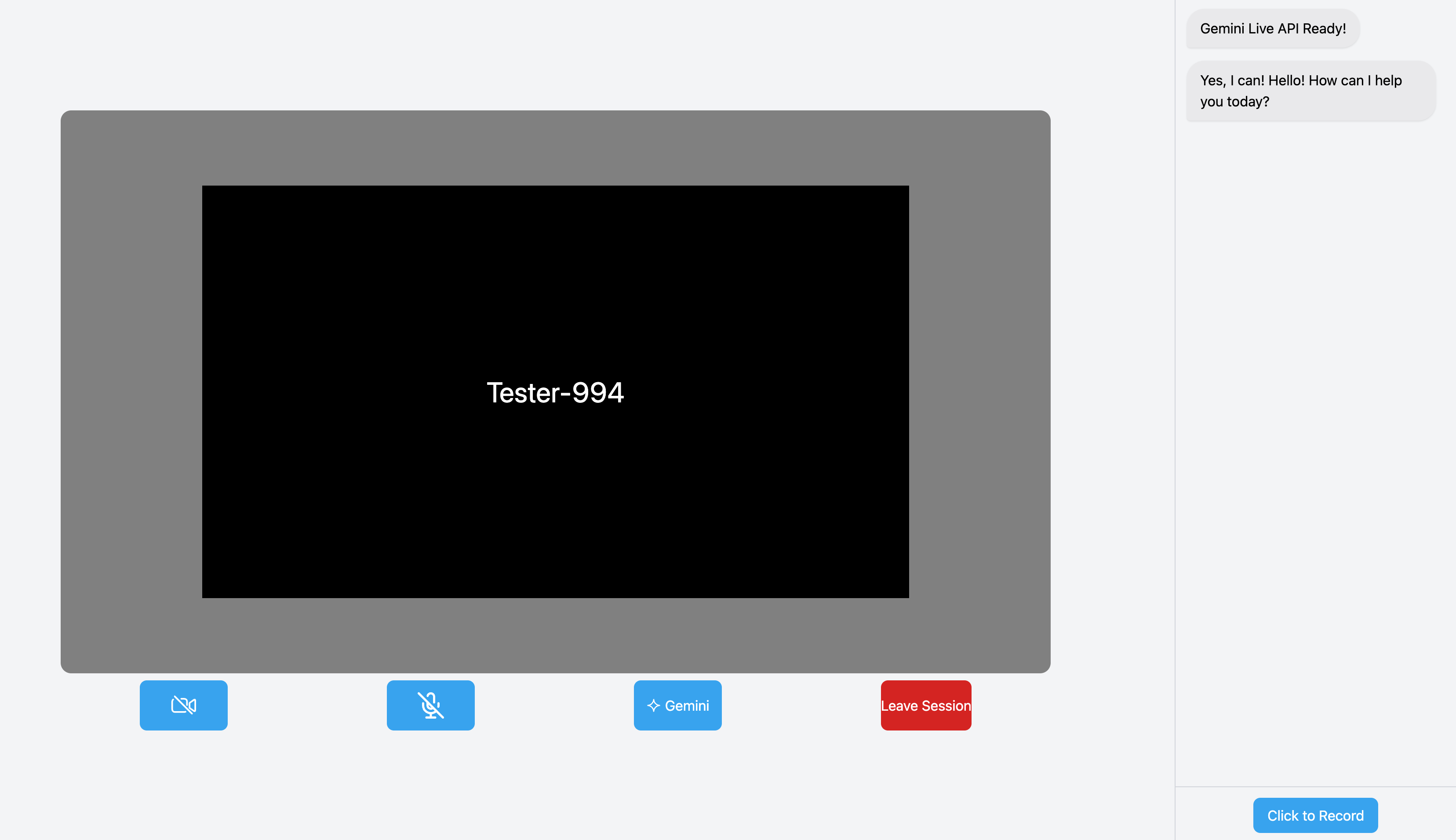
On the frontend, we will set up the initialization of the Gemini session and the UI that will house the client in the GeminiAgent component. This component is also passed a muteZoomAudio function which will be called to mute the Zoom microphone when audio is recorded for the Gemini Live API.
import { useState, useEffect, useRef } from "react";
import { BallTriangle } from "react-loader-spinner";
import { GoogleGenAI, Modality, Session } from '@google/genai';
import { MediaRecorder, IMediaRecorder } from 'extendable-media-recorder';
import { convertWebMToPCM, blobToBase64, playBase64Pcm } from "../../utils.ts";
import Toastify from 'toastify-js';
import "toastify-js/src/toastify.css";
import ChatBubble from "./ChatBubble.tsx";

const GeminiAgent = ({ muteZoomAudio, geminiToken }) => {
    const [loading, setLoading] = useState(true);
    const [session, setSession] = useState(null);
    const sessionRef = useRef(null);

    const displayToast = (message) => {
        Toastify({
            text: message,
            duration: 3000,
            gravity: "bottom",
            position: "left",
            }).showToast();
    };

    const playMicrophone = async () => {};
    const toggleRecordingAudio = async () => {};

    const initSession = async () => {
        const gemini = new GoogleGenAI({ apiKey: geminiToken, httpOptions: { apiVersion: 'v1alpha' } });
        const model = 'gemini-2.5-flash-native-audio-preview-12-2025';
        const config = {
            responseModalities: [Modality.AUDIO],
            outputAudioTranscription: {},
            systemInstruction: "You are a helpful and friendly AI assistant.",
            speechConfig: {
                voiceConfig: {prebuiltVoiceConfig: {voiceName: 'Orus'}},
            },
            realtimeInputConfig: {
                automaticActivityDetection: { disabled: true },
            },
        };

        try {
            let startSession = await gemini.live.connect({
                model,
                config,
                callbacks: {
                    onopen: () => console.log('Connected to Gemini Live API'),
                    onmessage: (message) => {
                        //TODO
                    },
                    onerror: (e) => {
                        console.error('Error', e.message);
                    },
                    onclose: (e) => {
                        console.error('Close:' + e.reason);
                    },
                },
            });
            setSession(()=>startSession);
            setLoading(false);
        } catch (e) {
           console.error(e);
        }
    };

    useEffect(() => {
        initSession();
        displayToast("Click top of popup to drag");

        return () => {
            console.log("Closing Gemini Connection", sessionRef);
            sessionRef.current.close();
        };
    }, []);

    return (
        <div className="flex flex-col h-full w-80 bg-gray-100 border-l border-gray-300">
            {loading && (
                <div className="flex items-center justify-center h-full">
                    <BallTriangle height={100} width={100} radius={5} color="rgba(0, 150, 255, 1)" ariaLabel="ball-triangle-loading" visible={true} />
                </div>
            )}
            {!loading && (
                <>
                    <div id="chat-window" className="flex flex-col flex-1 overflow-y-auto p-2">
                        {responseLog.map(log => (
                            <ChatBubble key={log.id} message={log.text} />
                        ))}
                    </div>
                    <div className="flex justify-center items-center p-3 border-t border-gray-300">
                        <button className="flex items-center justify-center h-10 px-4 rounded-lg bg-sky-500 text-white hover:bg-sky-600 active:bg-sky-700" type="button" disabled={disableBtn} onClick={toggleRecordingAudio}>
                            {!processing
                                ? !record ? 'Click to Record' : 'Click to Stop'
                                : <div className="flex items-center gap-2">
                                    <BallTriangle height={25} width={25} radius={5} color="#fafafbff" ariaLabel="ball-triangle-loading" visible={true} /> processing...
                                </div>
                            }
                        </button>
                    </div>
                </>
            )}
        </div>
    );
}

export default GeminiAgent;
We use a combination of the getUserMedia and MediaRecorder API for recording an audio sample to feed to Gemini. We also import helper functions that will convert the recorded audio into the PCM audio format expected by Gemini:
const playMicrophone = async () => {
   try {
       muteZoomAudio();
       const stream = await navigator.mediaDevices.getUserMedia({
           audio: {
               sampleRate: 48000,
               channelCount: 1,
           }
       });
       let mediaRecorder = new MediaRecorder(stream, { mimeType: 'audio/webm; codecs=opus' });

       mediaRecorder.addEventListener('dataavailable', event => {
           if (event.data.size > 0) {
               audioChunksRef.current.push(event.data);
           }
       });

       mediaRecorder.addEventListener('stop', async () => {
           try {
               const currentSession = sessionRef.current;
               if (!currentSession) {
                   console.error("No active Gemini session");
                   return;
               }
               const webmBlob = new Blob(audioChunksRef.current, { type: 'audio/webm;codecs=opus' });
               const pcmBlob = await convertWebMToPCM(webmBlob);
               const base64Audio = await blobToBase64(pcmBlob) as string;

               currentSession.sendRealtimeInput({ activityStart: {} });
               currentSession.sendRealtimeInput({
                   audio: {
                       data: base64Audio,
                       mimeType: "audio/pcm;rate=48000"
                   }
               });
               currentSession.sendRealtimeInput({ activityEnd: {} });
               audioChunksRef.current = [];
           } catch (err) {
               console.error("Error sending audio to Gemini:", err);
           }
       });
       setRecorder(mediaRecorder);

       mediaRecorder.start();
   } catch (err) {
       console.error(err);
   }
};
Once the audio is prepared, we send the audio to Gemini using the sendRealtimeInput function.
Now we can setup the Gemini onmessage listener which will receive the response audio and transcript data from Gemini:
let startSession = await gemini.live.connect({
        model,
        config,
        callbacks: {
            onopen: () => console.log('Connected to Gemini Live API'),
            onmessage: (message) => {
                const serverContent = message?.serverContent;
                if (!serverContent) return;

                if (serverContent?.modelTurn?.parts && Array.isArray(serverContent.modelTurn.parts)) {
                    const response = serverContent.modelTurn.parts[0];
                    if (response && "inlineData" in response && response.inlineData) {
                        const { data, mimeType } = response.inlineData as { data?: string, mimeType?: string };
                        if (typeof data === "string") {
                            setResponseAudioString(prev => prev + data);
                        }
                        if (typeof mimeType === "string") {
                            setResponseMimeType(mimeType);
                        }
                    }
                } else if (serverContent?.outputTranscription?.text) {
                    setTranscriptBuffer(
                        prevText => prevText + (serverContent.outputTranscription?.text ?? "")
                    );
                } else if ("generationComplete" in serverContent) {
                    const el = document.getElementById("chat-window");
                    if (el) el.scrollTop = el.scrollHeight;
                    setAudioReady(true);
                }
            },
            onerror: (e) => {
                console.error('Error', e.message);
            },
            onclose: (e) => {
                console.error('Gemini session closed:', e.reason);
                sessionRef.current = null;
            },
        },
    });
Once the audio response generation is complete, the response base64 PCM audio string is stored in the responseAudioString state, the audio mimeType is stored in the mimeType, and the response transcript is stored in the transcriptBuffer.
Finally, we setup useEffects to react to changes in state from the listener. Our audio is played and state is reset for the next response:
    useEffect(() => {
        setTranscriptBuffer("");
    }, [responseLog]);

    useEffect(() => {
        if (audioReady) {
            if (timeoutID) clearTimeout(timeoutID);
            playBase64Pcm(responseAudioString, responseMimeType);
            setResponseAudioString("");
            setResponseMimeType("");
            setProcessing(false);
            setDisableBtn(false);
            setResponseLog(prevResponses => [...prevResponses, { id: prevResponses.length + 1, text: transcriptBuffer }]);
        }
    }, [audioReady]);
Conclusion
That concludes the walkthrough of implementing the Gemini Live API alongside the Zoom Video SDK.
The complete code for this blog can be found on the Zoom GitHub . You can read more about Zoom Video SDK or Gemini Live API to get the full rundown of the many features offered in both products.