

After a primary-care consultation, the clinician needs to turn the conversation into a patient note: symptoms, examination findings, assessment, and next steps.
The Zoom Clinical Notes API transcribes a consultation recording and generates a note from the transcript. Select the SOAP template to organize the draft into Subjective, Objective, Assessment, and Plan sections. Your application receives both the transcript and the note for the clinician to review and edit before saving it to the patient record.
Prerequisites
- A Zoom developer account on the Build platform
- A Zoom AI Services JWT. See Get credentials.
- A consultation recording in
.wav,.mp3,.m4a,.mp4, or.webmformat, up to two hours long and at most 300 MB for uploads or 2 GB for recording URLs - cURL to run the examples below
Use a synthetic consultation recording for your first request.
Generate a SOAP draft
In the Platform Studio playground, select Clinical Notes API, provide a recording, choose the SOAP template, and run the request to see the transcript and note.
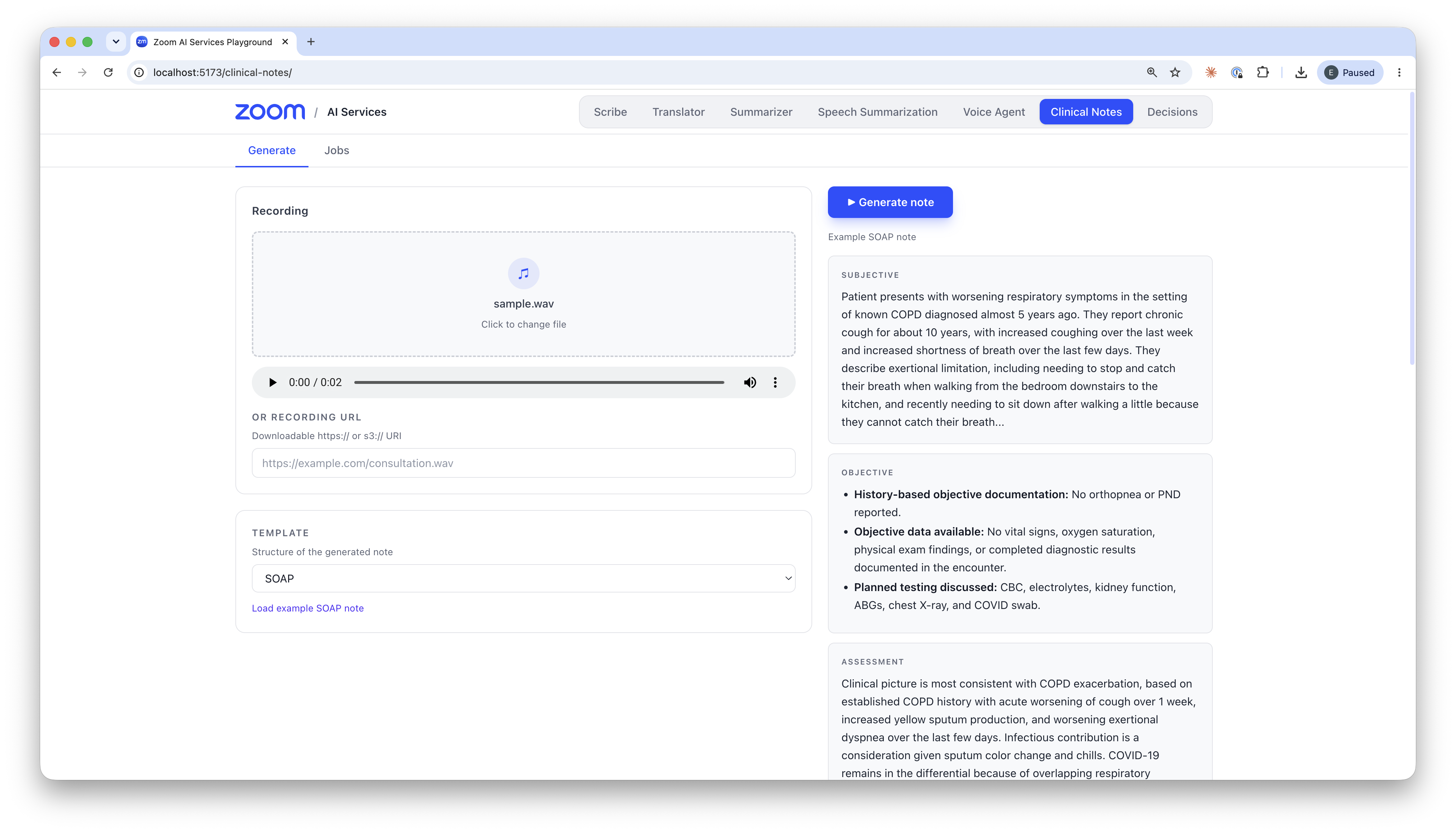
Example SOAP note displayed in the local playground.
To call the API from your backend, send the recording to the synchronous generation endpoint. Set TOKEN to your Zoom AI Services JWT, then upload your file:
curl -X POST "https://api.zoom.us/v2/aiservices/clinical_notes/generate" \
  -H "Authorization: Bearer $TOKEN" \
  -F "file=@consultation.wav;type=audio/wav" \
  -F "template=SOAP"
Set template=SOAP explicitly; without it, the API uses GENERAL_MEDICINE. For behavioral health encounters, GENERAL_BEHAVIORAL_HEALTH includes sections such as a Mental Status Exam.
If your recording is already at a downloadable HTTPS or S3 URI, send a JSON request with the URI in file instead. Synchronous generation covers that request format and the complete response schema.
Put the transcript beside the note
The response gives you three fields for the review screen:
| Field | Use in your application |
|---|---|
transcript.text_display | Show the complete transcript beside the draft. |
clinical_notes.full_note | Display the complete note as Markdown. |
clinical_notes.sections | Build separate editable fields from each section's title and content. |
This excerpt from the documented example response shows a synthetic encounter:
{
    "transcript": {
        "text_display": "This is a fictional clinical encounter for API testing. The patient reports a mild headache since yesterday. The patient denies fever and nausea. No examination findings were recorded. The clinician plans a follow-up next week."
    },
    "clinical_notes": {
        "sections": [
            {
                "title": "Subjective",
                "content": "Patient reports a mild headache since yesterday. They deny fever and nausea."
            },
            {
                "title": "Objective",
                "content": "No examination findings were recorded."
            }
        ]
    }
}
Use clinical_notes.sections to populate an editor for each SOAP section. Keep the transcript open while the clinician checks the draft for missing or unsupported details and makes corrections. Require clinician approval before your application saves the note to the patient record.
Process recordings in the background
For long recordings or notes the clinician will review later, submit an asynchronous job from your backend:
curl -X POST "https://api.zoom.us/v2/aiservices/clinical_notes/job" \
  -H "Authorization: Bearer $TOKEN" \
  -H "Content-Type: application/json" \
  -d '{
    "file": "https://example.com/consultation.wav",
    "template": "SOAP"
  }'
Replace the example URL with a downloadable recording URL and keep it available until the job finishes. The job endpoint takes recording URIs in JSON only; for direct file uploads, use synchronous generation.
Save the returned job_id and poll for its status:
curl "https://api.zoom.us/v2/aiservices/clinical_notes/job/$JOB_ID" \
  -H "Authorization: Bearer $TOKEN"
Then act on state:
QUEUEDorPROCESSING: keep polling.SUCCEEDED: show the note for review.FAILED: report the failure and check for available error details.
A status request returns HTTP 200 even when the job has failed, so check state before you use the result. The asynchronous jobs documentation covers submission and status responses.
Before connecting real consultations, add an explicit clinician approval step so that your application never saves a note nobody has reviewed.