Realtime Media Streams & AI orchestration: building AI agents on Zoom
We recently released Realtime Media Streams (RTMS) at Zoom Developer Summit 2025. Purpose built for AI developers, RTMS allows you to receive real-time audio, video, and transcript data from a Zoom meeting through WebSockets. This unlocks immense possibilities for AI-driven applications that can move beyond basic integration towards dynamic agents that can listen, interpret, and respond instantly as conversations unfold.
In this blog, I will show how you can use RTMS to pipe live data from Zoom Meetings into AI orchestration frameworks. We'll walk through practical design patterns for building powerful, real-time AI agents, enabling use cases like instant summarization, automated task extraction, and conversational assistants.
Use cases for realtime media
Before diving into the technical details, let's imagine what this enables:
- Sales Teams: Imagine an AI agent that listens to your sales calls, automatically identifies when prospects raise objections, and instantly suggests proven responses in your CRM. No more scrambling through notes after the call.
- Customer Support: An AI that processes support calls in real-time, automatically creates tickets, schedules follow-ups, and even suggests knowledge base articles to agents mid-conversation.
- Executive Meetings: An assistant that tracks action items as they're discussed, assigns them to the right people, and sends automated follow-ups before the meeting even ends.
What is "AI orchestration"?
Orchestration frameworks are responsible for:
- Managing context: Keeping track of what's been said so far.
- Making decisions: Choosing when and how to respond or act.
- Calling tools or APIs: Calling APIs, updating databases, sending chat messages/mails, or triggering workflows.
- Interfacing with LLMs: Structuring prompts, routing inputs, managing outputs.
- Maintaining memory: Short-term (last few utterances) or long-term (vector stores, RAG).
Without orchestration, your agent is just a raw LLM stuck in a loop of disconnected prompts. With it, you get structure, flow, and reasoning.
So why do you need AI orchestration? RTMS gives you the raw data feed from the meeting: live transcripts, audio, and video. But raw data isn't intelligence. To transform real-time meeting streams into something useful, you need an orchestration layer.
Workflow for AI orchestration and realtime data
The core idea of what we are building is very simple:
- Receive Zoom RTMS events via a webhook.
- Establish a WebSocket connection to Zoom's media servers.
- Stream real-time media (audio, video, transcript, or all) data directly into your AI orchestration layer.
- Process incoming data with your chosen AI orchestration framework to deliver real-time insights.
You can use any orchestration stack that fits your workflow. For example: You can use Langflow to visually map out logic, or LlamaIndex when you need structured document indexing or want to augment live transcripts with external knowledge, or LangChain for fine-grained control. Whichever orchestration stack you choose, the pipeline is the same: real-time data in, orchestration logic out.
Here is what AI orchestration looks like in practice. We will use python to demonstrate.
-
Build webhook and WebSocket connections
Your backend needs two key things set up first:
- A webhook to handle Zoom RTMS events.
- Two WebSocket clients to connect to Zoom's signaling handshake and media stream.
Zoom sends an event,
meeting.rtms_started, whenever an RTMS session starts in a meeting. Your handler then initiates a secure WebSocket connection back to Zoom's infrastructure.Webhook handler:
@app.post("/webhook") async def webhook(request: Request): body = await request.json() event = body.get("event") payload = body.get("payload", {}) # Zoom URL validation challenge (security handshake) if event == "endpoint.url_validation": # Respond securely pass # RTMS session starts if event == "meeting.rtms_started": meeting_uuid = payload.get("meeting_uuid") rtms_stream_id = payload.get("rtms_stream_id") server_urls = payload.get("server_urls") # Start WebSocket connection asynchronously asyncio.create_task(handle_signaling_connection(meeting_uuid, rtms_stream_id, server_urls)) # RTMS session stops if event == "meeting.rtms_stopped": # Close active connections cleanly pass return {"status": "ok"} -
Connecting to Zoom's media servers
Establishing the WebSocket handshake securely looks like this:
async with websockets.connect(server_url, ssl=ssl_context) as ws:
    handshake_payload = {
        "msg_type": 1,
        "protocol_version": 1,
        "meeting_uuid": meeting_uuid,
        "rtms_stream_id": stream_id,
        "signature": generate_signature(...)
    }
    await ws.send(json.dumps(handshake_payload))
    # Listen and respond to messages (keep-alives, stream state updates)
Once connected, Zoom streams data continuously through this secure channel. Your application now receives real-time audio, video, or transcripts.
-
Routing RTMS data into your AI orchestration layer
Each time new transcript data arrives, pass it to your AI orchestration framework:
# Inside WebSocket listener loop
if msg["msg_type"] == 17:  # MEDIA_DATA_TRANSCRIPT
    transcript_text = msg["content"]["data"]
    transcript_processor.process_new_transcript_chunk(transcript_text)
The
transcript_processoris your gateway to AI logic. It takes transcript chunks, adds context, and extracts insights instantly using your chosen orchestration tool.Once RTMS delivers the transcript chunk, your orchestration layer takes over:
# Simplified agent interface
context_window.append(transcript_chunk)
merged_context = " ".join(context_window)
response = orchestration_chain.invoke({"transcript_chunk": merged_context})
You can wire this orchestration layer however you want. Under the hood, you're still calling an LLM. We are using Anthropic Claude, but you can plug in any model that supports chat-style input.
Example with Claude, Anthropic, and LlamaIndex
from llama_index.llms.anthropic import Anthropic
llm = Anthropic(model="claude-3-sonnet-20240229", api_key=os.getenv("ANTHROPIC_API_KEY"))
response = await llm.acomplete("Summarize this transcript chunk:\n" + merged_context)
And viola! Now you've got a working setup: All you need to do is start a Zoom meeting and Zoom will send live meeting data through RTMS, your backend catches it, connects over WebSockets, and pipes it straight into your AI logic as shown here.
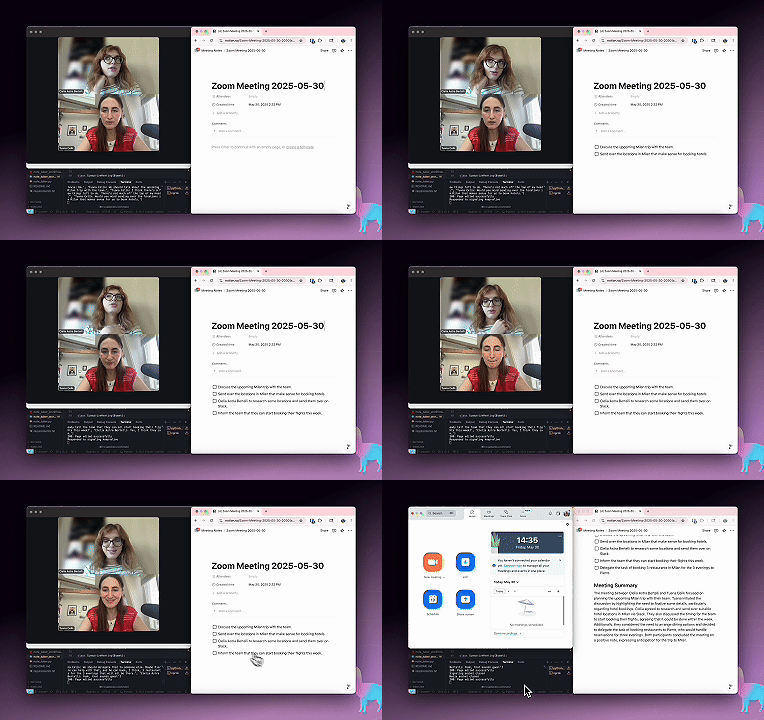
The combination of Zoom's Realtime Media Streams and modern AI orchestration frameworks opens up a world of possibilities for creating intelligent, responsive applications that can transform how we interact with meeting data. Start small, experiment with different use cases, and gradually build more sophisticated agents as you learn what works best for your specific needs. And with Zoom Apps, you can even bring your own custom UI and interactive experiences directly into Zoom Meetings, enabling seamless collaboration and engagement right where your users are.
The future of meetings is here, and it's intelligent, responsive, and real-time.
What have you decided to build?
Resources to get started
Get access to Realtime Media Streams
Start building agents with video, audio, and transcripts.
To help you get started building your own real-time AI agents with RTMS, here are some valuable resources:
LlamaIndex integration
Check out Tuana Çelik's blog post Create a Meeting Notetaker Agent for Notion with LlamaIndex and Zoom RTMS (GitHub repository) from LlamaIndex.
Langflow integration
Explore the Zoom RTMS Langflow sample implementation by Melissa Herrera for a complete visual workflow example.
Langchain integration
Here is a LangChain example Real-Time Meeting Transcript Processor with Action Item Extraction by me, Ojus Save.