Introducing PKCE support for public and confidential clients
Security has always been foundational to OAuth integrations. As more developers build native mobile apps, JavaScript single-page applications (SPAs), and SDK-based integrations, one challenge consistently arises: these apps cannot securely store a client secret.
To address this, Zoom supports Proof Key for Code Exchange (PKCE) for public clients.
Public clients using Authorization Code Flow with PKCE can securely obtain OAuth access tokens without embedding sensitive credentials in client-side code.
For mobile apps, desktop integrations, and browser-based experiences, this provides a secure, standards-based way to obtain an authorization code.
Why public client authentication with PKCE matters
The OAuth 2.0 specification defines two types of client applications: confidential clients and public clients. Confidential clients are applications that can securely store and protect their credentials. These typically include applications with secure backend servers that can safely store a client secret or implement other secure authentication methods. When requesting tokens, the backend authenticates itself using these protected credentials.
However, public applications operate differently:
- Native and mobile apps run on user devices
- JavaScript single-page applications (SPAs) execute entirely in the browser
In these environments, a client secret can be extracted from the app or browser and reused across installations. That lets an attacker impersonate the app and exchange intercepted authorization codes for tokens.
The public client ID option in the Zoom App Marketplace solves this by removing the requirement for a client secret and instead relying on:
- A dynamically generated code_challenge
- A client-generated code_verifier, retained for the token exchange
- Explicit user authorization
How the public client ID option works in Zoom
When you enable the public client option in the Zoom App Marketplace, Zoom generates an additional public client ID for your app.
This public client ID:
- Does not have an associated client secret
- Does not require an Authorization header during token exchange
- Is intended for client-side or native implementations
The flow still uses the OAuth Authorization Code grant with PKCE. The difference lies in how the token exchange is secured. Instead of authorization with client_secret, the application proves legitimacy using the PKCE code_verifier.
Public vs. confidential clients: What's the difference?
Zoom supports both confidential clients and public clients using Authorization Code Flow with PKCE, allowing you to choose based on your application architecture. The distinction depends on whether the client can securely authenticate with the authorization server, while the Zoom identity provider manages user authentication and authorization.
Confidential client (PKCE with client secret)
This model is designed for confidential clients that can securely store and send a client secret, typically via a secure backend server.
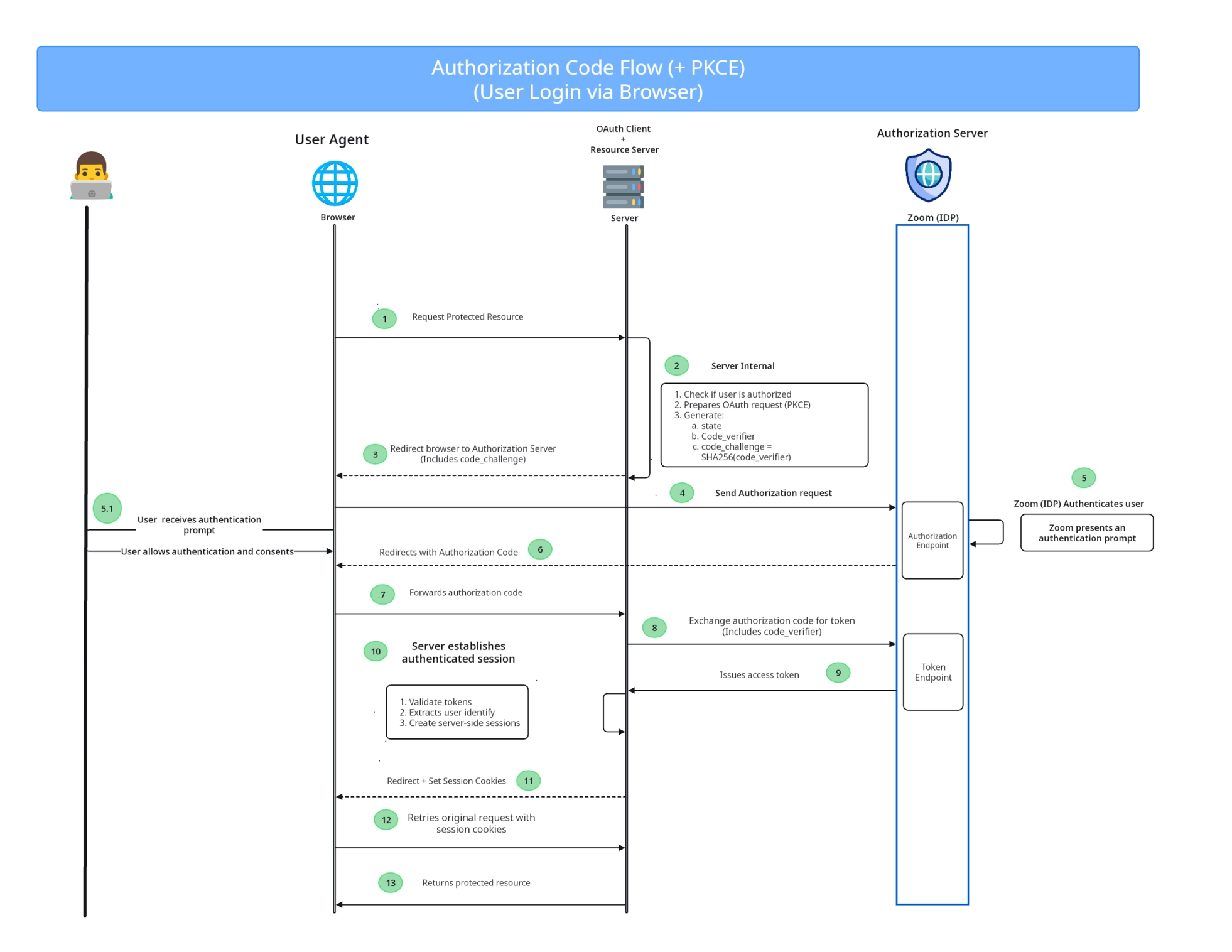
📘 This flow uses a confidential client with a backend server. The server handles the authorization request, securely stores the
code_verifier, and performs the token exchange using both theclient_secretandcode_verifier. The client secret is never exposed to the user environment.
During token exchange:
- The backend includes an Authorization: Basic base64(client_id:client_secret) header
- The request includes:
client_idclient_secretcode_verifier
This approach is ideal for:
- Server-side web applications
- Enterprise integrations
- Centralized backend systems
The client secret remains securely stored on the server and is never exposed.
Public client (PKCE without client secret)
This model is designed for public clients that cannot securely store or send a client secret, or that do not have a secure backend server.
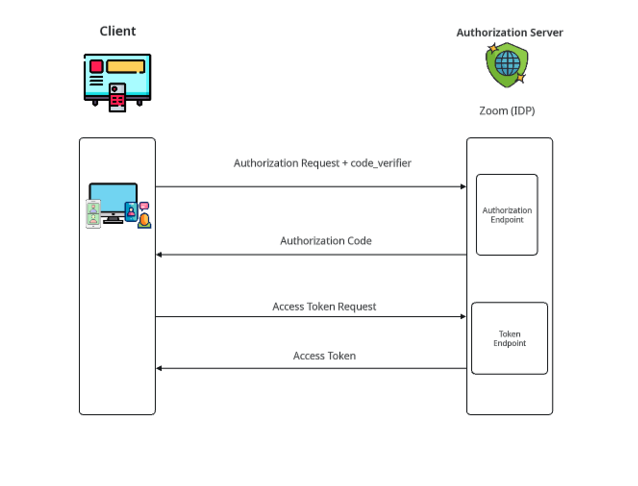
📘 This flow uses a public client with no backend or client secret. The client generates the
code_verifierand performs the token exchange directly using theclient_idandcode_verifier. Security relies on PKCE and user authorization, with no embedded credentials.
When enabled:
- Zoom generates a Dev and Production Public Client ID
- No client secret is required
- No Authorization header is required during token exchange
The token request includes:
client_idcode_verifier
Security is enforced through PKCE and explicit user authorization.
This configuration is ideal for:
- Native and mobile applications
- JavaScript SPAs
- SDK-based integrations
Because no secret exists, there is nothing to protect within client-side code.
OAuth flow comparison at a glance
The table below summarizes the differences across supported OAuth configurations:
| Feature | Traditional OAuth | PKCE for confidential clients | PKCE for public clients |
|---|---|---|---|
| Client type | Confidential | Confidential | Public |
| Client secret required | Yes | Yes | No |
| Backend required | Yes | Yes | No |
| Authorization header | Required | Required | Not used |
Uses code_verifier | No | Yes | Yes |
| Token exchange location | Server | Server | Client |
| Best for | Server-side web apps | Apps with a backend for added security | Mobile, native, and SPA applications without a backend |
This flexibility allows a single Marketplace app to support both backend-driven and fully client-side implementations.
Enabling a public client ID in the Zoom App Marketplace
All OAuth apps receive a dev and production client ID and client secret by default.
When you enable the public client option:
- Zoom generates an additional dev and production public client ID
- No secret is issued for this ID
- You can use it exclusively for public clients using Authorization Code Flow with PKCE
This allows you to support both confidential and public architectures within a single app configuration.
SDK support for native integrations
For mobile and native SDK integrations, Zoom introduced the publicAppKey property on ZoomSDKAuthContext.
When building a public application:
- A signed JWT is not required
- Use the Public Client ID as the publicAppKey
This enables secure SDK authentication without embedding a client secret.
Build securely for modern application architectures
Support for public clients using Authorization Code Flow with PKCE reflects the evolution of modern application design. As more integrations move toward client-side and distributed environments, secure OAuth flows must adapt.
With support for both confidential clients and public clients, Zoom provides the flexibility to build securely, whether your application runs on a server, in a browser, or on a user's device.
If you're developing a mobile app, single-page applications (SPAs), Zoom App, or SDK integration, PKCE helps you authorize your app securely without compromising credentials.