Adding Picture-in-Picture to Zoom Meeting SDK iOS apps
Introduction
Picture-in-picture allows users to multitask at ease, making calls with the Zoom Meeting SDK while using other apps. To enable this powerful feature, only a single setting within the Meeting SDK needs to be enabled, in addition to implementing the CallKit framework. This guide will teach you how to unlock picture-in-picture for your very own Zoom Meeting SDK app.
Prerequisites
Picture-in-Picture on iOS can only be used with the Zoom Default UI. This guide will not work for apps with Custom UI.
Enable "Audio, Airplay, and Picture in Picture" and "Voice over IP" under Background Modes in the Xcode project's Signing & Capabilities tab.
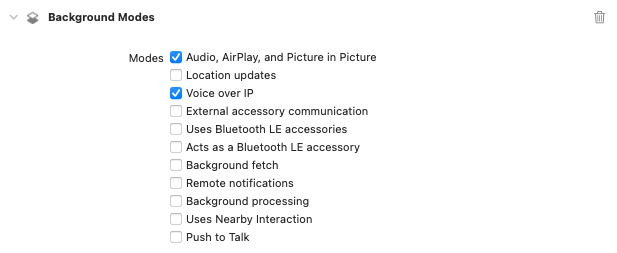
Enabling Picture-in-Picture in Meeting SDK
First, we call enableVideoCallPictureInPicture from the MobileRTCMeetingSettings class. We can do so before we join the meeting with the MobileRTCMeetingService object, to ensure that the setting has been set. To confirm that the setting is enabled, we can call videoCallPictureInPictureEnabled on the meeting settings object.
if let meetingSettings = MobileRTC.shared().getMeetingSettings()
{
	meetingSettings.enableVideoCallPicture(inPicture: true)
}
meetingService.joinMeeting(with: joinMeetingParameters)
Next, we need to implement the onCheckIfMeetingVoIPCallRunning callback function from the MobileRTCMeetingServiceDelegate protocol, to confirm with the meeting service that a VoIP meeting is in progress.
func onCheckIfMeetingVoIPCallRunning() -> Bool {
    return providerDelegate.isInCall()
}
We'll create the isInCall() function when we get to our custom CXProvider delegate class.
Implementing CallKit
Picture-in-Picture mode is triggered when a Zoom Meeting SDK app makes a VoIP call. We implement the CallKit framework to interface with our Meeting SDK call. The official Apple sample app showcasing CallKit can be found here. The accompanying introductory talk, WWDC 2016 session 230, is located here.
We can invoke CallKit from within the onMeetingStateChange: Zoom Meeting SDK callback, which is triggered when the value of the MobileRTCMeetingState enum changes, such as when a meeting begins connecting or ends. If the state is connecting, we create a CXStartCallAction, which represents when a telephony call has begun. In this case, the call is a VoIP meeting initiated through the Zoom Meeting SDK. We create that action with a UUID that we track in the class as a property and a CXHandle that represents the recipient's "address", which we populate here with dummy data. We create a CXTransaction with the start call action, and an instance of CXCallController (also a property) then performs the action via the request function. By doing so, we signal to the CallKit framework that a meeting has started, and we have entered a VoIP call.
if state == .connecting {
    let callUUID = UUID()
    let startCallAction = CXStartCallAction(call: callUUID,
                                            handle: CXHandle(type: .generic, value: "test@no.cd"))
    let transaction = CXTransaction(action: startCallAction)
    callController.request(transaction) { error in
        if let error = error {
            print("Error requesting start call transaction:", error.localizedDescription)
            self.providerDelegate.callingUUID = nil
        } else {
            print("Requested start call transaction succeeded")
            self.providerDelegate.callingUUID = callUUID
        }
    }
}
The provider delegate is a custom class we create that conforms to the CXProviderDelegate project. The provider delegate responds to when a call action is performed. In this case, we want to make sure it calls the fulfill() method whenever an action is successful. Here we also have the provider delegate track the calling UUID that is used in the CXHandle. The existence of the UUID is then used in isInCall() to confirm that a meeting is in progress.
We also have to make sure the required delegate callback providerDidReset is implemented.
import CallKit
final class ProviderDelegate: NSObject, CXProviderDelegate {
    private let provider: CXProvider
    var callingUUID: UUID?
    override init() {
        provider = CXProvider(configuration: type(of: self).providerConfiguration)
        super.init()
        provider.setDelegate(self, queue: nil)
    }
    func providerDidReset(_ provider: CXProvider) {
        callingUUID = nil
    }
    func provider(_ provider: CXProvider, perform action: CXStartCallAction) {
        action.fulfill()
    }
    func provider(_ provider: CXProvider, perform action: CXEndCallAction) {
        action.fulfill()
    }
    func isInCall() -> Bool {
        return callingUUID != nil
    }
    static let providerConfiguration: CXProviderConfiguration = {
        let providerConfiguration = CXProviderConfiguration()
        providerConfiguration.supportedHandleTypes = [.generic]
        return providerConfiguration
    }()
}
Finally, we should perform an end action whenever the user ends or leaves a meeting. This corresponds to the MobileRTCMeetingState for an ended meeting. As a counterpart to the connecting state we implemented previously, for connection state ended we create a CXEndCallAction, put it in a transaction object, and have the call controller request it be performed.
else if state == .ended {
    let endCallAction = CXEndCallAction(call: providerDelegate.callingUUID ?? UUID())
    let transaction = CXTransaction(action: endCallAction)
    callController.request(transaction) { error in
        if let error = error {
            print("Error requesting end call transaction:", error.localizedDescription)
        } else {
            print("Requested end call transaction succeeded")
            self.providerDelegate.callingUUID = nil
        }
    }
}
And that's it!
With CallKit implemented, picture-in-picture should now work on iOS with Zoom Meeting SDK.