Zoom Meeting API querying tips - understanding meeting IDs and meeting UUIDs
Welcome to the Zoom API querying hack series, where we will take a deep dive into the world of Zoom APIs. With each upcoming post, we'll uncover new tips, tricks, and insights that are desinged to empower you in maximizing the potential of Zoom APIs.
Zoom APIs allows developers to access information from Zoom to craft tailor-made solutions within private services or public applications.
In this specific blog post, we're going to navigate and discover practical hacks that can help when querying specifically to the Zoom Meeting API.
Understanding meeting IDs and meeting UUIDs
When a meeting is generated within Zoom, it's assigned a unique meeting ID.
There are two types of meetings: instant meetings and scheduled meetings, and each ID number is unique to its corresponding instance.
The main difference between these two types of meeting classifications lies in their functionality. Instant meetings allow you to immediatly start a meeting, while scheduled meetings are designated future meetings - either one-time or recurring.
Meeting IDs can be a 10 or 11-digit number. The 11-digit number is used for instant, scheduled or recurring meeting and the 10-digit number is used for Personal Meeting ID (PMI), which is a permanent personal meeting room that you can start at anytime or schedule for a future use.
A unique meeting UUID is also generated upon meeting creation and this number will be associated with a specific instance of the meeting. Meeting UUIDs also include a combination of letters, numbers and special characters like "=" or "/" whereas meeting IDs consist of numbers solely.
To summarize:
- Meeting ID is the meeting number
- Meeting UUID is unique to a meeting ID and instance of a meeting
Each instance of a meeting will have it's own, unique meeting UUID. Once a meeting is held under a given meeting ID, the past instance of the meeting will remain the same and a new meeting UUID will be generated for the next instance of the meeting.
Querying with meeting ID or meeting UUID
See below for a few queries to Zoom Meeting API endpoints to review the behavior of meeting ID and uuids.
Use cases for meeting ID
To query general data of a meeting:
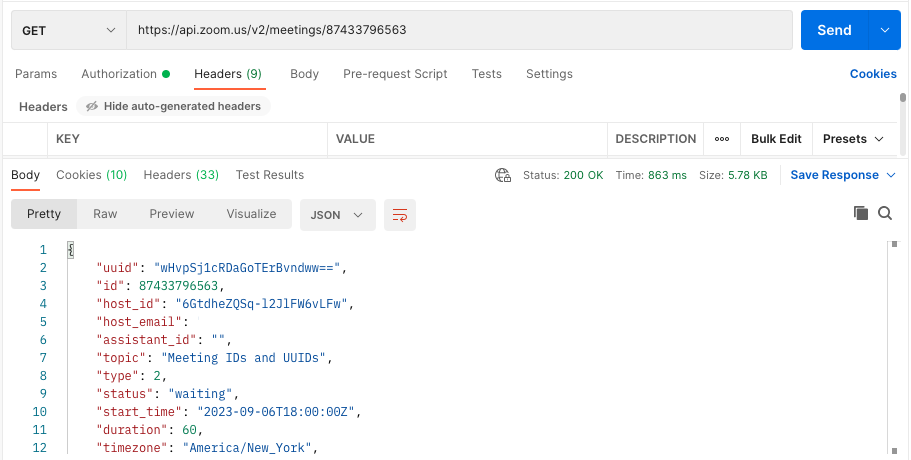
In this example to GET https://api.zoom.us/v2/meetings/{meetingID}, the response body includes general meeting information, including the most recent meeting instance's meeting UUID. You would be able to use that meeting UUID on the same or another endpoint that expects to take a meeting identifier in the query parameter to see more information about that particular meeting instance.
When we do not know the meeting UUID of a specific instance:
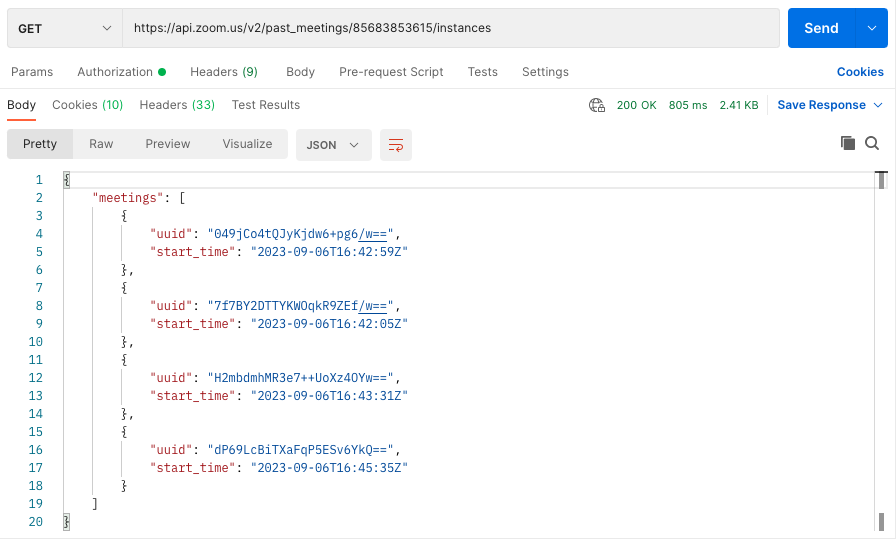
In this example to https://api.zoom.us/v2/past_meetings/{meetingID}/instances, we retrieve all the past meeting instances for this particular meeting ID and can use those meeting UUIDs to find more in-depth info for each.
When the meeting is a single occurrence:
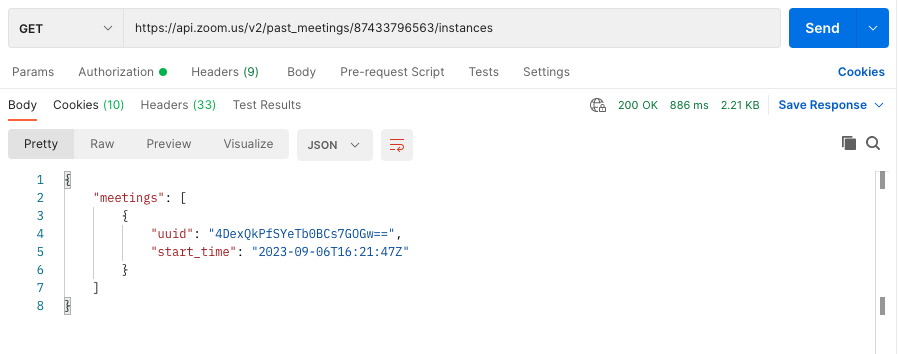
In this example to https://api.zoom.us/v2/past_meetings/{meetingID}/instances, we are able to find the specific singular instance associated with that meeting number.
Use cases for meeting UUID
To query specific instances of a meeting, especially if it has occured more than once:
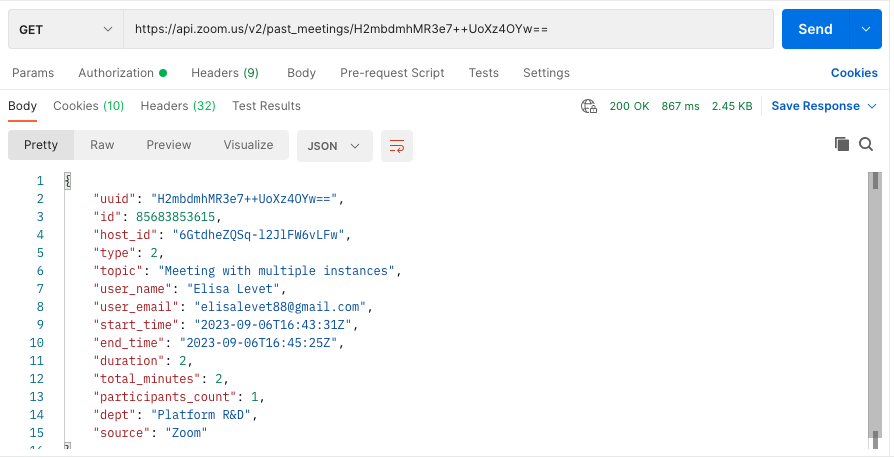
In this example, we query https://api.zoom.us/v2/past_meetings/{meetingID}/ with the meeting UUID as opposed to the associated meeting ID to get information related to a specific past instance.
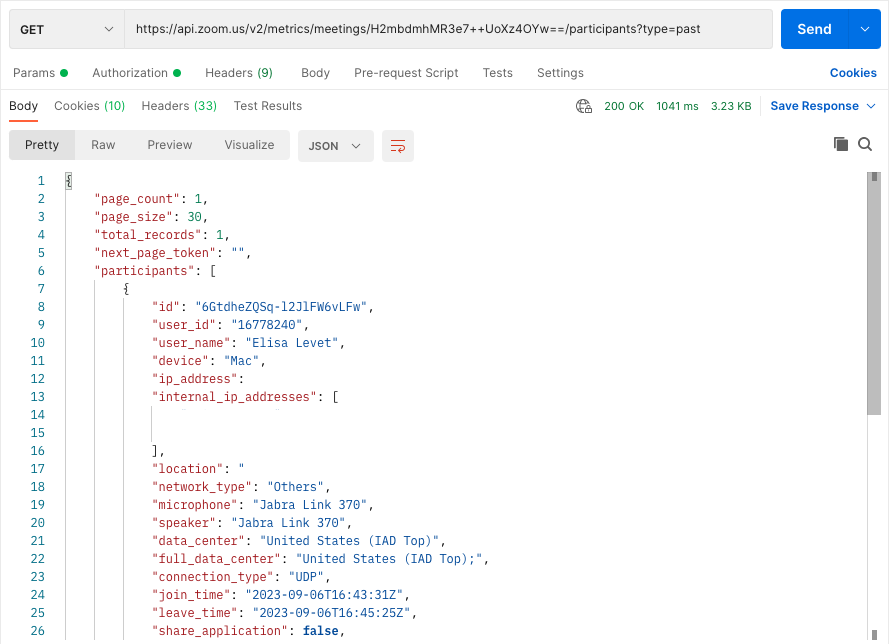
We do the same thing below, but to https://api.zoom.us/v2/metrics/meetings/{meetingID}/ which provides more in-depth data via returned fields like "ip_address", "network_type", etc. NOTE: This endpoint can be used for PAST or LIVE meetings, so specify type=past or type=live as needed.
Important to keep in mind
Meeting IDs and meeting UUIDs are NOT interchangable, while a meeting can have many instances, an instance (meeting UUID) can only belong to one meeting.
So, if you are wondering why meeting UUIDs exist, it is so we can have new instances of a meeting that are unique and that we can differentiate from one another.
Tips when calling the Zoom Meeting API
- If a meeting was held only once, you can always use the meeting ID to query any endpoint
- If a meeting was held more than once, and you do not know the meeting UUIDs associated with the different occurrences, use the meeting ID to call the endpoint List Past meeting instances, this will return a list of ended meeting instances
- Use meeting UUIDs to query each individual instance of a meeting
- Double encode the meeting UUID if it starts with "/" or contan any "//" to avoid getting a "Meeting does not exist"
- These rules apply to Webinars, a webinar ID and webinar UUID will be generated upon meeting creation and a new webinar UUID will be generated for future webinar instances
Thanks for reading and using Zoom APIs!