Run daily at 2:30 PM IST (9:00 AM UTC)
Employee recognition is a cornerstone of workplace culture, and celebrating work anniversaries helps build stronger team connections. In this blog, I'll walk you through building a comprehensive automation system that celebrates employee anniversaries by posting personalized kudos in Workvivo and sending notifications to Zoom channels—all powered by AWS Lambda.
Solving the challenge of manual anniversary tracking at scale
Managing employee anniversaries manually becomes increasingly difficult as organizations grow. HR teams often struggle with:
- Tracking hundreds or thousands of employee hire dates
- Creating personalized anniversary messages
- Ensuring consistent recognition across platforms
- Coordinating between different communication tools
Our solution automates this entire process, ensuring no anniversary goes unrecognized while maintaining a personal touch.
Architecture overview
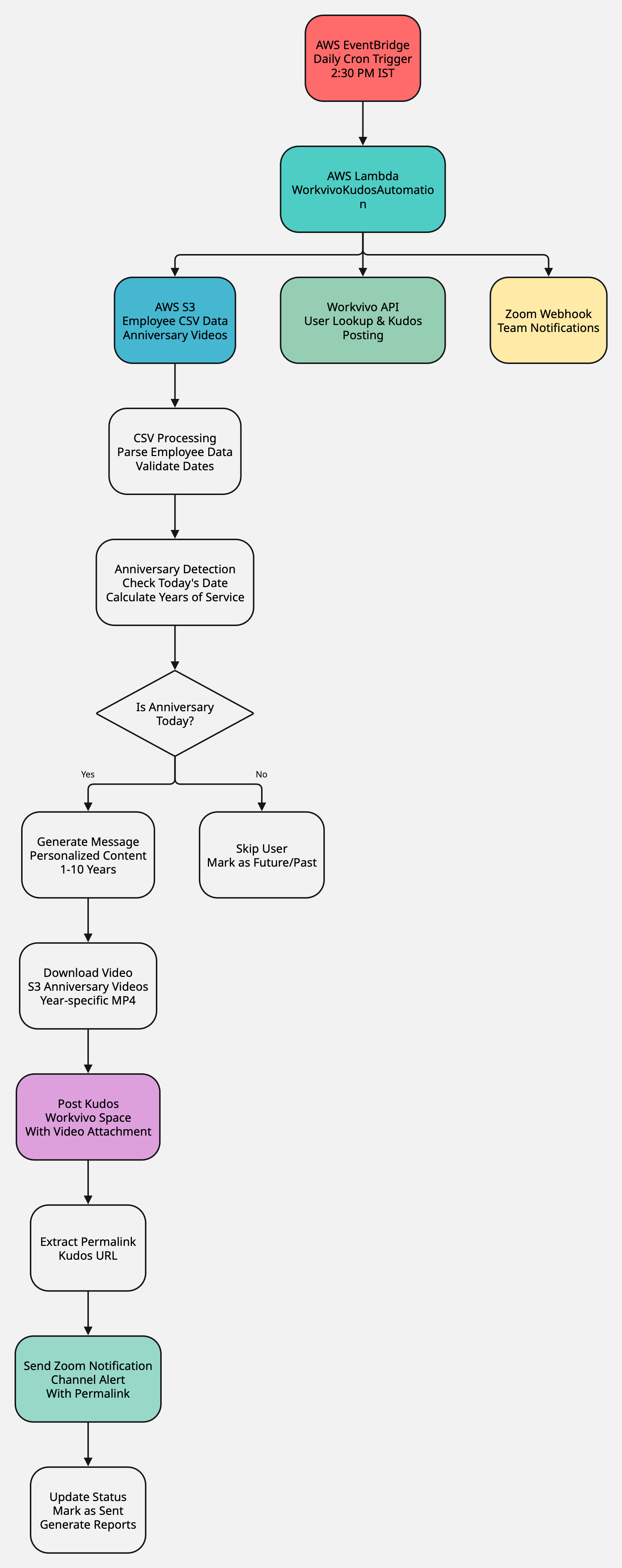
The system consists of several key components:
- AWS S3: Stores employee data CSV files and anniversary videos
- AWS Lambda: Processes anniversary logic and API integrations
- AWS EventBridge: Triggers daily execution at scheduled times
- Workvivo API: Posts anniversary kudos with personalized messages
- Zoom webhook: Sends success notifications to team channels
Prerequisites: Setting up Workvivo and Zoom integrations
Before building the Lambda function, you need to set up the required integrations in both Workvivo and Zoom.
Creating a Workvivo API application
-
Access Workvivo developer portal:
- Log into your Workvivo admin panel
- Navigate to Settings → Integrations → API Applications
- Click Create New Application
-
Configure application details:
Application Name: Anniversary Automation Description: Automated employee anniversary celebrations Application Type: Server-to-Server Scopes: - users:read (to fetch user data) - kudos:write (to post anniversary kudos) - spaces:read (to get space information) -
Generate API credentials:
- After creation, note down your Company ID and API Token
- Store these securely as they'll be used in Lambda environment variables
-
Test API access:
curl -X GET "https://your-company.workvivo.us/api/v1/users/me" \
  -H "Workvivo-Id: YOUR_COMPANY_ID" \
  -H "Authorization: Bearer YOUR_API_TOKEN"
Setting up Zoom incoming webhook
-
Install Zoom chatbot app:
- Go to Zoom App Marketplace
- Search for "Incoming Webhook" or go directly to the chatbot section
- Click Install and authorize for your Zoom account
-
Create incoming webhook:
- In Zoom desktop/web client, go to the channel where you want anniversary notifications.
- Type
/incoming_webhookin the message box - Follow the prompts to create a new webhook:
Webhook Name: Anniversary Celebrations Description: Employee work anniversary notifications -
Configure webhook settings
- Choose the target channel (e.g., #celebrations or #general)
- Set notification preferences
- Copy the generated Webhook URL and Auth Token
-
Test webhook:
curl -X POST "https://integrations.zoom.us/chat/webhooks/incomingwebhook/YOUR_WEBHOOK_ID?format=full" \
  -H "Authorization: Bearer YOUR_AUTH_TOKEN" \
  -H "Content-Type: application/json" \
  -d '{
    "content": {
      "head": {"text": "Test Message"},
      "body": [{"type": "message", "text": "Webhook is working!"}]
    }
  }'
Getting your Workvivo user ID
To post kudos as yourself (admin), you need your Workvivo User ID:
curl -X GET "https://your-company.workvivo.us/api/v1/users/by-email/your.email@company.com" \
  -H "Workvivo-Id: YOUR_COMPANY_ID" \
  -H "Authorization: Bearer YOUR_API_TOKEN"
Note the id field from the response - this will be your ADMIN_WORKVIVO_ID.
Setting up the core Lambda function
Now that we have our integrations configured, let's examine the main Lambda handler that orchestrates the entire process:
exports.handler = async (event) => {
    if (event.alertType === "WorkvivoAnniversaryKudos") {
        console.log("Starting batch processing...");
        const bucket = process.env.S3_CSV_BUCKET || "your-s3-bucket";
        const key = process.env.WORKVIVO_INPUT_CSV_KEY;
        try {
            // Process CSV data from S3
            const usersFromInput = await parseEmployeeData(bucket, key);
            // Filter active employees who haven't received kudos yet
            const activeUsers = usersFromInput.filter(
                (user) =>
                    user.originalRow["ActiveStatus"] === "Yes" &&
                    user.originalRow["FALSE"] !== "TRUE",
            );
            // Process employees in batches to avoid API rate limits
            await processInBatches(activeUsers, 10, processAnniversaryUser);
            return { statusCode: 200, body: "Processing completed" };
        } catch (error) {
            console.error("Batch processing failed:", error);
            throw error;
        }
    }
};
Processing employee anniversary data
The system reads employee data from a CSV file stored in S3, parsing hire dates and validating anniversary eligibility:
const parseEmployeeData = async (bucket, key) => {
    return new Promise((resolve, reject) => {
        const rows = [];
        s3.getObject({ Bucket: bucket, Key: key })
            .createReadStream()
            .pipe(csv())
            .on("data", (row) => {
                if (!row["EmailWork"]?.includes("@")) return;
                try {
                    const hireDateParts = row.HireDate.split("/");
                    const month = parseInt(hireDateParts[0]);
                    const day = parseInt(hireDateParts[1]);
                    let year = parseInt(hireDateParts[2]);
                    // Handle 2-digit years properly
                    if (year < 100) {
                        year = year < 50 ? 2000 + year : 1900 + year;
                    }
                    // Create standardized date
                    const hireDate = new Date(
                        `${year}-${month.toString().padStart(2, "0")}-${day.toString().padStart(2, "0")}`,
                    );
                    rows.push({
                        originalRow: row,
                        email: row["EmailWork"],
                        hireDate: hireDate,
                        spaceName: row["Spacename"],
                        status: "pending",
                    });
                } catch (error) {
                    console.error(
                        `Error parsing date for ${row["EmailWork"]}: ${error.message}`,
                    );
                }
            })
            .on("end", () => resolve(rows))
            .on("error", reject);
    });
};
Anniversary detection and message personalization
The heart of the system lies in detecting anniversaries and generating personalized messages:
const processAnniversaryUser = async (user) => {
    // Fetch user data from Workvivo API
    const userRes = await axios.get(
        `${process.env.WORKVIVO_API_URL}/users/by-email/${encodeURIComponent(user.email)}`,
        {
            headers: {
                "Workvivo-Id": process.env.WORKVIVO_COMPANY_ID,
                Authorization: `Bearer ${process.env.WORKVIVO_TOKEN}`,
            },
        },
    );
    const userData = userRes.data.data;
    if (!userData?.id) {
        console.log(`Skipped ${user.email}: User not found in Workvivo`);
        return;
    }
    // Calculate years of service
    const today = new Date();
    let yearsOfService = today.getFullYear() - user.hireDate.getFullYear();
    if (
        today.getMonth() < user.hireDate.getMonth() ||
        (today.getMonth() === user.hireDate.getMonth() &&
            today.getDate() < user.hireDate.getDate())
    ) {
        yearsOfService--;
    }
    // Check if today is their anniversary
    const isAnniversary =
        today.getMonth() === user.hireDate.getMonth() &&
        today.getDate() === user.hireDate.getDate() &&
        yearsOfService >= 1 &&
        yearsOfService <= 10;
    if (isAnniversary) {
        await postAnniversaryKudos(user, userData, yearsOfService);
    }
};
Creating personalized anniversary messages
The system includes a comprehensive message library with personalized content for each anniversary milestone:
const getAnniversaryMessage = (name, years, userId, includeUserTag = true) => {
    const firstName = name.split(" ")[0];
    const userTag = `@[${name}](person:${userId})`;
    const messages = {
        1: `Happy 1st anniversary, ${includeUserTag ? userTag : firstName}! Your first year has been filled with incredible contributions. We're thrilled to have you on the team and excited for the journey ahead!`,
        2: `Two years of excellence, ${includeUserTag ? userTag : firstName}! Your dedication and positive energy inspire everyone around you. Thank you for being such a valuable part of our success.`,
        3: `Celebrating 3 remarkable years, ${includeUserTag ? userTag : firstName}! Your creativity and hard work make a difference every day. Here's to many more achievements together!`,
        // ... messages for years 4-10
    };
    return messages[years];
};
Integrating with Workvivo API
The system posts kudos to Workvivo using their API, including video attachments for enhanced engagement:
const postAnniversaryKudos = async (user, userData, yearsOfService) => {
    const data = new FormData();
    const messageText = getAnniversaryMessage(
        userData.name,
        yearsOfService,
        userData.id,
    );
    // Configure the kudos post
    data.append("user_id", process.env.ADMIN_WORKVIVO_ID); // Posted by admin
    data.append("text", messageText);
    data.append("created_at", new Date().toISOString().slice(0, 19) + "Z");
    data.append("audience[type]", "spaces");
    data.append("audience[spaces][0]", user.spaceId);
    data.append("recipients[0][type]", "person");
    data.append("recipients[0][id]", userData.id); // Tag the anniversary person
    // Attach anniversary video if available
    const videoFile = `${yearsOfService}${getOrdinalSuffix(yearsOfService)}anniversaryWorkAnniversary.mp4`;
    try {
        const s3Response = await s3
            .getObject({
                Bucket: process.env.S3_CSV_BUCKET,
                Key: `anniversary_videos/${videoFile}`,
            })
            .promise();
        const videoPath = path.join("/tmp", videoFile);
        fs.writeFileSync(videoPath, s3Response.Body);
        data.append("video", fs.createReadStream(videoPath), {
            filename: videoFile,
            contentType: "video/mp4",
        });
    } catch (error) {
        console.log(`Video attachment skipped: ${error.message}`);
    }
    // Post to Workvivo
    const response = await axios.post(
        `${process.env.WORKVIVO_API_URL}/kudos`,
        data,
        {
            headers: {
                Accept: "application/json",
                "Workvivo-Id": process.env.WORKVIVO_COMPANY_ID,
                Authorization: `Bearer ${process.env.WORKVIVO_TOKEN}`,
                "Content-Type": `multipart/form-data; boundary=${data.getBoundary()}`,
            },
        },
    );
    return response.data;
};
Zoom webhook integration for team notifications
After successfully posting to Workvivo, the system sends a notification to designated Zoom channels:
const sendKudosSuccessNotification = async (
    webhookId,
    authToken,
    userName,
    userEmail,
    kudosMessage,
    spaceName,
    permalinkMessage,
) => {
    const url = `https://integrations.zoom.us/chat/webhooks/incomingwebhook/${webhookId}?format=full`;
    const userTag = `<!${userEmail}|${userName}>`;
    const payload = {
        is_markdown_support: true,
        content: {
            head: {
                text: "Celebrating a Team Member's Anniversary! 🥳",
                style: {
                    bold: true,
                    color: "#28a745",
                },
            },
            body: [
                {
                    type: "message",
                    text: `Congratulations ${userTag} on your Zoom work anniversary!`,
                },
                {
                    type: "message",
                    text: `"${kudosMessage}"`,
                },
                {
                    type: "message",
                    text: permalinkMessage,
                },
            ],
        },
    };
    await axios.post(url, payload, {
        headers: {
            Authorization: authToken,
            "Content-Type": "application/json",
        },
    });
};
Scheduling with AWS EventBridge
To run the system daily, configure AWS EventBridge with a cron expression:
# Run daily at 2:30 PM IST (9:00 AM UTC)
cron(0 9 * * ? *)
Error handling and monitoring
The system includes comprehensive error handling and logging for production reliability:
const processInBatches = async (items, batchSize, processor) => {
    for (let i = 0; i < items.length; i += batchSize) {
        const batch = items.slice(i, i + batchSize);
        await Promise.allSettled(batch.map((item) => processor(item)));
        if (i % 50 === 0) {
            console.log(`Processed ${i}/${items.length} records`);
        }
        // Rate limiting to respect API limits
        await new Promise((resolve) => setTimeout(resolve, 200));
    }
};
AWS setup and deployment
Step 1: Create S3 bucket and upload data
-
Create S3 Bucket:
aws s3 mb s3://your-workvivo-anniversary-bucket -
Create folder structure:
aws s3api put-object --bucket your-workvivo-anniversary-bucket --key anniversary_videos/ aws s3api put-object --bucket your-workvivo-anniversary-bucket --key audit-reports/ -
Upload employee CSV data:
Create
employee-data.csvwith the required format:EmailWork,HireDate,ActiveStatus,Manager,SpaceId,Month,FALSE,Spacename john.doe@company.com,01/15/2022,Yes,manager@company.com,123,Jan,FALSE,Engineering Team jane.smith@company.com,03/22/2021,Yes,manager@company.com,124,Mar,FALSE,Product Team -
Upload anniversary videos (optional):
aws s3 cp 1stanniversaryWorkAnniversary.mp4 s3://your-bucket/anniversary_videos/ aws s3 cp 2ndanniversaryWorkAnniversary.mp4 s3://your-bucket/anniversary_videos/ # ... for years 1-10
Step 2: Create Lambda function
-
Create deployment package:
mkdir workvivo-anniversary-lambda cd workvivo-anniversary-lambda npm init -y npm install aws-sdk csv-parser axios form-data csv-stringify -
Create the Lambda function code (save as index.js):
// [Include the complete Lambda code from earlier sections] -
Create deployment zip:
zip -r workvivo-anniversary-lambda.zip . -
Create IAM role for Lambda:
{ "Version": "2012-10-17", "Statement": [ { "Effect": "Allow", "Action": [ "logs:CreateLogGroup", "logs:CreateLogStream", "logs:PutLogEvents" ], "Resource": "arn:aws:logs:*:*:*" }, { "Effect": "Allow", "Action": ["s3:GetObject", "s3:PutObject"], "Resource": ["arn:aws:s3:::your-workvivo-anniversary-bucket/*"] } ] } -
Deploy Lambda function:
aws lambda create-function \ --function-name WorkvivoAnniversaryKudos \ --runtime nodejs18.x \ --role arn:aws:iam::YOUR_ACCOUNT:role/lambda-workvivo-role \ --handler index.handler \ --zip-file fileb://workvivo-anniversary-lambda.zip \ --timeout 900 \ --memory-size 512
Step 3: Configure environment variables
aws lambda update-function-configuration \
--function-name WorkvivoAnniversaryKudos \
--environment Variables='{
"WORKVIVO_API_URL":"https://your-company.workvivo.us/api/v1",
"WORKVIVO_COMPANY_ID":"your-company-id",
"WORKVIVO_TOKEN":"your-api-token",
"ADMIN_WORKVIVO_ID":"your-admin-user-id",
"S3_CSV_BUCKET":"your-workvivo-anniversary-bucket",
"WORKVIVO_INPUT_CSV_KEY":"employee-data.csv",
"WORKVIVO_KUDOS_WEBHOOK":"your-zoom-webhook-id",
"WORKVIVO_KUDOS_AUTH":"Bearer your-zoom-auth-token"
}'
Step 4: Set up EventBridge scheduling
-
Create EventBridge rule:
aws events put-rule \ --name "WorkvivoAnniversaryDaily" \ --schedule-expression "cron(0 9 * * ? *)" \ --description "Trigger anniversary processing daily at 2:30 PM IST" -
Add Lambda target:
aws events put-targets \ --rule "WorkvivoAnniversaryDaily" \ --targets "Id"="1","Arn"="arn:aws:lambda:region:account:function:WorkvivoAnniversaryKudos","Input"='{"alertType":"WorkvivoAnniversaryKudos"}' -
Grant EventBridge permission to invoke Lambda:
aws lambda add-permission \ --function-name WorkvivoAnniversaryKudos \ --statement-id "allow-eventbridge" \ --action "lambda:InvokeFunction" \ --principal events.amazonaws.com \ --source-arn "arn:aws:events:region:account:rule/WorkvivoAnniversaryDaily"
Employee data CSV format
The system expects employee data in the following CSV format:
EmailWork,HireDate,ActiveStatus,Manager,SpaceId,Month,FALSE,Spacename
john.doe@company.com,01/15/2022,Yes,manager@company.com,123,Jan,FALSE,Engineering Team
jane.smith@company.com,03/22/2021,Yes,manager@company.com,124,Mar,FALSE,Product Team
mike.wilson@company.com,07/10/2023,Yes,manager@company.com,125,Jul,TRUE,Marketing Team
Key fields:
- EmailWork: Employee's work email address
- HireDate: Hire date in MM/DD/YYYY format
- ActiveStatus: "Yes" for active employees
- FALSE: "TRUE" if kudos already sent, "FALSE" if not yet sent
- Spacename: Workvivo space name for posting kudos
Step 5: Test the deployment
-
Manual test:
aws lambda invoke \ --function-name WorkvivoAnniversaryKudos \ --payload '{"alertType":"WorkvivoAnniversaryKudos"}' \ response.json -
Check CloudWatch logs:
aws logs describe-log-groups --log-group-name-prefix "/aws/lambda/WorkvivoAnniversaryKudos" -
Verify S3 outputs:
aws s3 ls s3://your-workvivo-anniversary-bucket/audit-reports/
Results and impact of automating work anniversaries with Zoom Workvivo integration
Since implementing this automation system, we've achieved:
- 100% anniversary coverage: No employee anniversary goes unrecognized
- Consistent messaging: Personalized but standardized celebration approach
- Cross-platform visibility: Recognition appears in both Workvivo and Zoom
- Reduced manual effort: HR team freed from daily anniversary tracking
- Enhanced engagement: Video attachments and personalized messages increase interaction
Best practices and lessons learned
Through building and deploying this system, several key learnings emerged:
- Rate limiting is crucial: Always implement delays between API calls to respect service limits
- Error handling matters: Graceful degradation ensures the system continues processing even when individual requests fail
- Logging is essential: Comprehensive logging helps troubleshoot issues and monitor system health
- Batch processing scales: Processing users in batches prevents memory issues and timeout errors
- Environment flexibility: Using environment variables makes the system adaptable across different deployments
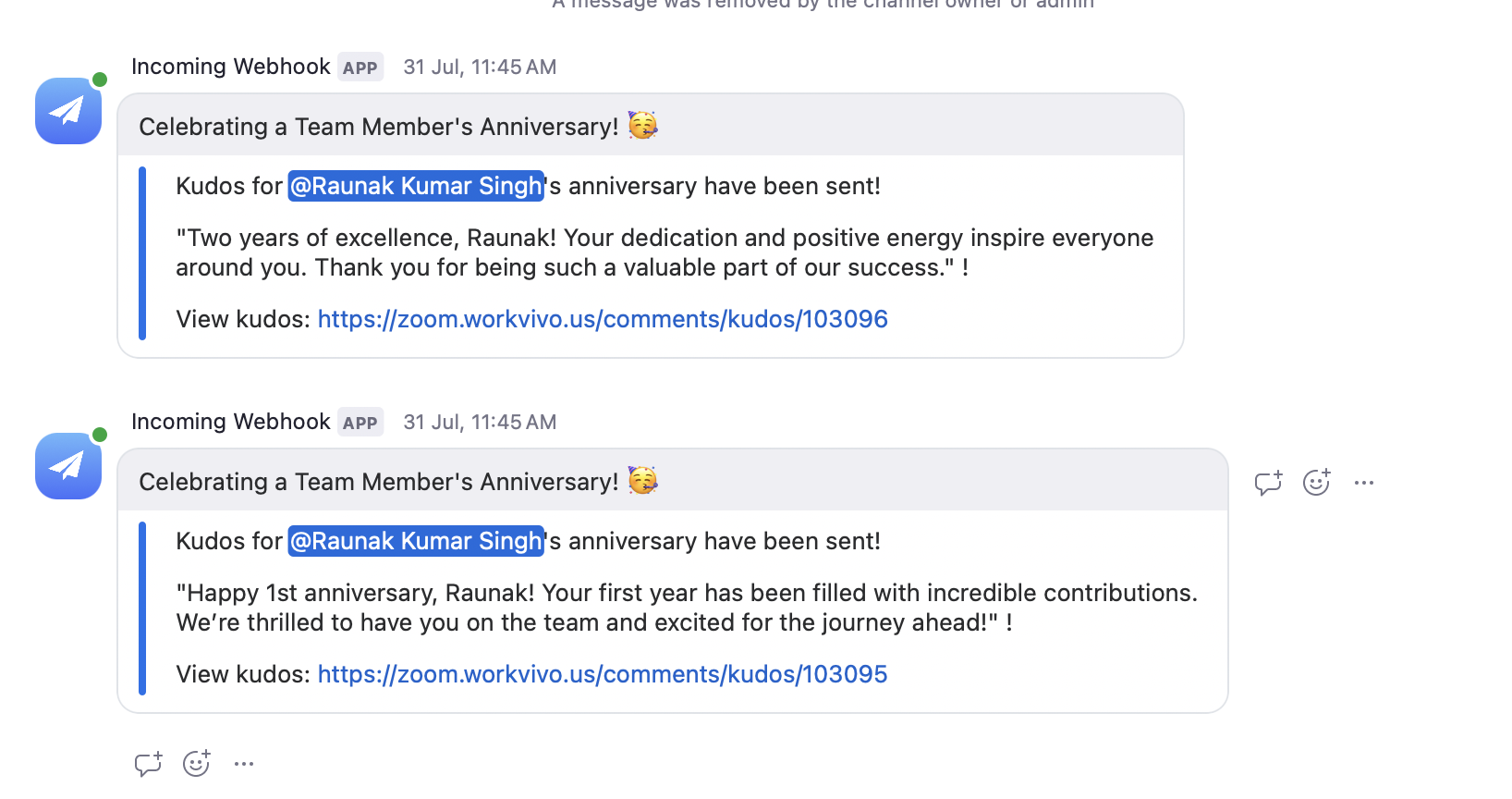
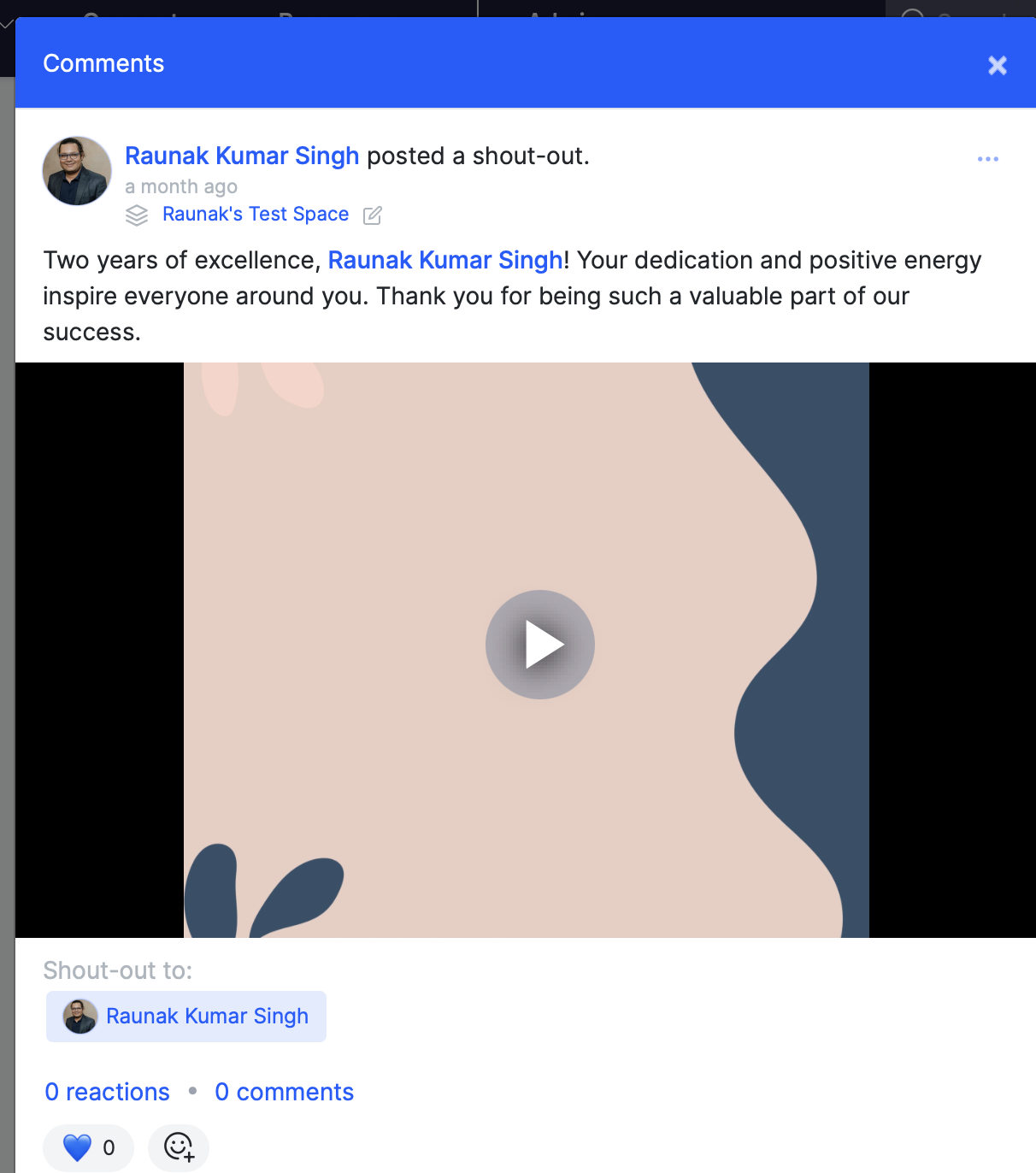
Final result
Channel
Workvivo
Automating employee anniversary celebrations demonstrates how thoughtful technology implementation can enhance workplace culture while reducing administrative overhead. By combining AWS Lambda's serverless capabilities with Workvivo and Zoom's APIs, we've created a system that ensures every team member feels valued on their special day.
The serverless architecture provides cost-effective scaling, while the comprehensive error handling and logging ensure reliable operation. Most importantly, the personal touch of customized messages and video attachments maintains the human element that makes recognition meaningful.
Whether you're managing a team of 50 or 5,000, implementing automated recognition systems like this can significantly impact employee satisfaction and engagement. The investment in building such automation pays dividends in improved team morale and reduced manual administrative tasks.
For organizations looking to enhance their employee recognition programs, this AWS Lambda-based approach provides a robust, scalable foundation that can be customized to match your unique culture and requirements. Ready to implement your own anniversary automation system? The complete source code and deployment instructions are available on our GitHub repository. For questions or implementation support, feel free to reach out through the Zoom Developer Forum.