Building advanced applications using Zoom Quality of Service Subscription (QSS)
Zoom Quality of Service Subscription (QSS) provides real-time metrics on audio, video, and network quality during a session. This allows developers to build advanced applications that use these metrics for a broad range of use cases, from monitoring call quality to dynamically adjusting media streams based on network conditions.
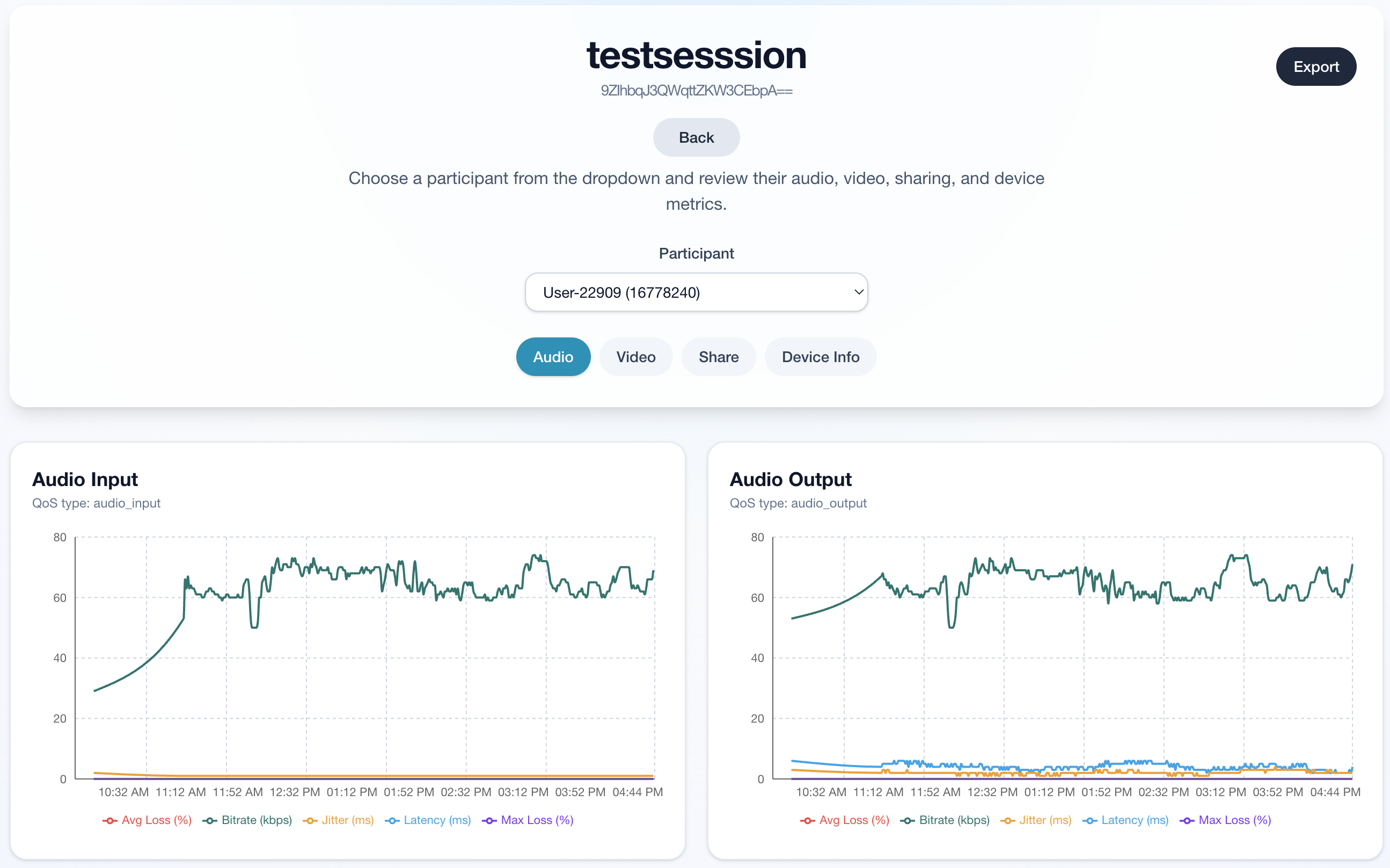
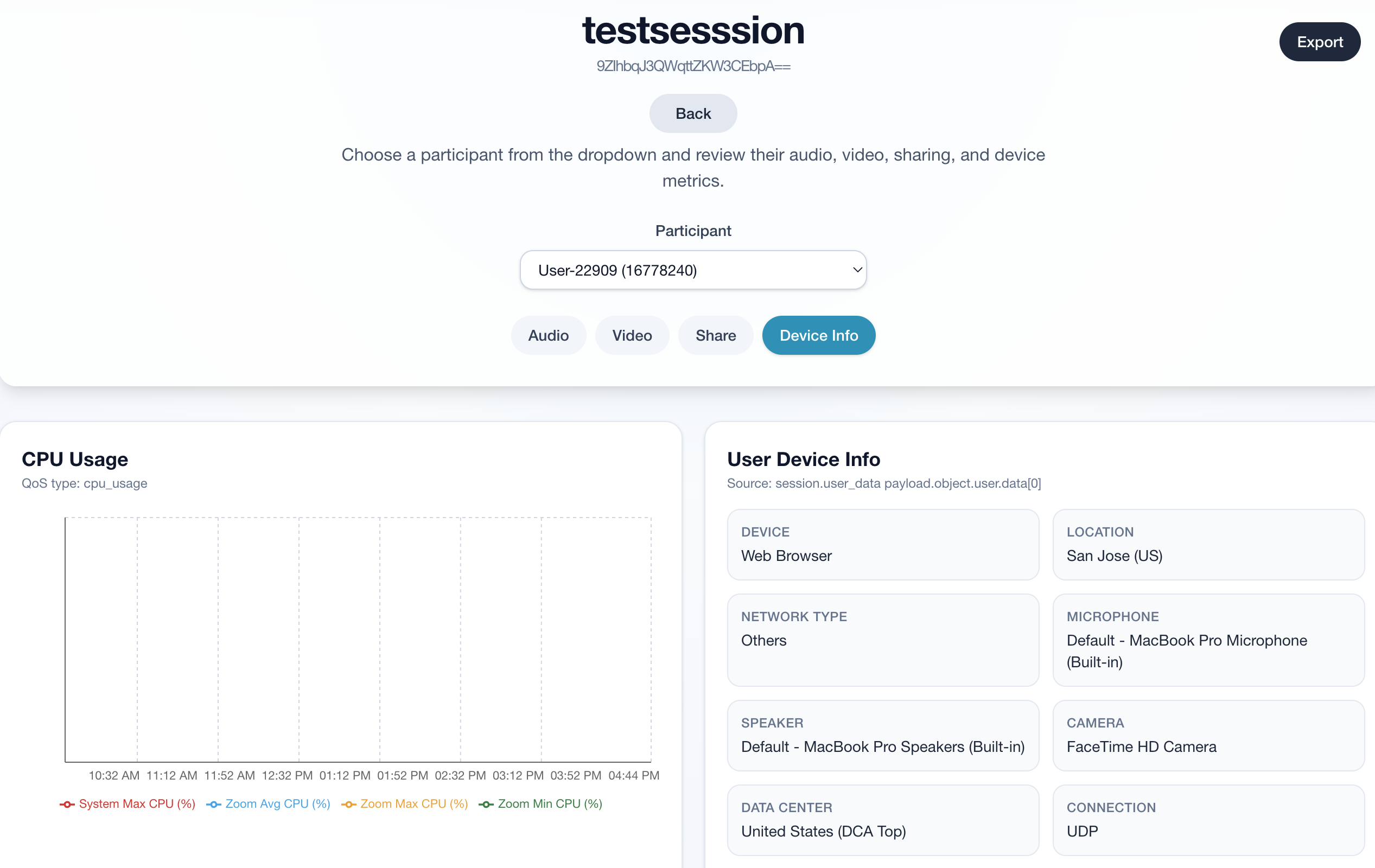
In this blog, you'll learn how to use QSS to get a clearer read on session quality by implementing a simple QSS Server to relay QSS webhooks to a QoS Dashboard. This dashboard surfaces real-time audio, video, and network quality data that can help get you started on spotting issues early and building a smoother in-meeting experience for your users.
After this follow-along, we can explore other use case scenarios where QSS metrics can be leveraged to support automated services, such as adjusting media in real time or handling dynamic session quality-based billing.
For follow-along code, check out the QSS Metrics Dashboard repository.
Prerequisites
- Node.js & npm LTS
- Zoom Video SDK or Meetings Account
- Zoom QSS Plan
- For Video SDK Dial In feature, enable it by contacting support
Configure QSS webhook on Zoom App Marketplace
To configure the QSS webhook, go to the Zoom Marketplace and create a new app or edit an existing app. Under Feature > Event Subscriptions, add a new event subscription and configure the webhook URL that will receive QSS events from Zoom. Make sure to subscribe to the relevant QSS events that your application will handle, such as session.user_data, session.user_qos or any of the other quality-related events.
Configure QSS server
Next, in qss-server.js we set up a server endpoint that will receive QSS webhook events from Zoom. This will be an Express server that will handle incoming POST requests from Zoom containing QSS event payloads. The server will parse the incoming JSON payload and respond with a 200 status to acknowledge receipt of the event. The event payload is then sent to all subscribed WebSocket clients so that they can process the event data to update their application's state, log quality metrics, or trigger other actions based on the QSS events received.
import dotenv from "dotenv";
import express from "express";
import { createHmac } from "crypto";
import cors from "cors";
import util from "util";
import { Server } from "socket.io";
dotenv.config();
const app = express();
const socketStore = {};
const bearerToken = process.env.ZOOM_API_JWT;
app.use(cors());
app.use(express.json({ limit: "50mb" }));
app.use(express.urlencoded({ limit: "50mb", extended: true }));
app.post("/qss-monitor", (req, res) => {
    if (req.body.event === "endpoint.url_validation") {
        const encryptedToken = createHmac(
            "sha256",
            process.env.VSDK_WEBHOOK_SECRET,
        )
            .update(req.body.payload.plainToken)
            .digest("hex");
        res.status(200).json({
            plainToken: req.body.payload.plainToken,
            encryptedToken,
        });
        return;
    }
    console.log(util.inspect(req.body, { depth: null, colors: true }));
    const sessionId = req.body.payload.object.session_id;
    if (sessionId in socketStore) {
        const sockets = Object.values(socketStore[sessionId].sockets);
        for (const socket of sockets) {
            console.log("sending to:", socket.id);
            socket.emit("webhookReceived", JSON.stringify(req.body));
        }
    }
    res.status(200).send();
});
// <-------------WebSocket-------------->
const httpServer = app.listen(process.env.PORT || 3001, () => {
    console.log(
        "middleware app up and running on port:",
        process.env.PORT || 3001,
    );
});
const io = new Server(httpServer, {
    cors: {
        origin: "*",
        methods: ["GET", "POST", "OPTIONS"],
    },
});
io.on("connection", (socket) => {
    const sessionId = socket.handshake.query.meetingId;
    if (sessionId in socketStore) {
        console.log("Adding socket connection:", socket.id);
        socketStore[sessionId].sockets[socket.id] = socket;
    } else {
        console.log(
            "created new sessionID:",
            sessionId,
            "\nAdding socket connection:",
            socket.id,
        );
        socketStore[sessionId] = { sockets: { [socket.id]: socket } };
    }
    socket.on("disconnected", () => {
        console.log(socket.id, "disconnected");
        if (sessionId in socketStore) {
            delete socketStore[sessionId].sockets[socket.id];
            if (Object.keys(socketStore[sessionId].sockets).length === 0)
                delete socketStore[sessionId];
        }
    });
});
Additional endpoints
For the dashboard, we also need to retrieve QoS and user data on demand. We can use the Zoom Video SDK REST APIs to fetch session-level quality of service metrics and user data for a given session ID when needed, rather than waiting for webhook events to arrive. The first endpoint we can use is /videosdk/sessions, where we can retrieve all past and live sessions tied to the Video SDK account.
app.get("/zoomsessions", async (req, res) => {
    if (!requireBearer(res)) return;
    const toDate = new Date().toISOString().split("T")[0];
    const fromDate = new Date(Date.now() - 7 * 24 * 60 * 60 * 1000)
        .toISOString()
        .split("T")[0];
    try {
        const response = await fetch(
            `https://api.zoom.us/v2/videosdk/sessions?type=${req.query.type}&from=${fromDate}&to=${toDate}`,
            { method: "GET", headers: zoomHeaders() },
        );
        res.json(await response.json());
    } catch (error) {
        res.status(500).json({ error: error.message });
    }
});
The next endpoint we need is /videosdk/sessions/{sessionId}/users/qos, which retrieves the quality of service metrics for all users in a given session ID.
app.get("/sessionqos", async (req, res) => {
    if (!requireBearer(res)) return;
    const sessionId = String(req.query.sessionId || "").trim();
    const type = String(req.query.type || "").trim();
    if (!sessionId) {
        res.status(400).json({
            error: "sessionId query parameter is required.",
        });
        return;
    }
    if (!type) {
        res.status(400).json({ error: "type query parameter is required." });
        return;
    }
    try {
        const response = await fetch(
            `https://api.zoom.us/v2/videosdk/sessions/${encodeURIComponent(sessionId)}/users/qos?type=${encodeURIComponent(type)}`,
            { method: "GET", headers: zoomHeaders() },
        );
        const data = await response.json();
        if (!response.ok)
            throw new Error(
                data?.message ||
                    `Failed to fetch users QoS: ${response.status}`,
            );
        const users = Array.isArray(data?.users) ? data.users : [];
        console.log(
            `Fetched QoS for ${users.length} users in session ${sessionId}`,
        );
        res.json(users);
    } catch (error) {
        res.status(500).json({ error: error.message });
    }
});
Finally, we need an endpoint to retrieve user-level QoS data for a given session ID using https://api.zoom.us/v2/videosdk/sessions/${sessionId}/users/${userId}/qos.
app.get("/liveuserqos", async (req, res) => {
    if (!requireBearer(res)) return;
    const sessionId = String(req.query.sessionId || "").trim();
    const userId = String(req.query.userId || "").trim();
    if (!sessionId) {
        res.status(400).json({
            error: "sessionId query parameter is required.",
        });
        return;
    }
    if (!userId) {
        res.status(400).json({ error: "userId query parameter is required." });
        return;
    }
    try {
        const response = await fetch(
            `https://api.zoom.us/v2/videosdk/sessions/${encodeURIComponent(sessionId)}/users/${encodeURIComponent(userId)}/qos`,
            { method: "GET", headers: zoomHeaders() },
        );
        const data = await response.json();
        if (!response.ok)
            throw new Error(
                data?.message || `Failed to fetch user QoS: ${response.status}`,
            );
        console.log(
            `Fetched QoS for user ${userId} in session ${sessionId}`,
            data,
        );
        res.json(data);
    } catch (error) {
        res.status(500).json({ error: error.message });
    }
});
Now, using the QSS Metrics Dashboard App, we can run a fully functional QoS dashboard for our past and live Video SDK sessions.
Other use cases for QSS
Now that we've covered a common use case of how developers use QSS metrics to populate a dashboard, let's discuss other possibilities in which QSS metrics can be leveraged to offer automated services.
Real-time quality guardrails and adjustments
Use packet loss, jitter, RTT, and bitrate drops to auto-adjust video resolution, prompt users to switch networks or media peripherals, and offer failover options to different devices or platforms as a real-time troubleshooting step.
Score meetings for quality-based billing
You can score meetings based on QSS metrics to offer dynamic billing. This billing model can offer discounted pricing to customers who have subpar session experiences due to poor network conditions.
Automated notifications based on network thresholds
Detect “at-risk” meetings early (for example, many users crossing jitter thresholds) and auto-notify support or a meeting host assistant flow. This can be further enhanced by integrating machine learning to detect patterns across sessions to identify performance trends.
Instant post-meeting client-side reporting
Offer automated reporting to clients who are curious about how to maximize the quality of their future Video SDK sessions.
Next steps
To keep exploring QSS, visit the Zoom QSS documentation for event details, API behavior, and implementation guidance. If you want a practical reference, use the QSS Metrics Dashboard on GitHub to follow along with working code.